

Catalog · How the catalog works
MakarovPhysics

Makarov Physics
- ★ 2 on GitHub
Anyone may press Interesting, signed in or not. It helps others find this project.
README
MakarovPhysics
A collection of interactive simulations for visualizing various physical processes in real time.
The project focuses on combining numerical modeling with graphical representation to better understand dynamic systems.
Overview
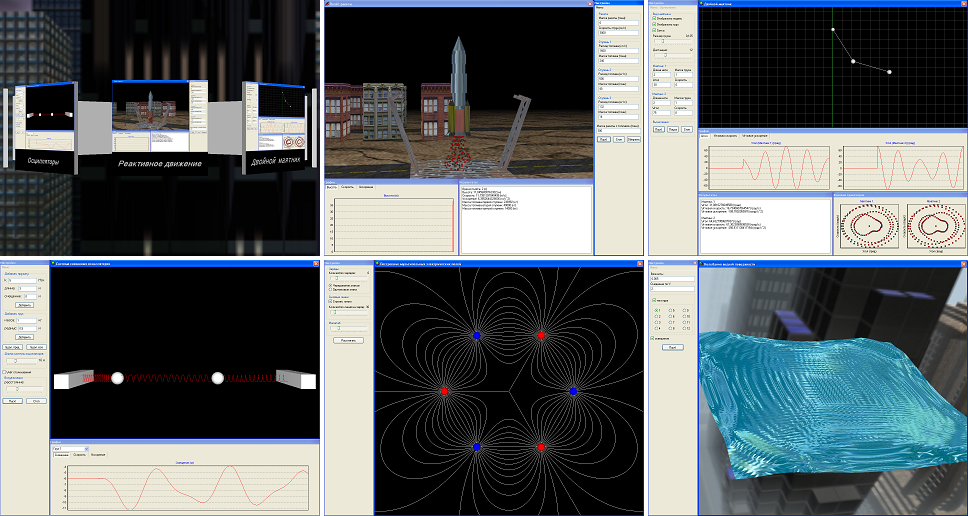
This application includes several simulation modules, such as:
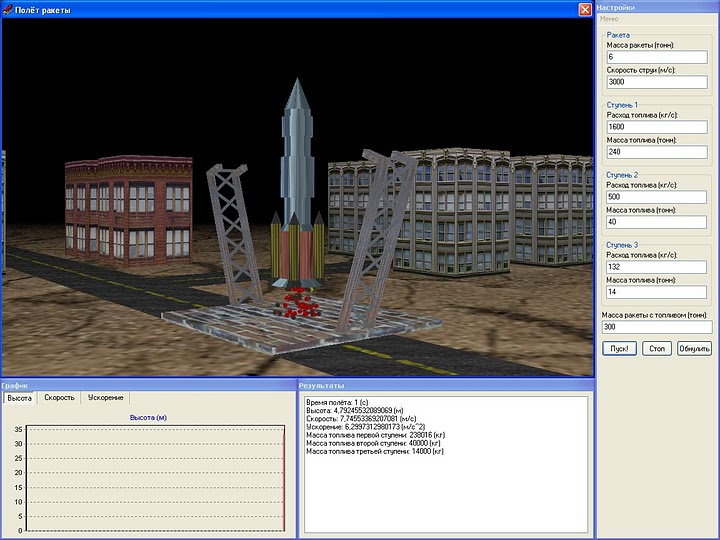
- Rocket motion based on reactive propulsion principles
- Oscillation systems (including pendulums and spring-based models)
- Particle motion in electric fields
- Fluid surface oscillations
Each simulation is designed to demonstrate the underlying physical behavior through real-time visualization and user interaction.
Technical Details
- Language: Delphi 12 (Community Edition), Win64 target
- Graphics: OpenGL
- Rendering: custom real-time rendering logic
- Simulation: numerical approximation of physical systems
The application uses custom implementations for both simulation logic and rendering, without relying on external physics or graphics engines.
Architecture
The application is split into a launcher (physic.exe) and a set of independent
simulation modules built as DLLs under data/modules. A shared OpenGL helper
library (data/engine/engine.dll) and a small tools library
(data/engine/MakarovTools.dll) are loaded by the launcher and the modules at
run time. The launcher reads data/engine/modules.cfg to discover the modules
and presents them as a rotating 3D carousel. The carousel is driven by the mouse:
horizontal cursor position spins it, hovering highlights a module, and a click
loads that module's DLL and calls its exported InitLibrary entry point.
Building
One-shot build (from a RAD Studio Command Prompt, or any prompt with the Delphi MSBuild environment available):
build.batbuild.bat builds the project group (engine, tools, modules, launcher), builds
the texture packer, and runs it to produce data/textures/skybox.dat and
data/textures/preview.dat. After it finishes, physic.exe can be run from the
project root. The generated .dat packs are not stored in the repository; the
source .bmp textures under data/textures/ are.
Manual build:
- Requires Embarcadero Delphi 12 (Community Edition is sufficient).
- Open
physic.groupprojand build the whole group, or build individual.dprojprojects. - Target platform: Win64. All floating point crossing the module/engine
boundary is
Double, so the ABI no longer depends on the target bitness. The launcher and every DLL must be built for the same platform: a Win64physic.exesilently refuses to load a leftover Win32 module DLL. Delete any stale binaries from a previous Win32 build before rebuilding. - Build order:
engineandMakarovToolsfirst, then the modules, thenphysic. The project group is already arranged in this order. - Output goes straight into the runtime layout:
physic.exein the root,engine.dll/MakarovTools.dllindata/engine, and each module DLL indata/modules. - Pack the textures once with the
bmp2dattool (or just runbuild.bat):bmp2dat data\textures\skybox 256 data\textures\skybox.datandbmp2dat data\textures\preview 512 data\textures\preview.dat.
Modernization (Delphi 12 upgrade)
The original sources were written for Delphi 7 (2004–2011). The project has been brought up to date for Delphi 12 without changing its structure or behavior:
- Added Delphi 12
.dproj/.groupprojproject files; the legacy.bdsprojfiles are no longer used. - Fixed Unicode-era issues in the launcher (string /
PCharhandling, an out-of-range module-name access, and a divide-by-zero in the rotation math). - Replaced the path lookup that relied on
Application.GetNamePathwith the executable path. - Converted the module timer callbacks to the correct
stdcallTIMERPROCsignature and replaced the deprecatedTThread.ResumewithStart. - Removed stale precompiled units and legacy IDE artifacts and added a
.gitignore. - Translated all source comments, string literals and UI captions from Russian to English; the sources are now plain ASCII, which avoids code-page issues.
- Replaced the keyboard-driven menu carousel with mouse control (move to spin, hover to highlight, click to launch) using OpenGL selection-buffer picking.
- Replaced the skybox textures with a procedurally generated gradient sky (seamless, no third-party assets) to avoid any licensing uncertainty.
Win64 port
The project now targets Win64 by default. What changed:
- Every
Extendedin the sources becameDouble. On Win64 Delphi mapsExtendedtoDoubleanyway, so the old declarations were quietly changing size depending on the target; making it explicit removes that trap from theengine.dllexports (DrawSkyBox,DrawOneSideTexturedBox,CalcNormal) and from the module physics code. - The launcher stored module handles in
Array[1..10] of LongWord. On Win64 anHMODULEis 64 bits wide, so the handle was being truncated before it reachedGetProcAddress. The array is nowArray[1..10] of HMODULE. InitLibraryand the matchingTLibProcare declaredstdcallon both sides instead of relying on the default register convention.- Added the missing
Base_Win64build configuration groups to the.dprojfiles, and switchedbuild.battoPlatform=Win64. Thebmp2dattexture packer stays Win32; it is a build-time tool and its bitness is irrelevant.
Two unrelated defects were fixed at the same time:
- The chart forms in
Rocket,OscillatorandPendulumstill carriedXValues.Multiplier/YValues.Multiplierin their.dfmfiles. That property belonged to the TeeChart version shipped with Delphi 7 and no longer exists. DFM text is not validated at compile time, so the form only failed at run time withProperty Multiplier does not exist, which left the module half-initialised and produced a follow-up access violation. TPixelFormatDescriptorwas zero-filled and then onlydwFlagswas set, leavingnSize,nVersion,iPixelType,cColorBitsandcDepthBitsat zero. All ten call sites now fill the descriptor properly.
Features
- Real-time simulation and rendering
- Interactive parameter manipulation
- Visualization of dynamic systems and physical processes
- Modular structure with multiple independent simulation scenarios
Screenshots
Purpose
This project was created as an experimental environment for exploring computer graphics and physics simulations, as well as for gaining hands-on experience with real-time rendering and visualization techniques.
Notes
The project reflects practical experimentation with graphics and simulation concepts rather than production-level engineering.
Support
If you found this project interesting or useful, you can support my work: