

Catalog · How the catalog works
Yutani-Particle-Engine

A high-performance, threaded VCL Raylib component for 3D GPU Particles. Demonstrates how to Materialize/Dematerialize and batch render thousands of particles efficiently.
- ★ 2 on GitHub
Anyone may press Interesting, signed in or not. It helps others find this project.
README
Yutani-Particle-Engine
A high-performance, threaded VCL Raylib component for 3D GPU Particles. Demonstrates how to Materialize/Dematerialize and batch render thousands of particles efficiently.
Yutani-Particle-Engine v0.5
A custom, high-performance 3D particle engine written in pure Delphi.
Sample video: https://youtu.be/-Wm1roxpJVg
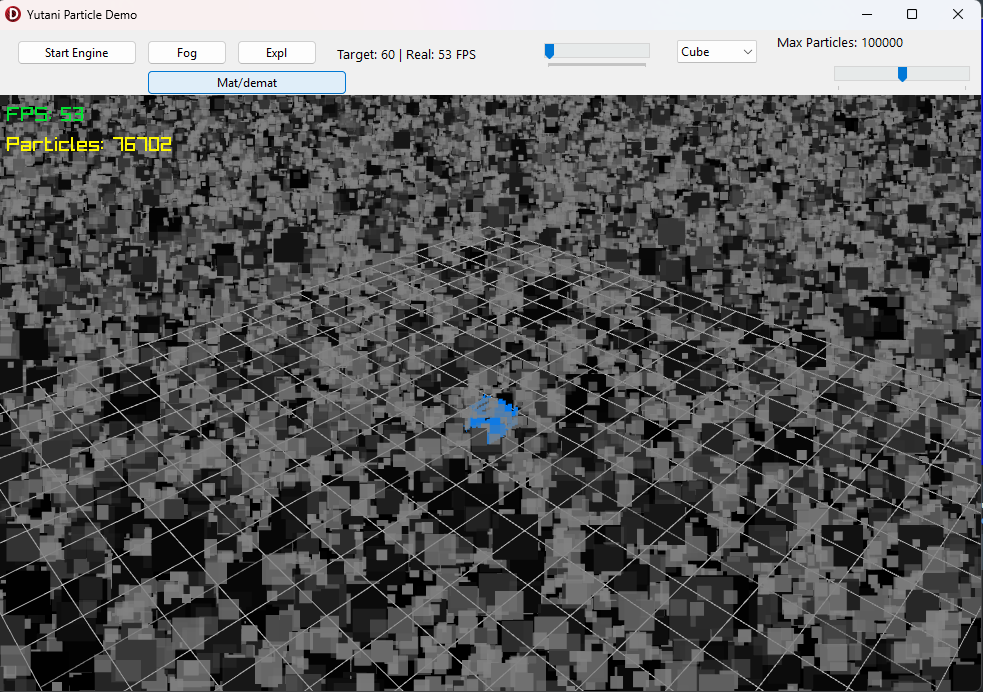
76k particles, 53fps at ryzen 4500u
Instead of relying on complex GPU compute shaders or bloated external VFX engines, this project implements a highly optimized, CPU-driven particle simulation that feeds directly into Raylib's internal render batching system. It is designed to spawn and render thousands of particles in real-time without dropping frames.
✨ Features
🚀 Core Engine & Performance
Matrix-Batched Rendering: Instead of relying on expensive individual DrawCube/DrawSphere calls, the engine utilizes raw OpenGL-style immediate mode (rlBegin/rlEnd) to push all vertices into Raylib's internal RenderBatch at once. This drastically reduces draw calls and enables massive particle counts.
2D/3D Hybrid Support: Dynamically switch between render shapes:
    rsBillboard2D: Flattened quads facing the camera (only 4 vertices per particle). Ideal for dense smoke or fire.
    rsCube: Fully volumetric 3D cubes (12 triangles).
    rsSphere: Fast 3D octahedron sphere approximation.
Pre-Allocated Memory Layout: Arrays are pre-allocated to their maximum capacity (1,000,000 particles) to prevent memory fragmentation and CPU overhead during massive spawn bursts.
Thread-Safe Architecture: Utilizes TCriticalSection to safely emit particles from external VCL UI threads into the Raylib render thread without crashing the array memory.
Optimized Update Loop: Removed lock-contention from the main physics update loop to prevent UI stuttering when calculating 100,000+ particles per frame.
🌪 Physics & Visuals
Custom Physics Simulation: Implements basic Euler integration for particle kinematics, including gravity, drag (air resistance), and lifespan progression.
Per-Particle State Lerp: Smoothly interpolates size and color (RGBA) from spawn to death, allowing for realistic fading smoke and cooling fireballs.
Zero-Gravity Emitters: Specific emitters (like smoke) can bypass gravity entirely, allowing them to linger, expand, and rise naturally.
Real-time Generation: Particles are spawned, simulated, and culled entirely at runtime without any pre-computation.
🌌 Volumetric Materialization & Pulverization (Sci-Fi Beaming)
Event-Driven Logic: Time-based durations for spawn effects have been completely removed. The engine relies exclusively on the SolidCubeReady event signal, which is only triggered when the absolute last particle (top layer) reaches its target coordinate.
Chaos Orbit to Matrix: Particles spawn in a localized chaotic orbit and are pulled straight into a mathematical 3D matrix layout using a damped-attraction vector force.
Dynamic Mesh Synthesis: Support for arbitrary 3D meshes (GLTF/OBJ). The engine dynamically scales voxels to match vertex positions and calculates an accurate Y-layer bounding box for synchronized building.
Universal Z-Offset Alignment: The particle matrix respects the exact model offset required by the physics engine, ensuring the volumetric build matches the final rendered 3D model perfectly.
Persistent Voxel Framing: Particles no longer fade out or get culled during the assembly process. Once a particle arrives, it freezes and maintains 100% opacity until the entire structure is complete. The real model is then swapped in, and all particles are killed instantly.
🛡 Hardware-Level Z-Buffer Optimization (The "Sinking" Dissolve)
Z-Buffer Glitch Prevention: In traditional engines, removing upper voxel layers instantly creates a depth-buffer conflict (Ghosting/Flickering). To circumvent this, this engine implements a "Sinking Layer" mechanic.
Sinking Layers: Upper cubes do NOT get destroyed in place. Instead, they physically descend layer-by-layer down to the lowest baseline (Y=0) of the object while maintaining 100% opacity. Once a voxel hits the bottom baseline, it is cleanly removed. This keeps the screen space completely dense and opaque at all times.
📦 The Sample Project
To demonstrate the engine in action, a demo application is included.
Start: Clicking Start Engine initializes the 3D scene.
The Scene: A 3D grid is rendered, acting as the stage for the particles.
Fog: Clicking Fog instantly spawns 5,000 low-alpha, zero-gravity gray particles spread across a wide area, simulating a dense fog bank that slowly rises and fades.
Expl: Clicking Expl triggers a massive explosion, spawning 10,000 red fire particles and applying outward velocity, gravity, and air resistance.
Materialize/Dematerialize: Toggles the volumetric materialization effect. Clicking it materializes a 1x1x1 solid cube out of 1,000 voxel particles. Clicking it again dematerializes the cube layer-by-layer back into nothingness.
Performance Tuning: A TrackBar at the top allows you to dynamically change the Target FPS of the render thread (from 1 up to 5000 FPS) to test the engine's limits.
📁 Repository Structure
Yutani.Render.Particles.pas - The core engine unit (can be dropped into any Raylib project).
uParticleEngine.pas - The threaded engine wrapper handling the QPC frame pacing and rendering loop.
Unit1.pas - The VCL demo form containing the UI controls.
Part of https://github.com/LaMitaOne/Yutani-Building-better-worlds
🛠️ Requirements
Delphi: Tested with Delphi 12 (should work on Delphi 10.4 and newer due to record operator syntax).
Raylib Pascal Bindings: Required to compile the included sample application (Raylib, rlgl, RayMath).
Raylib DLL: The compiled raylib.dll must be in the executable directory.