

Catalog · How the catalog works
VolumeControl

- ★ 2 on GitHub
Anyone may press Interesting, signed in or not. It helps others find this project.
README
VolumeControl
A small Delphi (VCL) sample that controls Windows volume through the Core Audio (WASAPI) API and reacts to external volume changes — when you change the volume from the Windows volume mixer, the volume keys, or any other app, the trackbars follow in real time.
English | 한국어
Features
- Two volumes, one interface (
IVolumeControl)- Master volume — the default output device's overall volume (
IAudioEndpointVolume) - App volume — this process's audio session volume, the per-app slider you see in the Windows volume mixer (
ISimpleAudioVolume)
- Master volume — the default output device's overall volume (
- External change notifications — registers
IAudioEndpointVolumeCallback/IAudioSessionEvents, so volume/mute changes made anywhere on the system are reflected in the UI. - Self vs. external change detection — every
Setpasses a fixed EventContext GUID; the callback compares it to tell whether the change came from this app (AExternal = False) or from outside (AExternal = True). - Thread-safe UI updates — callbacks arrive on an audio-system worker thread and are marshalled to the main thread with
TThread.Queue. - Coalescing — when notifications flood (e.g. dragging a mixer slider), only the latest value is dispatched, so no backlog builds up and the trackbar stays smooth.
- Optional debounce —
IVolumeControl.NotifyDelayMs;0reflects changes immediately, a value > 0 waits until changes stop and then reports only the final value.
How external-change notification works
Windows Core Audio does not tell you "the drag ended" — it sends a notification on every value change. This sample handles that as follows:
OnNotify/OnSimpleVolumeChangedfire on a Core Audio worker thread.- The latest value is stored under a lock and a single work item is queued (coalescing) via
TThread.Queue. - On the main thread, the value is dispatched as
OnVolumeChanged/OnMuteChanged. - The form updates the matching trackbar, guarded by a flag so the programmatic
Positionchange does not loop back into anotherSetVolume.
Project structure
| File | Purpose |
|---|---|
src/Audio.Volume.pas |
Volume control + notification library. IVolumeControl, CreateMasterVolume, CreateAppVolume, and the common base classes (TVolumeControlBase, TVolumeCallbackBase). |
src/uMain.pas / .dfm |
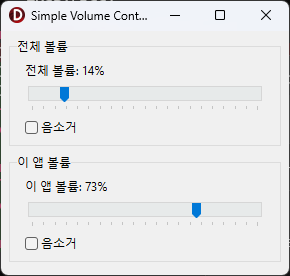
Main VCL form — two volume groups (master / app), each with a trackbar, a live percentage label, and a mute checkbox. |
src/VolumeTest.dpr |
The GUI application. Initializes COM (STA) and runs the form. |
src/VolumeSmoke.dpr |
Console smoke test that exercises control / notification / teardown without the GUI. |
Requirements
- Delphi 13 (Embarcadero Studio 37.0) or compatible
- Windows Vista or later (Core Audio / WASAPI)
- Target platform: Win64
COM initialization is required. The GUI program calls
CoInitializeEx(nil, COINIT_APARTMENTTHREADED)inVolumeTest.dpr. Without it, registering the audio-session notification leaves COM marshalling undefined and the app can crash on the first app-volume change.
Build
Using the IDE: open src/VolumeTest.dproj and build (the executable is written to BIN).
Using the command-line compiler:
"C:/Program Files (x86)/Embarcadero/Studio/37.0/bin/dcc64.exe" src/VolumeTest.dpr -B -E"BIN"To run the console smoke test:
"C:/Program Files (x86)/Embarcadero/Studio/37.0/bin/dcc64.exe" src/VolumeSmoke.dpr -BUsage
var LVolume: IVolumeControl := CreateMasterVolume;   // or CreateAppVolume
LVolume.NotifyDelayMs := 0;                          // 0 = immediate, > 0 = debounce (ms)
LVolume.OnVolumeChanged :=
  procedure(Sender: TObject; APercent: Integer; AExternal: Boolean)
  // ... handler ...
LVolume.Volume := 50;                                // set to 50%
License
MIT