

Catalog · How the catalog works
RhoTrackBar

Self Painting FMX Trackbar for Delphi
- ★ 2 on GitHub
Anyone may press Interesting, signed in or not. It helps others find this project.
README
RhoTrackBar
A modern, fully owner-drawn FireMonkey (FMX) trackbar / slider component for
Delphi. TRhoTrackBar descends directly from TControl and paints its track,
tick marks, value labels and thumb straight onto the canvas — no child controls
are involved.
Registered on the component palette under the Rhody Controls category.
This code was developed using a combination of Human effort and AI assistance.
Features
- Horizontal or vertical orientation (
Orientation); switching in the IDE automatically swaps width/height. - Ten selectable thumb shapes via
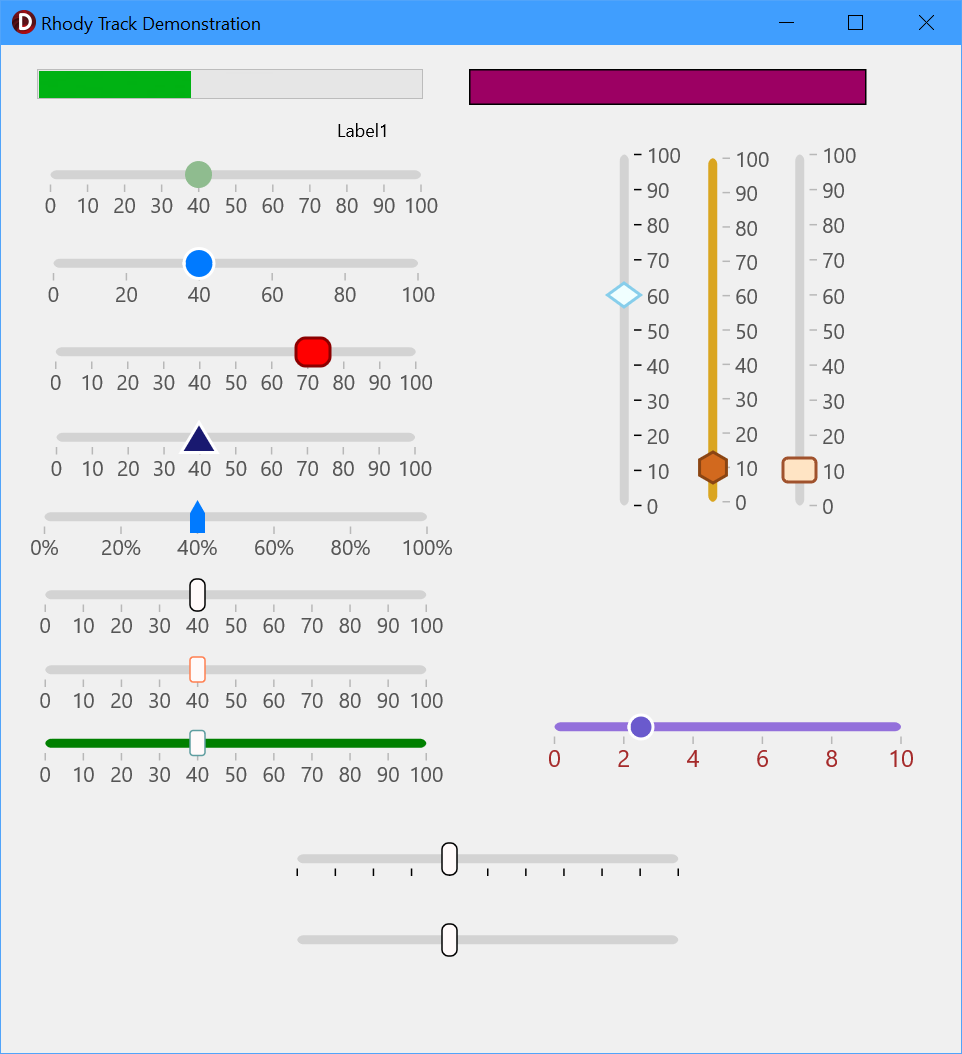
ThumbShape: circle, rectangle, rounded rectangle (pill), triangle, inverted triangle, diamond, pentagon, hexagon, star and an upward "pointer"/marker. - Fully themeable thumb — fill colour, stroke colour, stroke thickness, corner radius, width and height.
- Tick marks and numeric labels with configurable frequency, colour, font
size and an optional value suffix (e.g.
"%"," dB"). - Live tracking toggle — fire
OnChangecontinuously while dragging, or only once on release. - Keyboard control — the thumb responds to the arrow keys (and Home/End),
matching the built-in FMX trackbar, with a configurable step (
Increment). - Backward-compatible streaming — the enum ordering and custom
DefinePropertiesentries keep older.fmxfiles loading correctly.
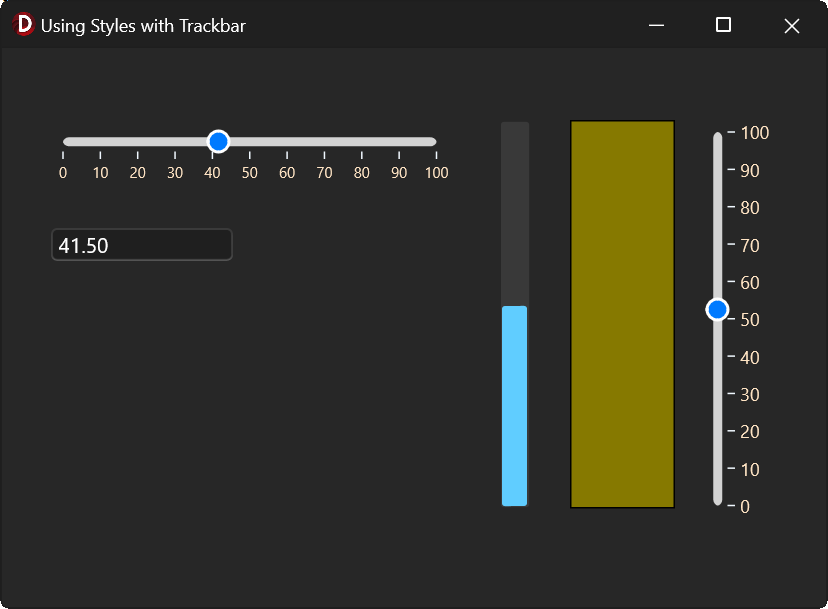
The trackbar can be made to work with styles by adusting the colors to match the style colors.
Installation
The component lives in a single unit, Source\uRhoTrackBar.pas, and ships with
a design-time package.
- Open
Packages\RhoFMXTrackbarPackage.dpkin RAD Studio. - Build, then Install the package (right-click the package in the Project Manager → Install).
- Add the
Sourcefolder to your project's or IDE's library/search path souRhoTrackBarcan be found. TRhoTrackBarnow appears on the Rhody Controls tab of the Tool Palette.
The package requires only the standard rtl and fmx runtime packages.
Build toolchain: RAD Studio (Delphi) with FireMonkey. Build from the command line by sourcing
rsvars.batand runningmsbuildon the.dproj.
Quick start
Drop a TRhoTrackBar onto an FMX form, or create one in code:
uses uRhoTrackBar;

var
  Bar: TRhoTrackBar;
begin
  Bar := TRhoTrackBar.Create(Self);
  Bar.Parent := Self;
  Bar.Min := 0;
  Bar.Max := 100;
  Bar.Value := 25;
  Bar.Orientation := TOrientation.Horizontal;
  Bar.ThumbShape := tsCircle;
  Bar.ValueSuffix := '%';
  Bar.OnChange := HandleChange;
end;
Reacting to changes:
procedure TfrmMain.HandleChange(Sender: TObject);
begin
  ProgressBar1.Value := (Sender as TRhoTrackBar).Value;
end;
See Demo\TrackBarDemoProject.dpr for a full sample form driving a progress
bar and a colour-interpolated rectangle from several trackbars.
Properties
Value / range
| Property | Type | Default | Description |
|---|---|---|---|
Min |
Single |
0 |
Minimum value. |
Max |
Single |
100 |
Maximum value. |
Value |
Single |
0 |
Current value; always clamped to [Min, Max]. |
Orientation |
TOrientation |
Horizontal |
Horizontal or vertical layout. |
Increment |
Single |
1 |
Value step applied per arrow-key press (must be > 0). |
LiveTracking |
Boolean |
True |
Fire OnChange while dragging (True) or only on release (False). |
Ticks & labels
| Property | Type | Default | Description |
|---|---|---|---|
ShowTicks |
Boolean |
True |
Draw tick marks along the track. |
ShowLabels |
Boolean |
True |
Draw numeric labels at each tick. |
TickFrequency |
Single |
10 |
Value interval between ticks. |
TickColor |
TAlphaColor |
$80808080 |
Tick line colour. |
LabelColor |
TAlphaColor |
$FF555555 |
Label text colour. |
LabelFontSize |
Single |
10 |
Label font size. |
ValueSuffix |
string |
'' |
Text appended to each label (e.g. '%'). |
Track & thumb appearance
| Property | Type | Default | Description |
|---|---|---|---|
TrackColor |
TAlphaColor |
$FFD3D3D3 |
Channel colour. |
ThumbShape |
TThumbShape |
tsCircle |
Thumb shape (see below). |
ThumbWidth |
Single |
16 |
Thumb width (must be > 2 and < Width). |
ThumbHeight |
Single |
16 |
Thumb height (must be > 2). |
ThumbFillColor |
TAlphaColor |
$FF007AFF |
Thumb fill. |
ThumbStrokeColor |
TAlphaColor |
$FFFFFFFF |
Thumb border colour. |
ThumbStrokeThickness |
Single |
2 |
Border thickness (0 = no border). |
ThumbCornerRadius |
Single |
4 |
Corner radius for tsRectangle. |
TThumbShape values:
tsCircle, tsRectangle, tsRoundRect, tsTriangle, tsInvertedTriangle,
tsDiamond, tsPentagon, tsHexagon, tsStar, tsPointer
Note:
tsRectanglehonoursThumbCornerRadius(0 gives sharp corners), whiletsRoundRectis always a rounded "pill" independent of the radius.
Standard inherited FMX properties are also published (Align, Anchors,
Position, Size, Margins, Padding, Opacity, Visible, Enabled,
RotationAngle, Hint, Cursor, etc.).
Events
| Event | Description |
|---|---|
OnChange |
Fired when Value changes. During a drag this fires continuously if LiveTracking = True, or only once on mouse-up if False. Also fires when Value is set programmatically. |
OnTracking |
Notify hook exposed for pointer-tracking use. |
Standard FMX mouse, drag and paint events (OnMouseDown, OnMouseMove,
OnMouseUp, OnMouseWheel, OnClick, OnPaint, OnResize, …) are published
as well.
Keyboard
The control is focusable (TabStop is enabled), so it can be reached with Tab
or by clicking on it. Once focused, it responds to the arrow keys just like the
built-in FMX trackbar. Each press changes Value by Increment (default 1)
and fires OnChange.
| Key | Horizontal | Vertical |
|---|---|---|
| Left | move thumb left (value −) | value − |
| Right | move thumb right (value +) | value + |
| Up | move thumb left (value −) | move thumb up (value +) |
| Down | move thumb right (value +) | move thumb down (value −) |
| Home | jump to Min |
jump to Min |
| End | jump to Max |
jump to Max |
Set Increment to tune the step — e.g. 0.1 for a fine 0..1 slider, or a
larger value for coarse jumps. LiveTracking only affects mouse dragging; arrow
keys always fire OnChange on each press.
How it works
Paintdraws the track, then tick marks (ifShowTicks), then the thumb on top — everything on this control's own canvas.Resizerecomputes the track rectangle and re-centres the thumb; the track ends are inset by half the thumb so it never overhangs atMin/Max.- Thumb geometry is rebuilt each paint as a
TPathDatain absolute control coordinates, snapped to the device-pixel grid for crisp edges under scaling. - Mouse handling captures the pointer on
MouseDown(also taking keyboard focus), maps coordinates to a value inCalculateValueFromCoords, and releases capture onMouseUp. - Keyboard handling overrides
KeyDown; handled keys are swallowed so they don't bubble up to a parent (e.g. scrolling) or move focus off the control.
Project layout
Source\      uRhoTrackBar.pas        the component (single unit)
Packages\    RhoFMXTrackbarPackage   design-time package (.dpk/.dproj)
Demo\        TrackBarDemoProject     sample FMX application
License
MIT