

ScannerMApp

A QR code and barcode scanner app built with Delphi and FireMonkey, using ZXing.Delphi and TFrameStand. On Google Play.
- Active · last change 11-4-2026
- ★ 87 on GitHub
README
ScannerMApp
A QR code and barcode scanner app built with Delphi and FireMonkey, using ZXing.Delphi for decoding and TFrameStand for the views.
It started in 2017 as a sample for TFrameStand (blog post). It now builds with RAD Studio 13 and runs on recent Android versions and on the iPhone, with a dark UI. What changed, nine years later: ScannerMApp, nine years later: ZXing.Delphi 4, TFrameStand and Android intents.
| Scans | Scan result | Formats | About |
|---|---|---|---|
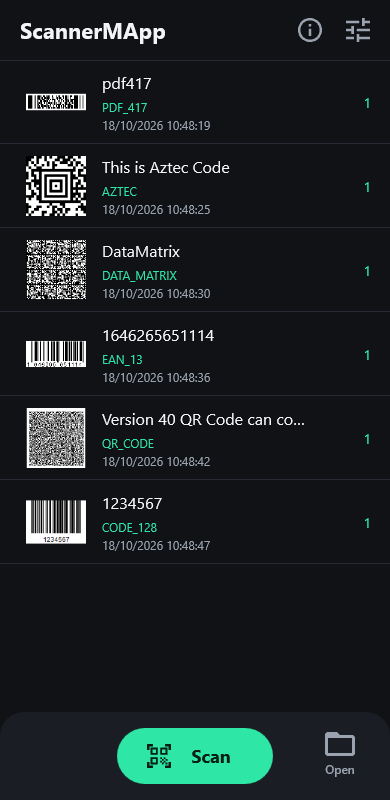 |
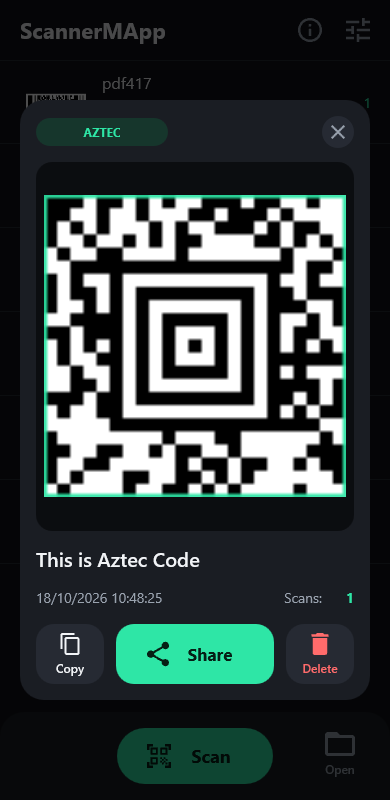 |
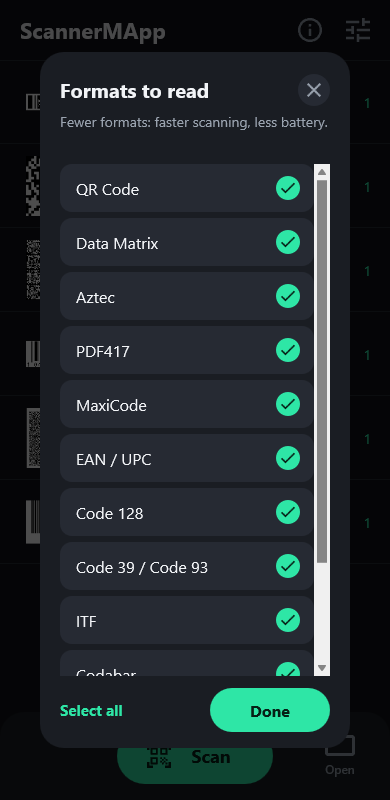 |
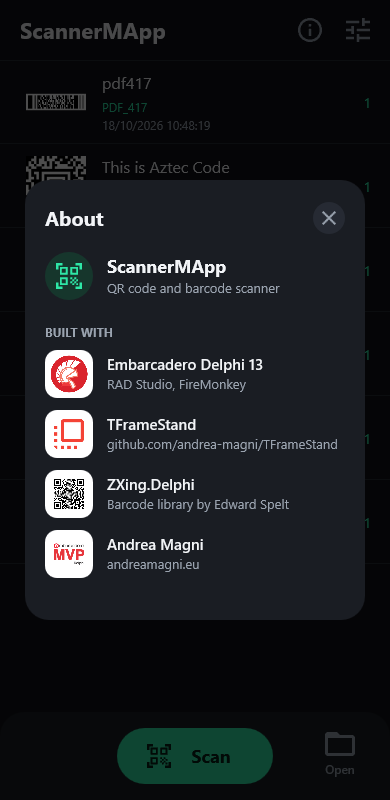 |
The screenshots come from the Windows build; on Android the bottom bar has Gallery instead of Open.
Status
| Platform | State |
|---|---|
| Android 64-bit | Tried on a phone (Android 17): camera, photo picker, shared images, Open. Published on Google Play (October 2026) as eu.andreamagni.scannermapp2, version 2.0.0. |
| iOS (iPhone) | Tried on an iPhone: camera scanning, the camera permission, app icon and launch screen. Not on the App Store yet; Open for contacts and events not tried yet. |
| macOS (ARM, Intel) | Compiles and links; not tried on a Mac yet. |
| Windows (32 and 64-bit) | Scanning from a file, and "Open with"; the camera has not been tested. |
Features
- Live scanning from the camera, with a square viewfinder, the points found by ZXing, a torch button and the zoom (pinch, or a 1×/2×/4× button; back to 1× on every scan). The frames are decoded in the background (
ScanAsync), so the preview stays smooth. A code that is found but cannot be read yet shows a hint: hold the phone still, or move closer. - Scanning from a picture in the photo library (Android, iOS) or from a file (Windows, macOS): every code in the image is read. On Windows an image can also be passed on the command line ("Open with").
- Every format ZXing.Delphi 4 reads automatically: QR code, Micro QR, Data Matrix, Aztec, PDF 417, MaxiCode, Code 39/93/128, EAN, UPC, ITF, Codabar, GS1 DataBar… The result card outlines the code in the frame.
- Formats to read: fewer formats make scanning faster and save battery. The choice is kept.
- A sound (a soft chime,
Sounds\scan.wav) and a vibration (mobile) when the camera reads a code; no sound in silent mode, and on Android the sound follows the media volume. Each can be turned off in the settings. - A list of the scans, kept between runs: the same code scanned again increments its counter. Delete all (in the header, with a confirmation) empties it.
- A result card with the scanned frame (pinch, double tap or mouse wheel to zoom, drag to pan) and Copy, Share and Delete.
- Open what a code contains: a link in the browser, a phone number in the dialer, an e-mail or SMS ready to send (also
MATMSG,SMSTO), a location in the maps app (geo:), a contact (vCard,MECARD) or an event (iCalendar) in the app that adds it. Only these kinds of content are offered; anything else can be copied or shared. - Android: images shared with ScannerMApp (one or more, from Gallery, Photos, a chat…) or opened with it are scanned right away, also while the app is running.
- Android: the camera is the only permission the user is asked for (VIBRATE, for the feedback, needs no consent), adaptive launcher icon (also themed), the Back key closes what is open and then leaves the app, edge-to-edge (Android 15+) with the content clear of the system bars.
Requirements
- RAD Studio 13 Florence (Delphi 13).
- Android 64-bit: min SDK 24, target SDK 36. Win32 and Win64 build too (scanning from a file; the camera has not been tested on Windows).
- iOS and macOS: the iOS device, macOS ARM and macOS Intel targets compile and link from Windows (with the SDKs imported in RAD Studio); running them needs a Mac with PAServer. On iOS the app asks for the camera permission before it creates the camera (
Forms.Main.StartCamera). - ZXing.Delphi 4.0 or later, included as a git submodule in
ThirdParty\ZXing.Delphi(branch4.0). Version 3.x does not build: the app usesIScanManagerandScanAsync. - TFrameStand v.2.4 or later, installed in the IDE (see below). It is not part of this repository: the project finds it through the IDE library path.
Building
Clone with the submodules, so that ZXing.Delphi lands in ThirdParty\ZXing.Delphi:
git clone --recurse-submodules https://github.com/andrea-magni/ScannerMApp.gitIn a clone made without it, run git submodule update --init.
TFrameStand must be installed in RAD Studio, so that its source folder is in the library path of every platform you build (Tools ▸ Options ▸ Language ▸ Delphi ▸ Library):
- with the setup of the latest release, or with TMS Smart Setup (
tms install andreamagni.tframestand); - or from a clone of the repository (v.2.4 or later): open
packages\13Florence\FrameStand.groupproj, install the design-time package and add thesourcefolder to the library path.
The version matters: the app needs the interactive gestures of the frames registered with the hosting form (#121), available since v.2.4. With v.2.3 or earlier the app builds and runs, but pinch and double-tap zoom on the scanned frame do nothing on Android.
To move ZXing.Delphi to the latest commit of its 4.0 branch: git submodule update --remote ThirdParty/ZXing.Delphi, then commit the new submodule commit.
Then open ScannerMapp.dproj, pick the platform and run.
For Android:
- In Tools ▸ Options ▸ Deployment ▸ SDK Manager, the Android SDK must have a JDK (the Java tab). Without it, the deployment stops because
java.exeis not found. - The app asks for the camera permission the first time you tap Scan; no storage permission is needed.
Project structure
| Unit | Content |
|---|---|
Forms.Main |
Main form: header, bottom bar, permissions, safe area, Back key |
Data.Main |
Data module: camera, ZXing scanning, the table of the scans (saved in the app data folder) |
Data.Settings |
App data folder; the formats to read and the feedback (TScanSettings, saved as JSON) |
Frames.Scanning |
Camera preview, viewfinder, torch, zoom |
Frames.Data |
List of the scans |
Frames.ScanResult |
Result card: zoomable frame, value, Copy / Share / Open / Delete |
Utils.ContentActions |
What a scanned value contains (link, phone, e-mail, SMS, location, contact, event) and how to open it on each platform |
Utils.Feedback |
Sound and vibration when a code is read, on each platform |
Utils.SharedImages |
Android: images received with an intent (SEND, SEND_MULTIPLE, VIEW) |
Frames.Settings |
Settings: formats to read, sound and vibration |
Frames.Info |
About |
UI.Theme |
Palette, icons (Material Icons paths), pressed feedback |
Icons\Android |
Launcher icon: adaptive layers (vector) and legacy PNGs |
Icons\iOS |
App icon (every size) and launch screen image, rendered from icon.svg and launch.svg |
Privacy
ScannerMApp collects nothing: no account, no ads, no analytics, and the Android release build has no internet permission. See the privacy policy.
Google Play Store
ScannerMApp is on Google Play as eu.andreamagni.scannermapp2 (the app published until 2020 as eu.andreamagni.ScannerMapp was removed and cannot be updated). The Release configuration of Android 64-bit builds the App Bundle (.aab) for Google Play. The store listing (English and Italian), the graphics, the answers to the Play Console forms and the signing steps are in docs/play-store.
License
Related links
Embarcadero Delphi is a modern, powerful and effective language and development tool. Learn more about it at the following links: