Catalog · How the catalog works
Altium_CloudParts

Altium Designer script to download and search schematic and pcb libraries from cloud. This way you can search through libs without downlaoding them.
- ★ 2 on GitHub
Anyone may press Interesting, signed in or not. It helps others find this project.
README
1. Requirements:
- Python 3
- Downlaod python 3 from the upstream and install
- Make sure python is added to the system PATH.
- Ref: https://www.python.org/downloads/
- Altium Designer
- The script will run under Altium Designer, so it is required to have the app installed.
2. How to install:
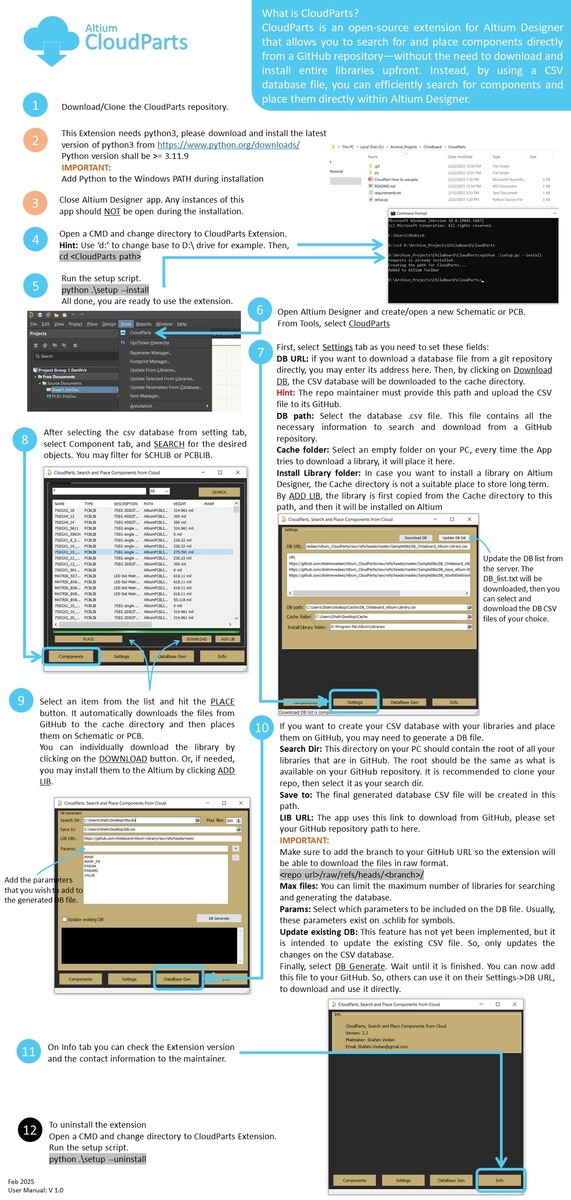
- Open a cmd and cd to the CloudParts folder
- cd <path to CloudParts>
- Install the Extention
- python .\setup.py --install
3. How to uninstall:
- Open a cmd and cd to the CloudParts folder
- cd <path to CloudParts>
- Uninstall the Extention
- python .\setup.py --uninstall
4. Usage:
- Open a schematic or PCB document on Altium Designer
- Tools->CloudParts
5. Issues and fixes:
- Libraries will not be updated:
- Check if your PC has internet access and the download URL is valid.
- Check if python is added to the Windows PATH. To verify, open a CMD and type python, then enter. Does it open the python?
- Uninstall the old python, and install the latest version of python