

Catalog · How the catalog works
tasmotasbacker

Lightweight utility to backup multiple Tasmota devices
- ★ 2 on GitHub
Anyone may press Interesting, signed in or not. It helps others find this project.
README
tasmotasbacker : Tasmotas Backer
Version 0.9.1 (July 14, 2021)
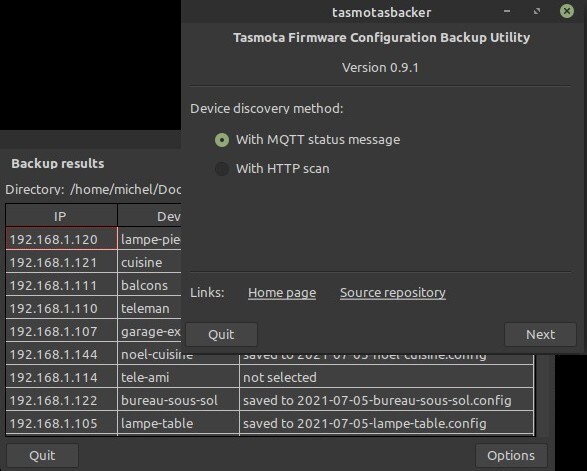
A utility to back up the configuration of all Tasmota devices on a local network. Discovery of Tasmota devices can be done by querying them through an MQTT broker or by performing an HTTP scan of IP addresses on the LAN.
The Eclipse mosquitto library is used to exchange messages with the MQTT broker. Should the library not be installed then the utility will run.
- 1. Requirements
- 2. Compiling
- 3. Testing
- 4. Installation and Releases
- 5. Program Options
- 6. Usage
- 7. WARNINGS
- 8. Similar Projects
- 9. Acknowledgment
- 10. Licence
1. Requirements
Two Free Pascal units are required
mosquitto.pas- conversion of the Cmosquitto.hheader to Pascal, provides the same API as the C versionmqttclass.pas- Object Pascal wrapper class to ease the integration of libmosquitto into Object Oriented
These files, found in the mosquitto-p directory, are copied from the GitHub repository with the same name by Károly Balogh (chainq).
In order to discover Tasmota devices by MQTT message to the Tasmota group topic or topics, the Eclipse mosquitto library must be installed on the system. The program will work if the library is not installed, but of course, an HTTP scan will have to be used to identify Tasmota devices on the network.
1.1. Brief instructions on installing the optional mosquitto library
1.1.1. Linux (Debian systems)
In Debian-based systems, the libmosquitto packages can be installed with a package manager such as Synaptic or from the command line.
$ sudo apt install libmosquitto1 libmosquitto-devNote that the first package, libmosquitto1, will probably already be installed if the mosquitto-clients package is available on the system. There is no requirement to install the mosquitto MQTT broker.
1.1.2. Windows 10
- Get the latest binary package from Eclipse mosquitto Download. Version 2.0.10 is available as of May 5, 2021. Chose the appropriate 64-bit installer (
mosquitto-2.0.10-install-windows-x64.exe) or 32-bit installer (mosquitto-2.0.10-install-windows-x32.exe). - Click on the downloaded application to install the package. It is not necessary to install it as a service if an MQTT broker is not needed.
- The 64-bit package was installed in
C:\Program Files\mosquitto\.- The 32-bit package will probably go into
C:\Program Files (x86)\mosquitto\.
- Test the
mosquitto_subandmosquitto_pubutilities from the command line using the host name or IP address of a reachable MQTT broker instead of <mqtt_broker>.
<pre> C:\Users\michel>"c:\Program Files\mosquitto\mosquitto_sub" -h <mqtt_broker> -t "#" </pre>
- Copy the mosquitto libraries <pre>
C:\Program Files\mosquitto\mosquitto.dll
C:\Program Files\mosquitto\mosquitto_dynamic_security.dll
C:\Program Files\mosquitto\libcrypto-1_1-x64.dll
C:\Program Files\mosquitto\libssl-1_1-x64.dll
C:\Program Files\mosquitto\mosquittopp.dll
</pre> to the same folder containing the compiled
lazmqttc.exeexecutable. Depending on use, they may not all be necessary, but the first two are needed without doubt.
It is left as an exercise for knowledgeable Windows users to find a more elegant way of ensuring that the DLLs are found.
Ultimately, if a mosquitto MQTT broker is to be run on the system, it may make more sense to simply copy the executable into the mosquitto directory alongside the mosquitto_pub.exe and mosquitto_sub.exe utilities it emulates.
2. Compiling
The repository is self-contained (except for the mosquitto library of course), so creating this tool should be straightforward. Clone the repository, start the Lazarus IDE, load the project, and compile.
When compiling a final version, it would be advisable to heed the following advice.
- Ensure that the directives
UseCThreads,INCLUDE_MQTT_OPTIONS,INCLUDE_HTTP_OPTIONS,DYNAMIC_MOSQLIB,
are added in thePersonalised OptionsinProject Options /Compiler Options. Optionally, the last directive may be omitted. In that case, themosquittolibrary will be linked in at compile time. Consequently, the utility will abort immediately when run on systems where the library is not installed. Because the extra time to load the library at run-time is negligible and it avoids this problem, it is best to define the directive.
- Modify the default password encryption key
DEFAULT_KEYin theunits/pwd.pasfile. That way it will not be easy for any one of the numerous users of this application to gain access to a system to read the configuration file and then obtain the MQTT broker password. See 7.2. Security for more details. - The application icon should be defined, but if it is not then select
Load IconinProject / Project / Project Optionsin the Lazarus IDE. Thetasmotabacker.pngimage in theimagesdirectory can be used. - Compile the release version. Select the
Releasebuild mode inProject / Project Options / Compiler Optionsin the Lazarus IDE. This will reduce the size of the executable by an order of magnitude.
3. Testing
The project was built with Lazarus 2.0.12 (Free Pascall 3.2.0) on a Mint 20.1 system with version 1.6.9-1 of the mosquitto libraries. A cursory test was done with the same compiler in Windows 10.
There is a proof of concept project in the repository that verifies that a Tasmota configuration can be downloaded.
4. Releases and Installation
Two executable beta versions of the utility have been released:
- Linux Mint 20.1:
tasmotasbacker-v****.gz(x86_64-linuxbinary). - Windows 10:
tasmotasbacker-v****.zip(x86_64-win64binary).
In both cases the exectuable must be extracted from the archive and, to get full advantage of the application, the mosquitto library should be installed on the system as explained above.
To complete the installation in Linux copy the executable tasmotasbacker to a directory in the search path such as ~./local/bin/. Copy the image images/tasmotabacker.png into the same directory. The installation directory in this repository contains a tamostasbacker.desktop file along with rudimentary instructions on how to install the utility in a Mint 20.1 Mate system. Presumably, installation in other Linux distributions would be more or less the same.
Unfortunately, details about installation of an application in Windows are not provided.
5. Program Options
In Linux, the program parameters are saved in the ini configuration file named ~/.config/sigmdel/tasmotabacker/options.ini where ~ is the user home directory. So the fully expanded file name is
<pre> /home/<user>/.config/sigmdel/tasmotasbacker/options.ini</pre>
In Windows 10, the file is saved in the local AppData folder :
<pre> C:\Users<user>\AppData\Local\sigmdel\tasmotasbacker\options.ini</pre>
Starting with version 0.3.6, all timeouts are measured in seconds; they were measured in milliseconds in previous versions. In the same version, two parameters, ConnectAttempts and ConnectTimeout, have been renamed DownloadAttempts and DownloadTimeout respectively.
If updating from a previous version, it may be simpler to delete the ini configuration file to avoid leaving orphaned entries in the file.
6. Usage
Information on how to use the program can be found on this site: DIY Tasmota Backups.
7. WARNINGS
7.1. Timing
Because the HTTP requests sent by the utility are blocking, timeouts have to be specified otherwise the program could hang. There are two options pertaining to downloads of the Tasmota device configurations that can be tweaked:
Download attempts- the maximum number of times an HTTP request for the Tasmota configuration is made.Download timeout- the maximum time to wait for a reply. Specified in seconds, the minimum is 1 second.
There are two similar options that apply when sending HTTP requests to scan the network for Tasmota devices.
Connect attempts- the maximum number of times an HTTP request for the hostname is sent to an IP address to establish if it is a Tasmota device.Connect timeout- the maximum time to wait for a reply. Specified in seconds, the minimum is 1 second.
Finally, there's a Timeout optionsin the MQTT broker. This is the maximum time, in seconds, allowed for establishing a TCP connection with the MQTT broker.
Consult DIY Tasmota Backups for more information on this topic.
7.2. Security
Prior to version 0.3.3, the MQTT broker password was stored in plain text in the configuration file. Do not save the MQTT broker password in the Options screen in these older versions.
A quick fix was added in version 0.3.3 to encrypt the password. A default encryption key is defined in units\pwd.pas which should be changed if compiling the program (see 2. Compiling for details). However those using a binary release can override the default key by storing a different key in a file named key.txt in the directory that contains the configuration file. The file should contain the key on one line and nothing else. Since this is a plain text file, this is not to be considered secured at all.
Note that the MQTT user and password are transmitted in plain text over an HTTP connection, so truly secure handling of the MQTT password will have to wait until communication with the broker using the HTTPS protocol is implemented.
8. Similar Projects
A version of this project that does not use an MQTT broker to find Tasmota devices is available.
- tasmotasbacker0 (as in tasmotasbackerZero).
It does not require the mosquitto library and only uses HTTP requests to find Tasmota devices and download their configuration. There is also an older version of the project
that discovers Tasmota devices by MQTT messages only and therefore requires the mosquitto library.
There are two Python scripts on GitHub that do essentially the same as tasmotasbacker0:
- tas-backup by dragonflyuk,
- Tasmota-Config-Backup by Yuval (rt400).
There is also a much more ambitious PHP/Sqlite project:
- TasmoBackupV1 by danmed.
A thorough search would probably turn up many more references.
9. Acknowledgment
Obviously, this utility would not have been possible without
- the Free Pascal and the Lazarus Ide projects
- the Eclipse Mosquitto project and
- the mosquitto-p project by Károly Balogh (chainq).
Useful information was obtained from others. Where possible, acknowledgment and references are provided in the source code.
10. Licence
The Eclipse Mosquitto project is dual-licensed under the Eclipse Public License 2.0 and the Eclipse Distribution License 1.0.
The content of the mosquito-p repository is covered by the ISC License (SPDX: ISC).
The BSD Zero Clause (SPDX: 0BSD) licence applies to the original code in this repository.