uloadingvcl

- Quiet · last change 12-9-2023
- ★ 2 on GitHub
README
uloadingvcl
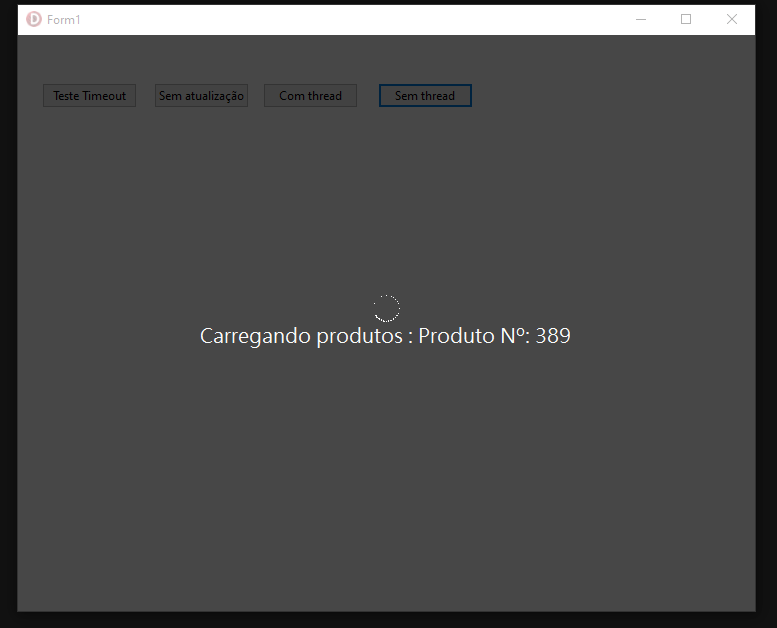
Delphi Runtime Form com GIF Animado e Mensagem Personalizada
Este repositório contém uma unit Delphi que permite criar em tempo de execução um formulário com uma mensagem de texto e um GIF animado. A mensagem pode ser atualizada dinamicamente e o formulário pode ser fechado automaticamente após um tempo limite especificado.
Características
- Criação de formulário em tempo de execução
- Exibição de GIF animado
- Mensagem de texto personalizável
- Fechamento automático com tempo limite
Como Usar
Aqui está um exemplo simples de como usar a TLoading em um projeto Delphi:
procedure TForm1.Button1Click(Sender: TObject);
var
  i, cont: integer;
begin
  cont := 0;
  TLoading.ShowLoad(form1, 'Fazendo update de produtos', 3000); // adicionar os milisegundos 3000 = 3s
  try
    for I := 0 to 100 - 1 do
    begin
      inc(cont);
      sleep(50);
      Tloading.Update('Carregando produtos : Produto Nº: ' + cont.tostring);
    end;
  finally
    tloading.Hide;
  end;
end;
English
Delphi Runtime Form with Animated GIF and Custom Message
This repository contains a Delphi unit that allows you to create a form at runtime featuring a custom text message and an animated GIF. The message can be dynamically updated and the form can be automatically closed after a specified timeout. Additionally, you can force-close the form using the Shift + F9 keyboard shortcut.
Features
- Runtime form creation
- Animated GIF display
- Customizable text message
- Auto-close with timeout
- Forced close keyboard shortcut (Shift + F9)
How to Use
Here's a simple example of how to use TLoading in a Delphi project:
procedure TForm1.Button1Click(Sender: TObject);
var
  i, cont: integer;
begin
  cont := 0;
  TLoading.ShowLoad(form1, 'Updating products', 3000); // add milliseconds 3000 = 3s
  try
    for I := 0 to 100 - 1 do
    begin
      inc(cont);
      sleep(50);
      Tloading.Update('Loading products: Product No.: ' + cont.tostring);
    end;
  finally
    tloading.Hide;
  end;
end;