

Catalog · How the catalog works
DinosOffice

Compontent delphi for OpenOffice/LibreOffice
- ★ 88 on GitHub
Anyone may press Interesting, signed in or not. It helps others find this project.
README
DinosOffice: Delphi Components for LibreOffice
Important
the DocVisible property was included, by default it is false, so when generating the spreadsheet it is not displayed on the screen, If you want to see the spreadsheet being generated, set it to true;
Running in:
Vcl, Fmx(Win32/64), Unigui, Intraweb, MCPServer





About 🎯
DinosOffice is an open source project for creating, customizing, and reading spreadsheets quickly and easily.
Installation ⚙️
Need install: https://pt-br.libreoffice.org/baixe-ja/libreoffice-novo/
Installation is done using the boss install command:
boss install github.com/Daniel09Fernandes/DinosOfficeInstall via Embarcadero - GetIt
OR manually:
- 1 - Open project "C:\yourLocal\ComponentDinosOffice-OpenOffice\srcPackage\OpenOfficeComponent_install.dproj" For delphi 7 use the C:\yourLocal\ComponentDinosOffice-OpenOffice\srcPackag\OpenOfficeComponent_install_Delphi7.dpk
- 2 - Clean
- 3 - Build
- 4 - install
- 5 - tools -> options -> language -> Delphi -> Library -> Library/ADD: "C:\yourLocal\ComponentDinosOffice-OpenOffice\srcPackage\Src" For delphi 7 use the "C:\yourLocal\ComponentDinosOffice-OpenOffice\srcPackage\Src_dx7"
| Github Project {branch versionOficial} | Version - On Embarcadero GetIt | Version |
|---|---|---|
| 20.4 | 20.3 | Tested ✅ |
Tested Delphi version
| Version | Supported | Windows version Tested | |---------- |----------- | --------------------------- | | Seattle | ✅ | Win7, Win 10, Win 11 | | XE 8 | ✅ | Win7, Win 10, Win 11 | | Delphi 7 | ✅ | Win7, Win 10 | | > 10.x | ✅ | Win 10 | | > 11.x | ✅ | Win 10, Win 11 | | > 12.x | ✅ | Win 11 | | > 13.X | ✅ | Win 11 |
| Frameworks Web | Supported | |------------------------- |----------- | | Unigui 1.95.0.1584 | ✅ | | Intraweb 14 | ✅ |
For Unigui
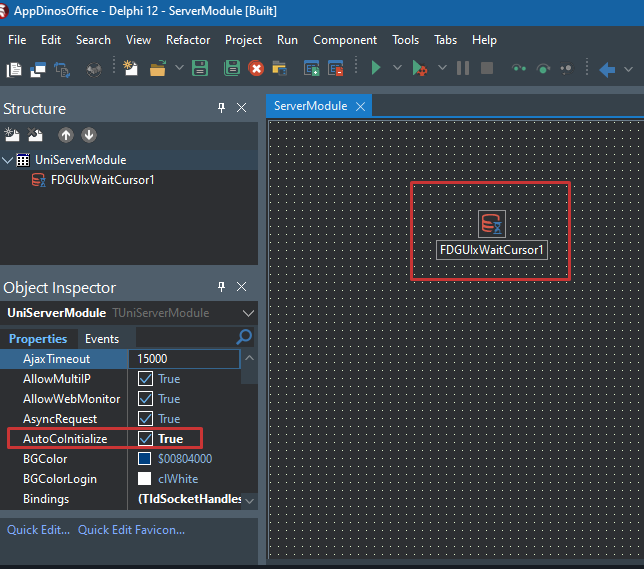
You need add FDGUIxWaitCursor to your serverModule and in your serverModule checked the property AutoCoInitialize
For Run on IIS
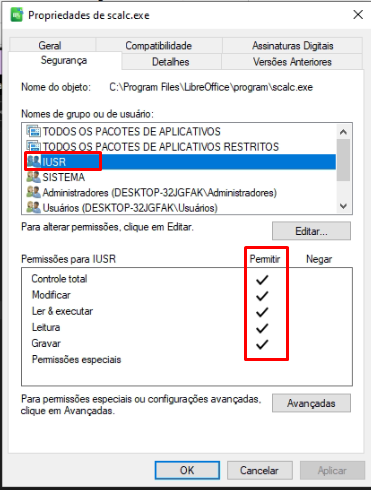
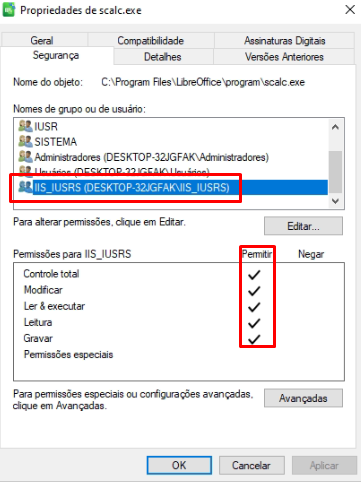
Need give permission to users IIS
To Unigui on IIS, use this path to access your spreadsheet

For Intraweb
You need add FDGUIxWaitCursor to your ServerController and in your ServerController change the property ComInitialize for ciMultiThreaded
Run MCPServer
In you MCP Client apont to DinosOfficeMCP.exe (use the STDIO protocol).
Claude IA exemple
Access the configuration on developer and edit config
In mcpServers node, attach DinosOfficeMCP.exe
There you go, now you can read and create spreadsheets with AI
For basic read and write sheet usage, just use the component To style the worksheet and documents, use the additional units: uOpenOfficeHelper.pas, uOpenOfficeCollors.pas
Calc(Spreedsheet) Example
var
   OpenOffice_calc1: TOpenOffice_calc;
begin
   OpenOffice_calc1 := TOpenOffice_calc.Create(Self);

  OpenOffice_calc1.DocVisible := False; //True to visible doc on screen
  OpenOffice_calc1.StartSheet
    .SetValue(1, 'A', 'STATUS')
       .SetBorder([bAll], opBrown)
       .changeJustify(fthRIGHT, ftvTOP)
       .SetBold(true)
       .changeFont('Arial', 12)
       .SetUnderline(true)
       .SetColor(opWhite, opMagenta)
    .setValue(1, 'B', 'VALOR')
       .changeJustify(fthRIGHT, ftvTOP)
       .SetBorder([bAll], opBrown)
       .SetBold(true)
       .ChangeFont('Arial', 12)
       .SetUnderline(true)
       .SetColor(opWhite, opMagenta)
    .setValue(2, 'B', 109, ftNumeric)
       .SetBorder([bAll], opBrown)
    .setValue(2, 'A', 'AGUA')
       .SetBorder([bAll], opBrown)
    .setValue(3, 'B', 105.55, ftNumeric)
       .SetBorder([bAll], opBrown)
    .setValue(3, 'A', 'LUZ')
       .SetBorder([bAll], opBrown)
    .setValue(4, 'B', 1005.22, ftNumeric)
    .setValue(4, 'A', 'ALUGUEL')
    .setValue(6, 'A', 'Total de linhas');

  OpenOffice_calc1.GetCountRow(lOutCountRow);

  OpenOffice_calc1
    .setValue(6, 'B', lOutCountRow, ftNumeric)
    .setValue(7, 'A', 'Total de Colunas');

   OpenOffice_calc1.GetCountCell(lOutCountCell);

   OpenOffice_calc1
    .setValue(7, 'B', lOutCountCell, ftNumeric)
    .addNewSheet('A Receber', 1)
    .setValue(1, 'A', 'VALOR')
      .SetBorder([bAll], opBrown)
      .changeJustify(fthRIGHT, ftvTOP)
      .setBold(true)
    .setValue(1, 'B', 'DESC')
      .SetBorder([bAll], opBrown)
      .changeJustify(fthRIGHT, ftvTOP)
      .setBold(true)
      .changeFont('Arial', 12)
      .setUnderline(true)
      .setColor(opWhite, opCiano)
    .setValue(2, 'B', 200, ftNumeric)
    .setValue(2, 'A', 'Emprestimo')
    .setValue(3, 'B', 369.55, ftNumeric)
    .setValue(3, 'A', 'Dividendos')
    .setValue(4, 'B', 1585.22, ftNumeric)
    .setValue(4, 'A', 'ALUGUEL')
    .setValue(5, 'B', 1585.22, ftNumeric)
    .setValue(5, 'A', 'Renda extra')
    .setValue(6, 'B', 1585.22, ftNumeric)
    .setValue(6, 'A', 'ALUGUEL 2')
    .setValue(9, 'A', 'Total de linhas')
      .SetBold(True)
      .SetCellWidth(5000);

   OpenOffice_calc1.GetCountRow(lOutCountRow);

   OpenOffice_calc1
    .setValue(9, 'B', lOutCountRow, ftNumeric)
    .setValue(10, 'A', 'Total de Colunas')
    .SetBold(True);

   OpenOffice_calc1.GetCountCell(lOutCountCell);

   OpenOffice_calc1
    .setValue(10, 'B', lOutCountCell, ftNumeric)
    .setValue(8, 'A', 'Total')
      .setBold(true)
    .setFormula(8, 'B', '=B2+B3+B4+B5+B6')
      .setBold(true)
    .positionSheetByName(lSheetname);

  // Configure the chart settings
  SettingsChart.Height := 11000;
  SettingsChart.Width := 22000;
  SettingsChart.Position_X := 1500;
  SettingsChart.Position_Y := 5000;
  SettingsChart.StartRow := 0;
  SettingsChart.EndRow := 3;
  SettingsChart.PositionSheet := 0; // first tab
  SettingsChart.StartColumn := 'A';
  SettingsChart.EndColumn := 'B';
  SettingsChart.ChartName := 'TestChart';
  SettingsChart.typeChart := ctDefault;

  OpenOffice_calc1.addChart(SettingsChart);

  SettingsChart.typeChart := ctVertical;
  OpenOffice_calc1.addChart(SettingsChart);

  SettingsChart.typeChart := ctPie;
  OpenOffice_calc1.addChart(SettingsChart);

  SettingsChart.typeChart := ctLine;
  OpenOffice_calc1.addChart(SettingsChart);

  OpenOffice_writer1.saveFile('c:/temp/sheet.xlsx');
  OpenOffice_calc1.Free;
Writer(DOCX) Example
var
  lTable: TTableWriter;
  OpenOffice_writer1:  TOpenOffice_writer;
begin
  OpenOffice_writer1 :=  TOpenOffice_writer.Create(Self);
  OpenOffice_writer1.setBold(true).setFontHeight(16)
    .setValue(
       'Título: Apresentando o componente Libre Office writer via Delphi <3'+ #13#13)
    .gotoEndOfSentence
    .setBold(false).setFontHeight(12)
    .setValue(
       'Neste exemplo estou mostrando a criação de documentos via código, de um jeito simples, rápido e fácil.'+ #13)
    .gotoEndOfSentence
    .setBold(false).setFontHeight(12)
    .setValue(
        'Espero que seja útil e que estejam gostando, lembrando o componente é open source e totalmente free!'+ #13#13)
    .gotoEndOfSentence
    .setBold(false).setFontHeight(12).setBold(true)
      .setValue('Obrigado a todos pela presença!!!' + #13)
    .gotoEndOfSentence;

  lTable := TTableWriter.New;
  try
    lTable.TableFields.Add('Participantes');
    lTable.TableFields.Add('Idade');
    lTable.TableFields.Add('Local');

    lTable.Lines.Line.Add('Dinos');
    lTable.Lines.Line.Add('31');
    lTable.Lines.Line.Add('Brasil');

    lTable.Lines := TTableWriter.AddNewLines; //Adiciona uma nova linha
    lTable.Lines.Line.Add('Jao');
    lTable.Lines.Line.Add('22');
    lTable.Lines.Line.Add('USA');
    lTable.TableLines.Add(lTable.Lines);

    OpenOffice_writer1
      .CreateTable(lTable)
      .gotoEndOfSentence
      .setValue(#13#13);

    OpenOffice_writer1.saveFile('c:/temp/sdoc.docx');
  finally
    lTable.Free;
    OpenOffice_writer1.Free;
  end;
end;
This software is MIT open source!
Wiki: https://github.com/Daniel09Fernandes/ComponentDinosOffice-OpenOffice/wiki
See more on Instagram https://www.instagram.com/dinosdev/
O componente é totalmente free, se ele foi muito útil para você, que tal me pagar um café para incentivar o projeto?
PIX:
Star History
https://star-history.com/#Daniel09Fernandes/DinosOffice&Date