

DUnitmTestRunner

Source for the DUnitm Test Runner Project
- Quiet · last change 10-1-2019
- ★ 2 on GitHub
README
DUnitmTestRunner
The DUnitm Test Runner is a Delphi console project that allows you automatically build and run all of the DUnitm Test projects in a specified folder. This is similar to popular Javascript test runners like Mocha, Karma and Jest. You can run it at the command line or even integrate it into Delphi's IDE (although at this point, very minimally).
It is also ideal to use with continuous delivery systems like Microsoft DevOps (TFS), Bamboo, Team City, Final Builder etc, and it is especially effective when using Delphi Project bundles. It will report to the build system if there have been test failures so that the build process can return failed Test results.
It can build and run test cases for all versions of Delphi are supported back to Delphi 5 (Delphi4 probably also works). You can run tests for different versions of Delphi simply by specifying the version of Delphi in the command line if that version of delphi is installed AND your project has compatible language features.
There is a single executable TestBuilder.exe which can be installed locally or globally to run the tests.
Building and Installing DUnitmTestRunner
You can get the binary and/or the Source Code for TestBuilder from the releases section of this GitHub project.
If you just want to run your tests, there is no need to build test runner. TestBuilder is a small standalone EXE, available in the Releases Section of this repo, that can compile and run your DUnitM test cases for any version of Delphi. The release build is typically built using Delphi 7 (to make it as small as possible). You can build TestBuilder.dpr using any version of Delphi after Delphi 6.
Getting the Binary
Get Release R0.1 from Github. There MAY be newer releases please check Releases.
Minimal Global Install
Simply add TestBuilder.exe to a suitable folder ALREADY IN YOUR PATH. Echo out the %PATH% environment variable. eg
:>echo %PATH%
C:\Program Files (x86)\Embarcadero\RAD Studio\12.0\bin;C:\Users\Public\Documents\RAD Studio\12.0\Bpl;C:\Program Files (x86)\Embarcadero\RAD Studio\12.0\bin64;C:\Users\Public\Documents\RAD Studio\12.0\Bpl\Win64;C:\ProgramData\Oracle\Java\javapath;C:\Program Files ...
See that there is a path entry for user public BPLs here C:\Users\Public\Documents\RAD Studio\12.0\Bpl. Just copy TestBuilder.exe into that (or similar) folder on your machine.
You should now be able to run the TestBuilder from the command line. You will see the Help prompt.
REMEMBER - TestBuilder can build test cases for any version of delphi currently installed on the machine. There is no need to install it multiple times for different versions of delphi
How to Use the Test Runner
TestBuilder is a command line console application that is controlled by command line options. It creates a re-usable Windows Batch Script which it runs to display the results in a viewer of your choice.
While the primary purpose of the TestRunner is to allow your test cases to be run within continuous Integration process, it can also be run manually at the command line or integrate it with the IDE via Build Scripts.
Command line Help
To see the command line options for TestBulder use the /? or /help switch (actually, you will also see it if you dont supply any parameters)
This will display the following.
C:\Testing>TestBuilder.exe /?

>TestBuilder [-|/][?|help] | [[-|/]b] [[-|/][EXCLUDE[:]<[*]|Project;Project...>

     [[-|/][INCLUDE[:]<Project1;Project2...>] [[-|/]S:<ScriptName>]
     [[-|/]V:<DelphiVersion>] [[-|/]O:<OpenWith>]
     <StartInFolder>

 ?|help           : This Message
 b                : Build SCRIPT ONLY, do not RUN
 EXCLUDE          : List of Project Names to exclude ("*"=All)
                    eg: /EXCLUDE:TestMyFunc;TestMyProc
 INCLUDE          : List of Project Names to include (if otherwise excluded)
                    eg: /INCLUDE:TestMyFunc;TestMyProc
 V:<DelphiVersion>: The version of delphi to build. Use short name or VersionId
                    eg: -v:D7 -v:Delphi7 -v:XE2 -v:Berlin -v:Seattle etc
 O:<OpenWith>     : Open the test result with a specific program default (none)
                    eg: -O:Notepad - opens the Test results in notepad
 <ScriptName>     : Full pathname to Test Runner Script
                  (<StartInFolder>TestRunner.bat if not supplied)
 <StartInFolder>  : (Required) Folder to recursively search for test projects.

C:\Users\glen.GALKAMLAN\Documents\DUnitmTestRunner\win32\debug>
Note that you can put the start in folder anywhere in the command.
Default Delphi Version
Although the version switch is optional, you should always get into the habit of specifying the version. The DEFAULT Version of Delphi depends what version of Delphi was used to build TestBuilder. The Release Build is always Delphi 7, so it is unlikely that will be the version of Delphi you currently have installed. If you built TestBuilder yourself, and you only have one version of delphi installed, then you can omit the version switch. BUT REMEMBER when collaborating with other developers, "It works on My Machine" is not something anyone wants to hear. So, to avoid unnecessary headaches, always supply the target version in the command.
Examples
Run all tests in a folder against Delphi 2009, open results with Notepad
>TestBuilder c:\DelphiProjects\MyBigProject\ -v:D2009 -o:notepad
\tests\TestTFileDownloader.dpr
\tests\TestTMainForm.dpr
\clients\Tests\TestPhoneDialer.dpr
\clients\Tests\TestAddressChecker.dpr
Opening in notepad
Run all tests in a folder against Delphi XE2, but dont open the result
Typically you can use this open if you are monitoring the result file (typically "TestRunnerResults.txt") using a continous tail or a text viewer like Notepad++ with the tail option enabled.
>TestBuilder c:\DelphiProjects\MyBigProject\ -v:XE2
\tests\TestTFileDownloader.dpr
\tests\TestTMainForm.dpr
\clients\Tests\TestPhoneDialer.dpr
\clients\Tests\TestAddressChecker.dpr
Create the TestRunner Script against Delphi Berlin, but dont run the tests
Use this to create the Batch Script so you can run it later (eg in the IDE Build Events or as part of the CI process).
>TestBuilder c:\DelphiProjects\MyBigProject\ -v:Berlin /b
\tests\TestTFileDownloader.dpr
\tests\TestTMainForm.dpr
\clients\Tests\TestPhoneDialer.dpr
\clients\Tests\TestAddressChecker.dpr
Wrote Test Runner script to c:\DelphiProjects\MyBigProject\TestRunner.bat
Exclude a Specific Project
When you have different parts of the system being built under different versions of Delphi, you can exclude specific test Projects by name.
>TestBuilder c:\DelphiProjects\MyBigProject\ -v:Berlin -exclude:TestPhoneDialer;TestAddressChecker
\tests\TestTFileDownloader.dpr
\tests\TestTMainForm.dpr
Include only specific Projects
It is also possible to include only specific test Projects by name by excluding everything, and then including specific projects
>TestBuilder c:\DelphiProjects\MyBigProject\ -v:D2009 -exclude:* -include:TestPhoneDialer;TestAddressChecker
\clients\Tests\TestPhoneDialer.dpr
\clients\Tests\TestAddressChecker.dpr
IDE integration - Minimal
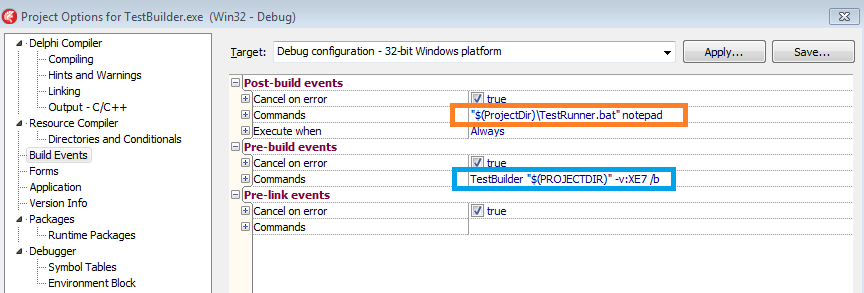
Using BUILD EVENTS in delphi, it is possible to prevent an application from building if the test cases fail. This is done by adding a PRE Build Event to Create the build Script without running it. Then in the POST Build Event run the script.
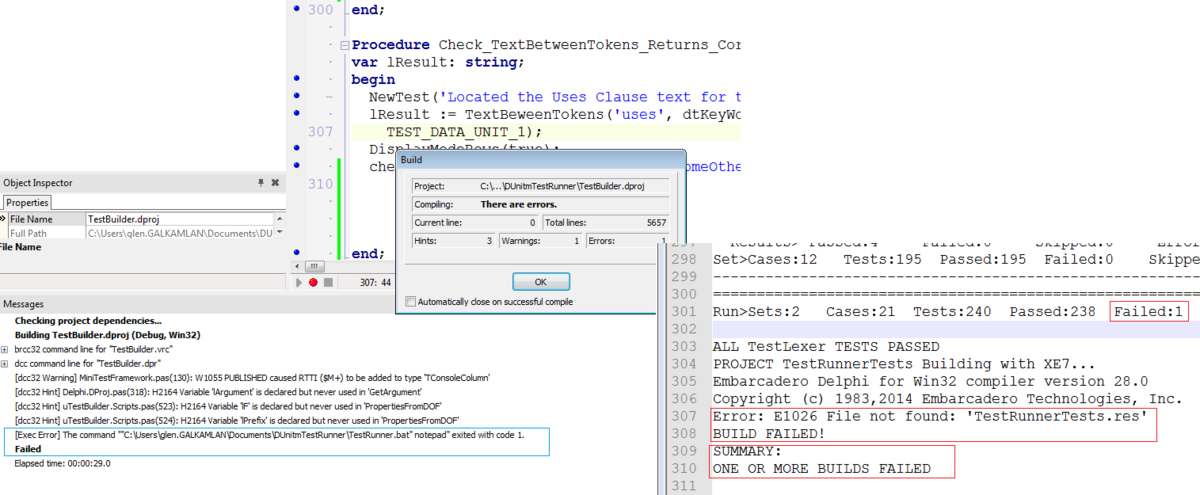
When Delphi runs the script post build, The TestRunner.bat script will report that there has been a Test failure and the Application build will fail.
Project Roadmap
- Resource files not currently integrated. We know this might be annoying - an issue has been raised.
- NUnit XML Report format. This will extend the "Open with" functionality
- Delphi IDE Integration: Test WorkBench. Allows you to Select and run individual tests - in a similar way to Visual Studio.