

Catalog · How the catalog works
xelplayer

Crossplatform GUI for MPlayer by Alexandre Minoshi
- ★ 1 on Codeberg
Anyone may press Interesting, signed in or not. It helps others find this project.
README
XelPlayer Light
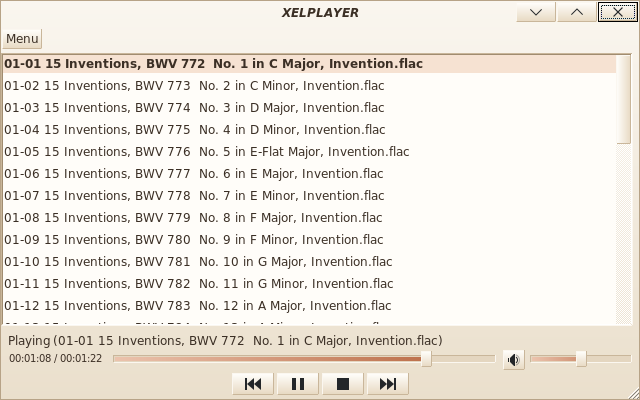
A small audio player for Linux, written with MSEide+MSEgui. It is a front-end for MPlayer, and a light version of Alexandre Minoshi's XelPlayer, reduced to the essentials: playing music files and playlists.
Features
- Play one or several audio files given on the command line.
- Play a playlist (
.pls,.m3u) given on the command line. - Open files, a directory or a playlist from the application (button
Menu, thenOpen). - Play, pause, stop, previous and next track, position and volume sliders.
Video is not played: MPlayer is started with -vo null -novideo, so a video
file is played as sound only.
Screenshot
Requirements
- MPlayer (
/usr/bin/mplayer, or the path given inxelplayer.conf). - Free Pascal and the MSEgui sources to build.
Build
make MSEGUI=/path/to/mseide-mseguiMSEGUI may also be set in the environment.
The program can also be built from MSEide with xelplayer.prj.
Usage
./xelplayer song.mp3
./xelplayer 01.mp3 02.mp3 03.mp3
./xelplayer playlist.m3u
The settings (mplayer path and cache, next track, volume) are
kept in xelplayer.conf, next to the executable.
Keyboard shortcuts
| Key | Action |
|---|---|
Space or X |
Play / pause |
C |
Stop |
Z |
Previous track |
V |
Next track |
← / → |
Move back / forward 5 seconds in the current track |
M |
Mute / unmute |
Delete |
Remove the selected tracks from the playlist |
Skins
Three skins are available in skins/:
azureskin: light, pale blue background, blue accent.graphiteskin: dark, anthracite background, orange accent.sandskin: light, cream background, terracotta accent.
To change the skin, replace loadsandskin in xelplayer.pas by loadazureskin
or loadgraphiteskin, then rebuild.
The skins are generated by tools/genskins.py, where their colors are defined.
After a change, regenerate them and their *_mfm.pas files:
python3 tools/genskins.py skins
for f in skins/*skin.mfm; do tools/mfm2pas $f; done
Contents of the repository
| Path | Contents |
|---|---|
xelplayer.pas, main.pas, aboutform.pas, ... |
The program and its forms (*.mfm and generated *_mfm.pas). |
xelide/ |
alsmplayer.pas, the component that drives MPlayer, and the files needed to build a MSEide with this component in its palette. See xelide/README.md. |
ide.sh, open.sh |
Start this MSEide, and open xelplayer.prj with it. |
icons/, icons/dark/ |
Button icons from the Breeze theme (LGPL), for light and dark skins. |
xelplayer_logo.png |
Window icon, loaded at startup. |
skins/ |
Skins: azureskin, graphiteskin, sandskin. See Skins. |
tools/ |
mfm2pas, converts a form file (*.mfm) to *_mfm.pas without the IDE. genskins.py, generates the skins. |
animation/ |
Standalone example: the logo animation of the former video area. See animation/README.md. |
archive/ |
The original program by Alexandre Minoshi (alminsoft.zip). |
test.sh |
Manual test script. |