

Catalog · How the catalog works
MNIST-Converter

Reading and writing MNIST file format . "mnistex.py" which reads that file with TensorFlow is attached.
- ★ 2 on GitHub
Anyone may press Interesting, signed in or not. It helps others find this project.
README
MNIST Converter
Reading and writing MNIST file format. "mnistex.py" which reads that file with TensorFlow is attached.
(MNISTファイルの読み書き。そして、TensorFlowでそのファイルを読み取る「mnistex.py」を付属。)
Since MNIST conversion and mnistex.py for TensorFlow are a set, You can instantly classify by CNN just by preparing images.
(MNIST変換とTensorFlow用のmnistex.pyがセットになっているので、画像を用意するだけでCNNによるクラス分類が可能。)
How to use (mnistex.py)
Let's try "THE MNIST DATABASE" which is classic with CNN at the beginning.
(最初はCNNで定番の「THE MNIST DATABASE」を試しましょう。)
Download MNIST DATABASE
(MNIST DATABASEをダウンロードする)
[http://yann.lecun.com/exdb/mnist/](http://yann.lecun.com/exdb/mnist/)
| FileName | Contents |
|---|---|
| train-images-idx3-ubyte.gz | training images |
| train-labels-idx1-ubyte.gz | training labels |
| t10k-images-idx3-ubyte.gz | test images |
| t10k-labels-idx1-ubyte.gz | test labels |
When expanded it will be the next file.
(全て展開すると次のファイルになります。)
| FileName | Contents |
|---|---|
| train-images-idx3-ubyte | training images |
| train-labels-idx1-ubyte | training labels |
| t10k-images-idx3-ubyte | test images |
| t10k-labels-idx1-ubyte | test labels |
Place the following files in the same folder.
(次のファイルを同じフォルダに配置します。)
| FileName |
|---|
| train-images-idx3-ubyte |
| train-labels-idx1-ubyte |
| t10k-images-idx3-ubyte |
| t10k-labels-idx1-ubyte |
| mnistex.py |
| test.ipynb |
Just run test.ipynb with Jupyter Notebook.
(後は、Jupyter Notebookでtest.ipynbを実行するだけです。)
How to use (for keras)
import mnistex

# Numver of Class (クラス数)
num_classes = 10

# Image size (width = height)
image_size = 28

mnist = mnistex.read_data_sets(
         'train-image', # Training images (訓練用画像)
         'train-label', # Training labels (訓練用ラベル)
         'test-image',  # Test images  (テスト用画像)
         'test-label',  # Test labels  (テスト用ラベル)
         validation_size = 0,  # Number of Validation (検証用データ数)
                               # "This argument can be 0" (この引数は0でも可能)
         num_classes=num_classes, # Numver of Class (クラス数)
         one_hot=False            # one hot (ワンホット)
       )

train_images = mnist.train.images
train_labels = mnist.train.labels
test_images = mnist.test.images
test_labels = mnist.test.labels

# If necessary we will format it for keras
# (必要であればkeras用に整形する)
train_images = train_images.reshape(-1, image_size, image_size)
test_images = test_images.reshape(-1, image_size, image_size)
How to use (mnist.exe)
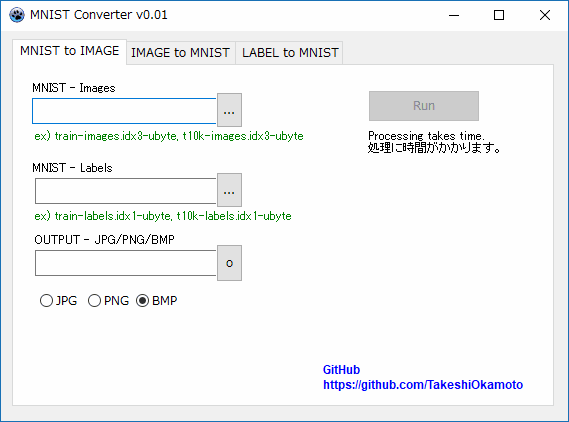
There are two types of MNIST file, "image" and "label". And that two are paired.
(MNISTファイルには「画像」と「ラベル」の2種類の形式があります。そして、その2つはペアになっています。)
training data = training images + training labels
test data = test images + test labels
The next is how to use mnist.exe.
(次はmnist.exeの使い方です。)
| Operation | Contents |
|---|---|
| MNIST to IMAGE | Convert MNIST file to image file. (MNSITファイルを画像ファイルへ変換します。) |
| IMAGE to MNIST | Convert the image file to MNIST (image). (画像ファイルをMNIST(画像)へ変換します。 ) |
| LABEL to MNIST | Convert the text file to MNIST (label). (テキストファイルをMNIST(ラベル)へ変換します。 ) |
MNIST file format is no distinction between training and test data.
(MNISTのファイルフォーマットでは訓練、テストデータの区別はありません。)
The maximum value of the label (class number) is "Number of class - 1". If the number of classes is 10, "0 .. 9" can be set.
(ラベル(クラス番号)の最大値は「クラス数 - 1」です。クラス数が10ならば「0 .. 9」が設定可能となります。)
Mac / Linux
mnist.exe can be executed on Windows.
(mnist.exeはWindowsで実行可能です。)
Mac / Linux users have source code, please compile with "Lazarus".
(Mac / Linuxの方はソースコードがありますので、"Lazarus"でコンパイルして下さい。)
However, the operation is unconfirmed.
(但し、動作は未確認です。)
Bonus (おまけ)
Also includes an application to increase one image file.
(1枚の画像ファイルを増やすアプリも同梱しています。)
Contact
English Can understand, only 3-year-old level :-)