Free-Pascal-UTF8-supported

Win10, try to understand why some console program under has no proper display UTF8 other than ANSI
- Quiet · last change 9-25-2017
- ★ 2 on GitHub
README
Free-Pascal-UTF8-supported
Win10, try to understand why some console program has no proper display UTF8 string other than ANSI, my first time to deal with PASCAL language.
Inperfection, but not really quality issues, there are two issues
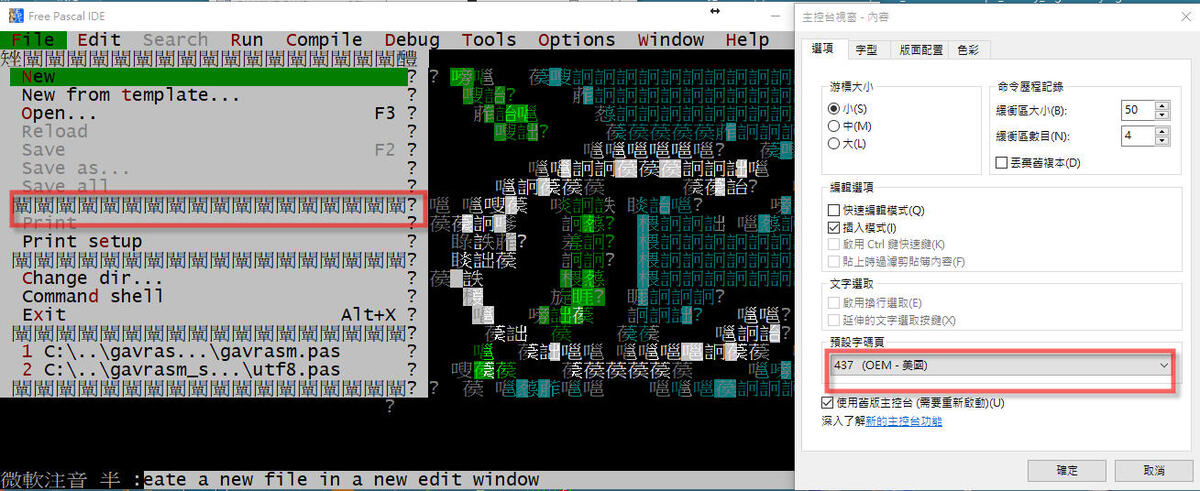
1) Free Pascal IDE, display does not look like comfortable even a bit ugly
it is used typical ANSI char of 0x80 - 0xff for display and grid line something, under DOS or pure English OS is ok, but win10 with default code page 950, change code page to OEM 437, did not work out, do not know why, however compiler still functioning properly.
To embeds image to this read.me
``
https://github.com/xiaolaba/Free-Pascal-UTF8-supported/blob/master/Free_Pascal_IDE_display_no_good.jpg
.
.
.

2) The User program, console output has no proper display for UTF8 string
This is origination and the cause, https://github.com/xiaolaba/gavrasm_CHT
.
.
.
.
Try and notes
1) Pascal source code, need to be UTF-8-BOM, used the editor 'Notepad++' and ensure to save such format
what is UTF-8-BOM, see https://zh.wikipedia.org/wiki/%E4%BD%8D%E5%85%83%E7%B5%84%E9%A0%86%E5%BA%8F%E8%A8%98%E8%99%9F
UTF-8 wihtout BOM, it is not working in our example.
2) Free Pascal IDE, no display properly for such UTF8 string, but do not worry as they will be treated as byte sequency
3) hit F9 to compile, then open dosbox, uses 'chcp 65001' command to swtich code page to utf-8 as you want. examples for other code page following,
chcp 65001, code page will be utf-8
chcp 950, code page will be ANSI/OEM BIG5, or CHT
chcp 936, supposedly code page will be ANSI/OEM GBK, or CHS, but it is invalid ?!
chcp 54936, should be equal to 936 as long as microsoft saying
chcp 437, should be ANSI OEM US
4) aforementioned step (3) could be omitted, as this source code has specific code of code page setup at runtime with 'SetConsoleOutputCP(CP_UTF8);', however, the first time invoke, display no good as default code page started is 950 with the dosbox just opened; second time invoke, it should be fine and displayed properly with nice utf8 strings.
https://github.com/xiaolaba/Free-Pascal-UTF8-supported/blob/master/Free_Pascal_UTF8_supported.jpg

.
.
5) utf8.pas, the source code available https://github.com/xiaolaba/Free-Pascal-UTF8-supported/blob/master/utf8n.pas
exectuable, https://github.com/xiaolaba/Free-Pascal-UTF8-supported/blob/master/utf8n_exee rename to utf8n.exe, or download & compile by your own.
.
source code listing
{ref : http://wiki.freepascal.org/Console_Mode_Pascal#Unicode_.28UTF8.29_output}
{實驗如何用 Free PASCAL 輸出 UTF8 字串, by xiaolaba}
program uniconsole;
{$mode objfpc}{$H+}
{$APPTYPE CONSOLE}
uses
  Windows,Classes;
var
    UTF8TestString, UTF8TestString2: String;
begin
    {SetConsoleOutputCP(CP_ACP);}

    {set console code page to 65001 = UTF8}
    SetConsoleOutputCP(CP_UTF8);
    UTF8TestString:= '简体';
    UTF8TestString2:= '繁體';
    writeln ('plain: ' + UTF8TestString);
    writeln ('plain: ' + UTF8TestString2);
end.
.
.
.
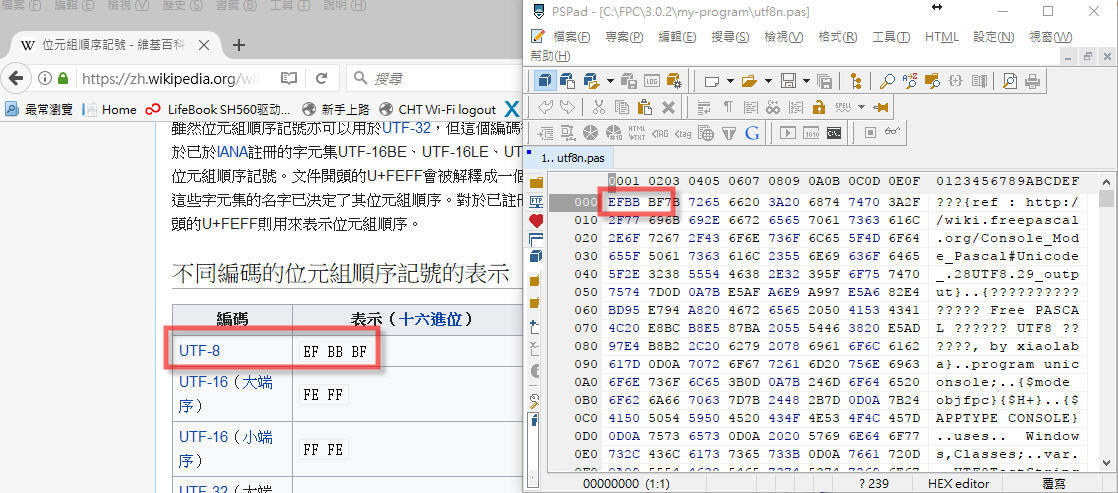
To confirm what is UTF-8-BOM and saying, there is 3-bytes at beginning of the text file (pascal source code)
0xEF, 0xBB, 0xBF
it is the same as WIKI saying of how the UTF-8-BOM looks like.
https://github.com/xiaolaba/Free-Pascal-UTF8-supported/blob/master/Free_Pascal_UTF8-BOM_source_code.jpg