

Catalog · How the catalog works
Posit-92_WASM

POSIT-92 implementation targeting WebAssembly
- ★ 3 on GitHub
Anyone may press Interesting, signed in or not. It helps others find this project.
README

This project is a port of the original POSIT-92 for DOS, which targets WebAssembly
Requirements
- Lazarus IDE
- Free Pascal Compiler which has been configured with
wasm32-embeddedas the target (read Compiler Setup section below to see how) - Perl to handle most of the build & text processing tasks
- Node.js, npm or yarn, and TypeScript compiler (
tsc)
Optional: Bun for users who already use it, see the section below
I'm using Windows 10 Home (64-bit, version 22H2, build 19045.6575) to build this project
If you want to use VSCode instead of Lazarus, install the OmniPascal extension by Wosi
Getting Started
I added 2 documents in docs to guide you from setting up the project structure up to making a proper game release:
Preparing the JS glue code
Use tsc to transpile both the engine & mixin files, simply by using:
cd experimental
tsc
It will read tsconfig.json automatically and start transpiling the listed TypeScript files to JS
The command requires at least TypeScript version 4.6 (along with the latest LTS version of Node.js), which can be installed by either one of these:
npm install -g typescript@^4.6.0
yarn global add typescript@^4.6.0
This is because Posit-92 extensively uses private class fields and methods using the #field syntax, which is guaranteed to break even with polyfills
After that, you can copy the engine's JS runtime and the necessary mixins manually
Alternative: Bun
Requires: Bun (at least v1.3.5) either to transpile the engine code or to start the local HTTP server
I decided to move this as optional because of the obscure error message when I tried to get this started on my old laptop from 2017
(Posit-92 engine folder)> bun build .\posit-92.ts
error: Cannot read file "C:\": EPERM
To start a local server with Bun, see local_server.md
Boilerplate Overview
hello_demoscene
- Starts immediately without an intro
hello_intro
- Standard Posit-92 project with an intro / loading sequence
hello_minimal
- Smallest possible project
Compiler Setup
-
Download fpcupdeluxe-x86_64-win64.exe from LongDirtyAnimAlf/fpcupdeluxe
The version that I used at the time of writing was v2.4.0g
-
Install in
E:\fpc-wasmor anywhere that's easy to reach -
Under the Basic tab, choose the trunk version above the FPC button, install Only FPC
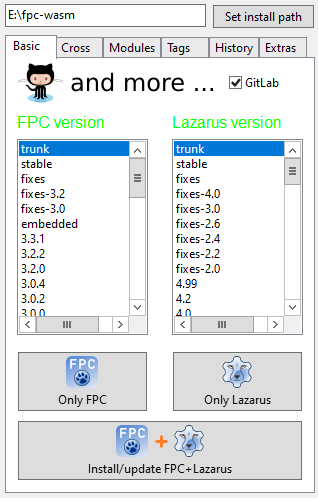
-
Under the Cross tab, choose CPU: wasm32, OS: embedded, then click Install compiler
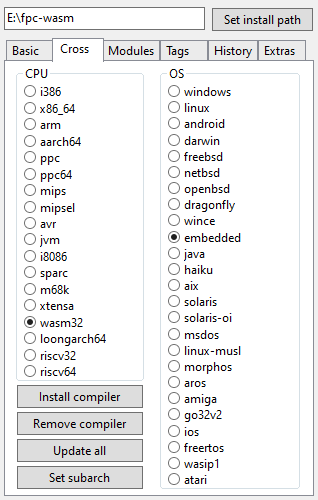
It took me a few retries until the compiler finally completed compiling
Running locally
Posit-92 (WASM) projects need to be served through a local HTTP server rather than from the filesystem or directly run by Lazarus
See local_server.md for the available options, including Bun
Credits
Default font: P92 Sans
BMFont format: AngelCode BMFont