

Catalog · How the catalog works
termstyle

Colorful and styled terminal output for Free Pascal
- ★ 3 on GitHub
Anyone may press Interesting, signed in or not. It helps others find this project.
README
TermStyle
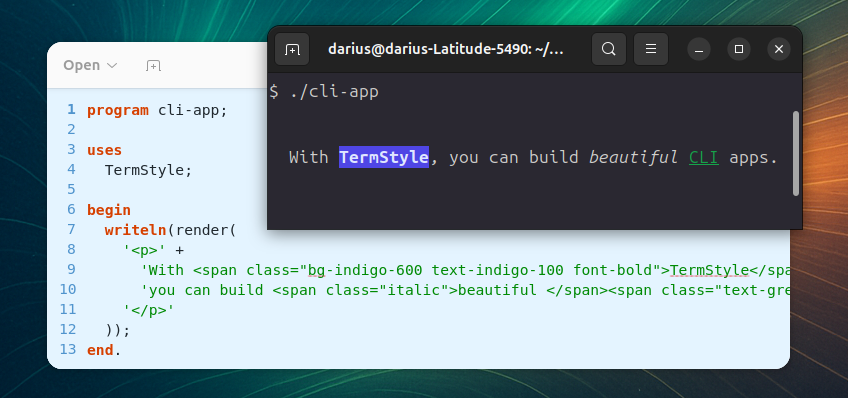
TermStyle brings colorful, styled output to your CLI applications with the familiar Tailwind CSS API. It allows building a beautiful and expressive terminal with ease.
TermStyle is inspired by Termwind.
Installation
Install using Nova.
nova require daar/termstyleUsage
TermStyle accepts valid HTML and Tailwind formatting classes.
uses
  TermStyle;

writeln(render('<div class="font-bold text-red">Important!</div>'));
writeln(render('<div class="text-green-500 bg-gray-800">Green text on dark background</div>'));
Interactive Prompts
The TermStyle.Prompts unit provides beautiful, interactive command-line prompts.
uses
  TermStyle.Prompts;
text()
Text input with placeholder, default value, and hint support.
name := text(
  'What is your name?',
  'John Doe',           // placeholder
  '',                   // default value
  'Enter your full name' // hint
);
suggest()
Text input with autocomplete suggestions. Use TAB to complete, arrow keys to cycle suggestions.
country := suggest(
  'What country are you from?',
  ['Australia', 'Austria', 'Belgium', 'Brazil', 'Canada'],
  'Start typing...'
);
password()
Password input with hidden characters (displayed as asterisks).
pwd := password(
  'Enter your password',
  'Min 8 characters',
  'Your password will be encrypted'
);
confirm()
Yes/No confirmation prompt.
if confirm('Do you want to continue?', true) then
  // proceed...
select()
Single selection from a list of options. Navigate with arrow keys or TAB, confirm with Enter.
choice := select(
  'Choose a framework',
  ['Option A', 'Option B', 'Option C'],
  0,  // default selection index
  'Use arrow keys to navigate'
);
multiselect()
Multiple selection from a list. Navigate with arrow keys, toggle with Space, confirm with Enter.
features := multiselect(
  'Select features to enable',
  ['Auth', 'API', 'Queue', 'Scheduler'],
  'Space to toggle, Enter to confirm',
  true  // required (at least one)
);
pause()
Wait for user to press Enter.
pause('Press ENTER to continue...');Informational Output
intro('My CLI Application');   // Section header: ┌─ My CLI Application
outro('Goodbye!');             // Section footer: └─ Goodbye!
note('Additional information'); // Note line
alert('Important warning!');    // Yellow alert box
Progress Indicators
// Spinner
spin('Loading...');
Sleep(1000);
spinStop(true, 'Done!');  // true = success, false = failure

// Progress bar
bar := progress('Downloading', 100);
for i := 1 to 100 do
begin
  Sleep(20);
  bar.Advance(1);
end;
bar.Finish;
bar.Free;
table()
Display data in a formatted table.
table(
  ['Name', 'Email'],
  [
    ['John', 'john@example.com'],
    ['Jane', 'jane@example.com']
  ]
);
Message Helpers
TermStyle comes with ready-to-use helpers that print messages styled by their severity.
error('Something went wrong!');
success('Operation completed!');
warning('Disk space is low');
info('Processing...');
banner('Welcome', 'text-white bg-blue-400 font-bold');
banner()
The banner() function may be used to show a banner on screen with a custom HTML formatting.
banner('TERMSTYLE DEMO CLI', 'text-white bg-blue-400 font-bold');Diff Output
TermStyle provides functions for rendering colored diff output, similar to git diff.
// Render a complete unified diff
diff_file(UnifiedDiffString);

// Or build diff output manually
diff_header('diff --git a/file.pas b/file.pas');
diff_hunk('@@ -1,6 +1,6 @@');
diff_del(1, 'old line');
diff_add(1, 'new line');
diff_context(2, 'unchanged line');
Available functions:
| Function | Description |
|---|---|
diff_header(FileName) |
Renders file header (gray background) |
diff_hunk(Range) |
Renders hunk header like @@ -1,6 +1,6 @@ (cyan) |
diff_add(LineNum, Text) |
Renders added line (green background, + prefix) |
diff_del(LineNum, Text) |
Renders deleted line (red background, - prefix) |
diff_context(LineNum, Text) |
Renders context/unchanged line (gray text) |
diff_file(UnifiedDiff) |
Parses and renders a complete unified diff string |
Example output:
diff --git a/example.pas b/example.pas
@@ -1,3 +1,3 @@
   1   program example;
   2 - writeln('Hello');
   2 + writeln('Hello, World!');
   3   end.
Classes Supported
All the classes supported use exactly the same logic that is available on tailwindcss.com/docs.
- Background Color:
bg-{color}-{shade}. - Text Color:
text-{color}-{shade}. - Font Weight:
font-bold,font-normal. - Font Style:
italic. - Text Decoration:
underline,line-through. - Text Transform:
uppercase,lowercase,capitalize,snakecase,normal-case. - Margin:
m-{margin},ml-{leftMargin},mr-{rightMargin},mt-{topMargin},mb-{bottomMargin},mx-{horizontalMargin},my-{verticalMargin}. - Padding:
p-{padding},pl-{leftPadding},pr-{rightPadding},pt-{topPadding},pb-{bottomPadding},px-{horizontalPadding},py-{verticalPadding}. - List Style:
list-disc,list-decimal,list-square,list-none.
HTML Elements Supported
All the elements have the capability to use the class attribute.
``
The `` element can be used as a block type element.
render('<div>This is a div element.</div>');``
The `` element can be used as a paragraph.
render('<p>This is a paragraph.</p>');``
The `` element can be used as an inline text container.
render(
    '<p>' +
    'This is a CLI app built with <span class="text-green-300">TermStyle</span>.' +
    '</p>'
  );
<a>
The <a> element can be used as a hyperlink. It allows to use the href attribute to open the link when clicked.
Default Styles: text-blue-500
render(
    '<p>' +
    'This is a CLI app built with TermStyle. <a href="/">Click here to open</a>' +
    '</p>'
  );
and
The and elements can be used to mark the text as bold.
Default Styles: font-bold
render(
    '<p>' +
    'This is a CLI app built with <b>TermStyle</b>' +
    '</p>'
  );
and
The and elements can be used to mark the text as italic.
Default Styles: italic
render(
    '<p>' +
    'This is a CLI app built with <i>TermStyle</i>.' +
    '</p>'
  );
<s>
The <s> element can be used to add a line through the text.
Default Styles: line-through
render(
    '<p>' +
    'This is a CLI app built with <s>TermStyle</s>.' +
    '</p>'
  );
<ul>
The <ul> element can be used for an unordered list. It can only accept <li> elements as childs, if there is another element provided it will throw an InvalidChild exception.
Default Styles: list-disc
render(
    '<ul>' +
    '    <li>Item 1</li>' +
    '    <li>Item 2</li>' +
    '</ul>'
);
<ol>
The <ol> element can be used for an ordered list. It can only accept <li> elements as childs, if there is another element provided it will throw an InvalidChild exception.
Default Styles: list-decimal
render(
    '<ol>' +
    '    <li>Item 1</li>' +
    '    <li>Item 2</li>' +
    '</ol>'
);
<li>
The <li> element can be used as a list item. It should only be used as a child of <ul> and <ol> elements.
render(
    '<ul>' +
    '    <li>Item 1</li>' +
    '</ul>'
);