

Catalog · How the catalog works
SkiaDesktopPetBase

One of the catlings from the SkiaLemmings game project escaped its 2D platformer confinement and decided to take up residence on your Windows Taskbar.
- ★ 3 on GitHub
Anyone may press Interesting, signed in or not. It helps others find this project.
README
SkiaDesktopPetBase
🐱💻 While working on skia circlepopup i had an idea :D
One of the catlings from the SkiaLemmings game project escaped its 2D platformer confinement and decided to take up residence on your Windows Taskbar.
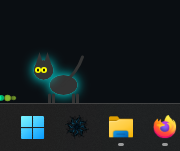
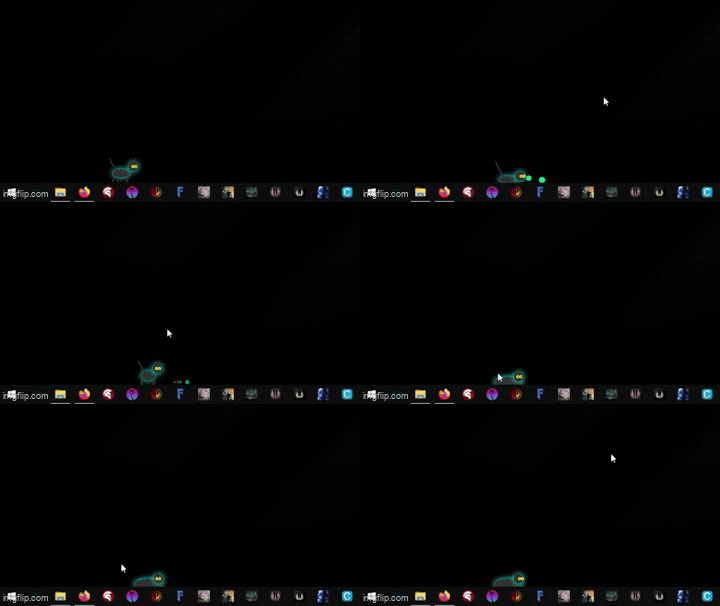
Sample video: https://youtu.be/4ti6VRvX9ck
SkiaDesktopPetBase is the result. It's a standalone, highly optimized desktop pet that lives on your taskbar, interacts with its environment, and occasionally causes chaos.
🐾 The escaped Catling:
The cat has its own little mind and cycles through various states based on a randomized state machine:
???? Strolling: Casually walks back and forth across your taskbar, covering random distances (200 to 600 pixels) before deciding what to do next.
???? Bread Loafing (Sitting): Sometimes it just stops, tucks its paws in, flattens out like a loaf of bread, and chills for a few seconds.
???? Mouse Tracking: When it's standing or sitting still, its eyes will actively follow your mouse cursor across the screen. Creepy, but cute.
🌪️ Zoomies (Freakout): Occasionally, the cat gets the zoomies. It will sprint back and forth at hyperspeed, rapidly changing directions until it tires itself out.
🤮 Vomiting: After a intense zoomie session (or just randomly because cats are gross), it will hunch its back, and it spews a physics-based stream of particles onto your taskbar. The vomit respects gravity and bounces!
🧱 Wall Awareness: It knows where your screen boundaries are. If it hits the edge or doesn't have enough room to complete a walk, it will seamlessly turn around.
⚙️ Under the Hood (Technical Details)
While the cat is silly, the engine running it is serious about performance:
Direct Desktop Rendering: Uses a borderless, click-through WS_EX_LAYERED window overlaid on the entire desktop.
Skia4Delphi: All vector graphics (body, legs, tail, ears) and particle effects are drawn procedurally using Skia. No external image assets (PNGs/Sprites) are used!
Sub-2% CPU Usage: The engine uses a highly aggressive DirtyRect optimization. It only calculates and redraws the exact 60x60 pixel bounding box where the cat currently is. If the cat sits down to rest for more than 3 seconds, the render loop pauses entirely, dropping CPU usage to 0%.
zipped exe and sample project included
SkiaLemmings game: https://github.com/LaMitaOne/SkiaLemmings
If you want to tip me a coffee.. :)
🎨 Skia4Delphi Components:
Alive Progress/Loading circle https://github.com/LaMitaOne/SkiaAliveProgress
Audio Visualizer https://github.com/LaMitaOne/SkiaAVisualizer
CustomThreadedBase (this i use mostly) https://github.com/LaMitaOne/SkiaCustomThreadedBase
Skia Alive Grid https://github.com/LaMitaOne/Skia-AliveGrid
Skia-Flowmotion animated image grid https://github.com/LaMitaOne/skia-flowmotion
Skia-Slideshow https://github.com/LaMitaOne/Skia-Slideshow
Skia-Circlepopup https://github.com/LaMitaOne/skia-circlepopup
Skia-CubesPopup https://github.com/LaMitaOne/SkiaCubesPopup
Skia-Button https://github.com/LaMitaOne/SkiaButton
🧪 Skia4Delphi experimental Components:
CustomMultithreadedBase https://github.com/LaMitaOne/SkiaCustomMultiThreadedBase
Page Control https://github.com/LaMitaOne/SkiaPageControl
Surface Widget/modules rendering engine https://github.com/LaMitaOne/MRX-Skia-Surface
LCARS fluid engine https://github.com/LaMitaOne/Skia-LCARS-Fluid-Engine
Fluid Magma effect https://github.com/LaMitaOne/Fluid-Magma-Effect