

Catalog · How the catalog works
BIOSSPLITMERGE

Simple GUI for splitting and merging BIOS ROMs
- ★ 3 on GitHub
Anyone may press Interesting, signed in or not. It helps others find this project.
README
BIOS Splitter/Merger Tool
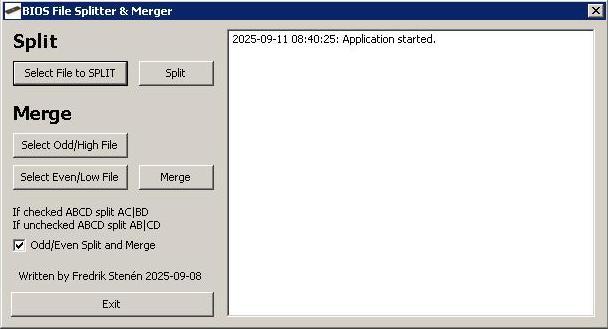
Overview
A Lazarus/Free Pascal tool to split and merge binary files using either odd/even byte separation or first half/second half division. Useful for backup, modification, or transferring large files in parts.
Features
- Split files into odd/even bytes or first half/second half
- Simple GUI for selecting files and toggling split modes
- Logs all actions for easy tracking
Requirements
- For compiling Lazarus 4 (or Free Pascal with LCL)
- Tested on Windows
Usage
1. Select a File to Split
- Click "Select File to SPLIT" and choose the file you want to split
- The selected file path will appear in the log
2. Choose Split Mode
| Option | Output Files | Use Case |
|---|---|---|
| Odd/Even Split | _odd.bin, _even.bin |
Interleaved byte separation |
| First Half/Second Half | _first.bin, _second.bin |
Equal half division |
3. Split the File
- Click the "Split" button
- The software will create two new files in the same directory as the original file:
- If Odd/Even Split is selected:
[OriginalFilename]_odd.binand[OriginalFilename]_even.bin - If First Half/Second Half Split is selected:
[OriginalFilename]_first.binand[OriginalFilename]_second.bin
- If Odd/Even Split is selected:
How Splitting Works
- Odd/Even Split: Separates the file into odd and even bytes. For example, a file with bytes
A B C Dwill be split intoA C(odd) andB D(even) - First Half/Second Half Split: Divides the file into two equal halves. For example, a file with bytes
A B C Dwill be split intoA B(first half) andC D(second half)
4. Merge Files
- Click "Select Odd File" (or "Select First File" if in First Half/Second Half mode) and choose the first split file
- Click "Select Even File" (or "Select Second File" if in First Half/Second Half mode) and choose the second split file
- Click the "Merge" button
- The software will combine the files into a new file named
merged.binin the same directory as the first selected file
How Merging Works
- Odd/Even Merge: Interleaves bytes from the odd and even files. For example, if the odd file contains
A Cand the even file containsB D, the merged file will beA B C D - First Half/Second Half Merge: Concatenates the first half and second half files. For example, if the first file contains
A Band the second file containsC D, the merged file will beA B C D
Code Logic
Splitting
- Odd/Even Split: Reads each byte sequentially and writes odd-positioned bytes to
_odd.binand even-positioned bytes to_even.bin - First Half/Second Half Split: Reads the file and writes the first half of the bytes to
_first.binand the second half to_second.bin
Merging
- Odd/Even Merge: Reads one byte from the odd file and one byte from the even file alternately, writing them to
merged.bin - First Half/Second Half Merge: Reads all bytes from the first file followed by all bytes from the second file, writing them to
merged.bin
Example Workflow
Splitting a File
- Load
example.bin - Ensure "Odd/Even Split" is checked
- Click "Split"
- Output:
example_odd.binandexample_even.bin
Merging Files
- Select
example_odd.binas the odd file - Select
example_even.binas the even file - Click "Merge"
- Output:
merged.bin(identical to the originalexample.bin)
Notes
- [ ] Backup your files before splitting/modifying
- [ ] Ensure you have write permissions in the directory where the files are located
- [ ] The log displays all actions and errors for easy troubleshooting
Troubleshooting
| Issue | Solution |
|---|---|
| "File not selected" | Ensure you have selected both files before clicking Merge |
| "File access denied" | Check file permissions and ensure the files are not open in another program |
| Incorrect output | Verify that you selected the correct files for merging |
Future Improvements
- [ ] Add support for splitting into more than 2 parts
- [ ] Implement CRC checking for file integrity
- [ ] Support drag-and-drop for file selection
License
MIT