

Catalog · How the catalog works
TMessenger

- ★ 3 on GitHub
Anyone may press Interesting, signed in or not. It helps others find this project.
README
TMessenger
TMessenger is a Lazarus package with a reusable visual chat control, TMessengerChat, for desktop messenger-style interfaces.
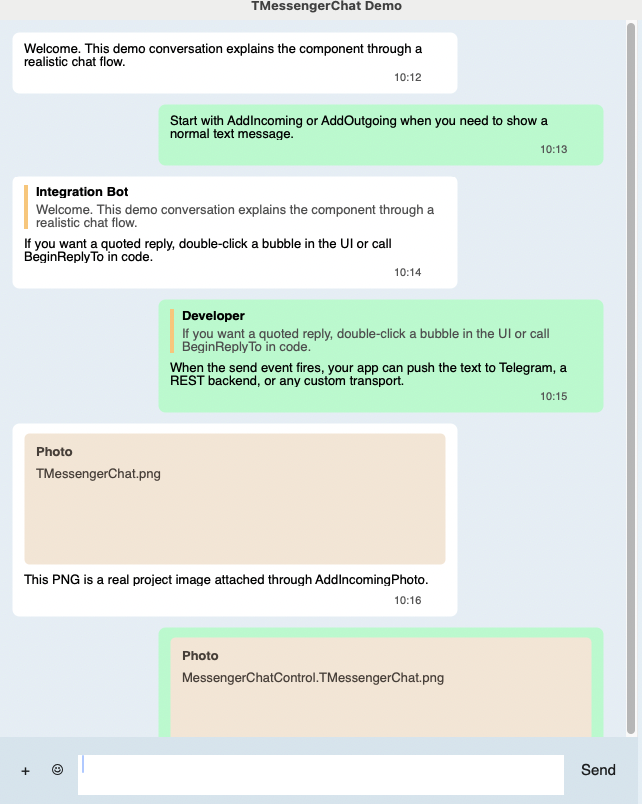
It is built for real application integration rather than a static mockup: the component exposes message APIs, reply/edit/delete flows, bulk selection, attachment handling, emoji insertion, and drag-and-drop file intake through standard Lazarus events.
Features
- Incoming and outgoing chat bubbles
- Reply preview and quoted messages
- Message editing and deletion
- Multi-select with bulk copy and bulk delete
- Emoji insertion through a custom picker
- Photo and file attachments
- Click-to-open attachments
- Drag-and-drop file delivery into the chat area
- Lazarus palette registration with component icon
- Standalone visual demo project
- Separate Telegram Bot API demo project
Package
- Package file:
messengeruipkg.lpk - Registered control:
TMessengerChat - Lazarus palette tab:
TMessenger
Quick Start
- Open
messengeruipkg.lpkin Lazarus. - Add or install the package.
- Drop
TMessengerChatonto a form. - Handle
OnSendMessageto process outgoing text. - Optionally handle
OnEmojiClick,OnMessageDblClick, andOnDropFiles.
Minimal example:
procedure TMainForm.FormCreate(Sender: TObject);
begin
  MessengerChat1.AddIncoming('Anton', 'Hello', '10:12');
  MessengerChat1.AddOutgoing('Hi there', '10:13');
end;

procedure TMainForm.MessengerChat1MessageDblClick(Sender: TObject;
  AMessage: TMessengerMessage);
begin
  MessengerChat1.BeginReplyTo(AMessage);
end;

procedure TMainForm.MessengerChat1SendMessage(Sender: TObject; const AText,
  AReplySender, AReplyText: string);
begin
  MessengerChat1.AddOutgoing(AText, FormatDateTime('hh:nn', Now),
    AReplySender, AReplyText);
end;
Demos
Visual demo
- Project:
demo/messengerchatdemo.lpi - Shows replies, editing, deleting, bulk actions, emoji, theme switching, files, photos, and drag-and-drop
Telegram bot demo
- Project:
botdemo/messengerbotdemo.lpi - Shows two-way chat UI integration through Telegram Bot API long polling
- Uses
getUpdatesfor inbound messages andsendMessagefor replies - Local token file is ignored by Git:
botdemo/local_bot_token.inc - Template file:
botdemo/local_bot_token.sample.inc
Main API
Add messages
AddIncomingAddOutgoingAddIncomingPhotoAddOutgoingPhotoAddIncomingFileAddOutgoingFile
Message actions
BeginReplyToBeginEditMessageEditMessageTextDeleteMessageDeleteSelectedMessagesCopySelectedMessagesClear
Useful properties and events
InputMemoSelectedMessageSelectedCountOnSendMessageOnEmojiClickOnMessageDblClickOnAttachClickOnDropFiles
Repository Notes
- Author: Anton Lindeberg
- License: MIT
- Copyright: 2020
Limitations
- No message virtualization for very long histories yet
- No built-in emoji catalog UI; the host app provides it
- No network/backend layer inside the component itself
- Bot demo keeps edit/delete as local UI actions unless you wire remote API methods yourself