

BraunUI

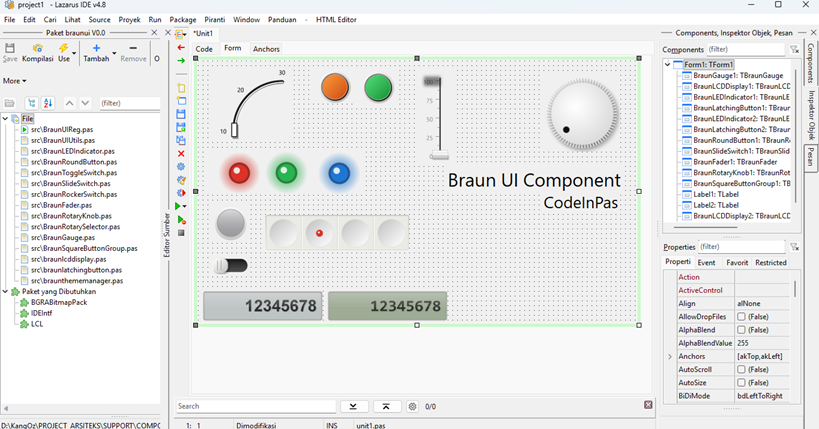
A pixel-perfect, skeuomorphic UI component library for Lazarus/FPC inspired by Dieter Rams' classic Braun designs. Features highly detailed knobs, faders, switches, LEDs, and dynamic theming.
- Active · last change 10-8-2026
- ★ 4 on GitHub
README
BraunUI Component Library for Lazarus/FPC 📻
A pixel-perfect, skeuomorphic UI component library for Lazarus/FPC inspired by Dieter Rams' classic Braun designs. Features highly detailed knobs, faders, switches, LEDs, and dynamic theming to bring vintage hi-fi aesthetics to your modern applications.
✨ Features
- Skeuomorphic Design: Meticulously crafted 3D lighting, drop shadows, and deboss effects.
- High-Quality Rendering: Powered by
BGRABitmapfor smooth antialiasing, alpha blending, and gradient transitions. - Global Theme Manager: Switch the entire UI palette instantly with a single property change.
- Flicker-Free: Custom drawing logic designed to prevent black box glitches and double-drawing.
📦 Components Included
TBraunRotaryKnob- A tactile, rotating dial with precision grip.TBraunFader- A smooth vertical sliding fader with scale markings.TBraunGauge- A curved analog indicator gauge.TBraunLatchingButton- A mechanical push-button that stays depressed when activated.TBraunRoundButton- A standard momentary push-button with beautiful deboss press effects.TBraunRockerSwitch- A classic 2-way rocking switch.TBraunToggleSwitch- A mechanical toggle lever.TBraunSlideSwitch- A horizontal sliding selector.TBraunLEDIndicator- A realistic glass dome LED with bloom/glow effects (Red, Green, Blue, etc.).TBraunLCDDisplay- A retro-digital display panel inspired by the Braun ET66 calculator.TBraunSquareButtonGroup- Grouped functional switches.TBraunThemeManager- A non-visual component to control global form themes.
🎨 Dynamic Theming
The library includes a robust TBraunThemeManager that allows you to change the look of your entire application in real-time. Available themes:
- Classic Light: The iconic off-white/ivory aesthetic of the 1960s Braun appliances.
- Studio Dark: A sleek, matte black finish for professional audio/video software.
- Silver Aluminum: A metallic, hi-fi stereo system look from the 1980s.
⚙️ Requirements & Dependencies
- Lazarus IDE (Tested on recent versions)
- Free Pascal Compiler (FPC)
- BGRABitmap: You must install the BGRABitmap package via Online Package Manager (OPM) before installing this library.
🚀 Installation
- Make sure BGRABitmap is installed in your Lazarus IDE.
- Clone or download this repository.
- Open Lazarus, go to Package -> Open Package File (.lpk).
- Select
braunui.lpkfrom the downloaded folder. - Click Compile to verify the package.
- Click Install and rebuild Lazarus when prompted.
- The components will now appear in your Component Palette under the BraunUI tab!
💡 Quick Start Usage
- Drop a
TBraunGrillePanelonto your form and set itsAligntoalClientfor a beautiful textured background. - Drop various switches, faders, and LEDs inside the panel.
- Add
TBraunThemeManagerto the form. Change itsThemeproperty in the Object Inspector to instantly restyle all components.
🏛️ Inspiration
This project is a tribute to the legendary industrial designer Dieter Rams and his "Less, but better" (Ten Principles for Good Design) philosophy during his tenure at Braun.
☕ Support the Project
If you find BraunUI helpful and want to support its ongoing development, consider buying me a coffee or sending a tip. Any support is deeply appreciated!
💡 Your support keeps the momentum going!
Every contribution directly fuels my passion, energy, and motivation to continuously build, maintain, and release even more useful open-source desktop applications for the developer community.
📄 License
This project is open-source and available under the MIT License.