

Catalog · How the catalog works
NaiveGUI

Client/Server configuration GUI for NaiveProxy and Caddy
- ★ 4 on GitHub
Anyone may press Interesting, signed in or not. It helps others find this project.
README
NaiveGUI
Client/Server configuration GUI for NaiveProxy and Caddy.
Dependencies:
- Mageia-10 (RPM): gtk2 systemd lib64proxy-gnome
- Ubuntu (DEB): libproxy1v5 systemd libgtk2.0-0
Work directories / services:
- Client: ~/.config/naivegui; Service: /etc/systemd/user/{naive.service,naive-xray.service}
- Server: /etc/caddy; Service: /etc/systemd/system/caddy.service
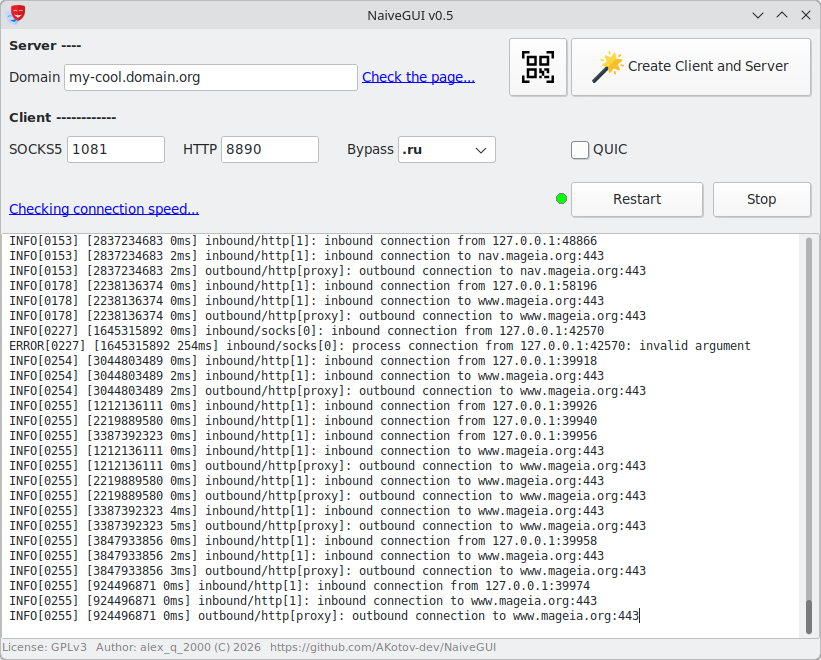
How It Works
- Rent a VPS located outside your country.
- Point a domain to your server’s IP address: buy one or use a free option.
- Launch NaiveGUI, enter your domain name and click “Create Client and Server”.
- Save the generated archive containing:
- naive.json, xray.json — client configurations
- Caddyfile — server configuration
- Install the
caddy-forwardproxy-naivepackage on your server. Important: this package includes/usr/bin/caddyand provides a full web server. It is intended to be the only web server running on your VPS. - Upload the
Caddyfileto the server into/etc/caddyand start the service:
systemctl enable caddy; systemctl restart caddy- Wait 1–2 minutes for Caddy to automatically obtain a free SSL certificate and for DNS to propagate.
- In NaiveGUI, verify that your server is reachable over HTTPS using the "Check the page…" link.
- If the domain is accessible, click "Retart" button and verify your proxy using this test.
Note: To keep the free Caddy certificate valid for longer than three months, edit and use this script.
Connection Modes
The client and server support two modes: QUIC and HTTPS (TCP).
In some regions, QUIC may be blocked or unstable, so HTTPS is usually the preferred option.
You can test the connection speed in each mode using the "Checking connection speed…" link in NaiveGUI.
Supported DEs
Budgie, GNOME, Cinnamon, Plasma 5/6, MATE.
To use the system proxy in LXDE, XFCE and LXQt, install XDE-Proxy-GUI.
Smartphones and QR codes
For Android smartphones, it is convenient to use NekoBox / Exclave + naiveproxy-plugin.