Catalog · How the catalog works
delphi_doom

- ★ 4 on GitHub
Anyone may press Interesting, signed in or not. It helps others find this project.
README
delphi_doom
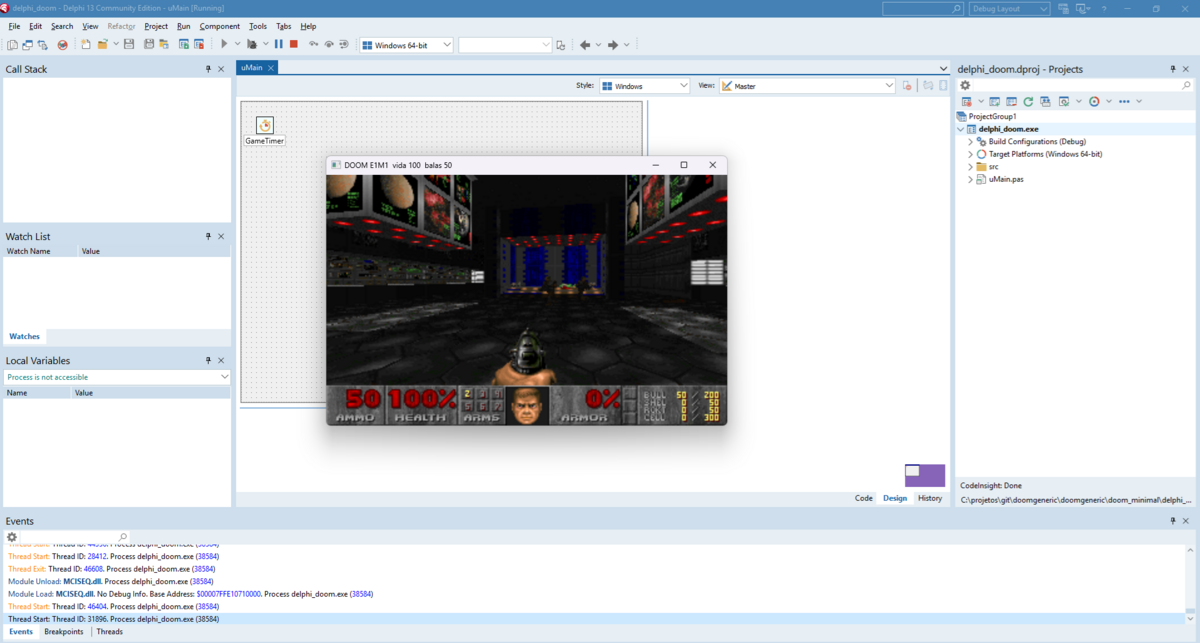
Video: DOOM running in Delphi
DOOM generic ported from python_doom to Delphi FireMonkey.
By Wagner Nunes da Silva
- vagucs@bol.com.br
- vagucs@vagucs.com.br
- vagucs@gmail.com
- [www.vagucs.com.br](https://www.vagucs.com.br)
This tree is that Python engine again, in Pascal. The game loop, the map, and the renderer stay in Delphi. A FireMonkey form is the window, the keyboard, and the bitmap. There is no SDL2 and no Allegro. The same project targets Windows, Android, and iOS. On Windows the arrows move. On Android the same actions are buttons on the screen, and the phone stays in landscape.
Versão em português: README.pt.md
What this project is
python_doom is a condensed, playable DOOM engine in Python. This directory is the same study piece, rewritten in Delphi:
- Window and blit: FireMonkey (
TForm,TImage,TBitmap) - Framebuffer: 320×200, stretched in a 640×480 window
- Loop: one FireMonkey timer advances the game and paints the frame
- Renderer: BSP, textured walls, floor and ceiling planes, sprites, the weapon sprite
- Map: VERTEXES, LINEDEFS, SIDEDEFS, SECTORS, SEGS, SSECTORS, NODES, THINGS, BLOCKMAP, REJECT
- Play: walk, doors, lifts, switches, exit, pickups, weapons, status bar, Tab automap, DS* sound, MUS→MIDI music, ESC menu, intermission tally, melt wipe on a level change, monster look/chase/attack
You need a legal IWAD (shareware doom1.wad or commercial doom.wad / doom2.wad). This repository does not ship commercial WAD data. The shareware DOOM1.WAD may be added to an Android package. A commercial WAD stays out of the repository and out of any package you publish.
It is a condensed educational port: the engine is Pascal, and the native layer is only what FireMonkey does not already provide (Windows MIDI, and the Android audio track).
Left out of this tree:
- Network, joystick, CD audio
Educational purpose
This project is a study piece. The Python port already dropped the preprocessor and Harbour's 1-based arrays. The Delphi port asks a different question: what changes when the window is a FireMonkey form, so one project compiles for Windows, Android, and iOS from RAD Studio, with no SDL library to ship.
What it is meant to teach:
- Python, then Delphi. Open
python_doom/doom/next todelphi_doom/src/. The names stay close (Thrust,FixedMul,AsI32) so the two files can sit side by side. - 32-bit wrap, written down.
Integeris already 32 bits. A product that can overflow is widened toInt64and brought back withAsI32/AsU32.FixedDivuses floor division, like Python//. - 0-based reads. WAD lumps, BSP nodes, and menu rows stay 0-based, as in Python.
- Where Pascal is enough. Columns, floors, sprites, thinkers, and the menu run in Pascal. FireMonkey is the window. Windows MCI plays MIDI. Android mixes sound effects and a small software synth into one
AudioTrack.
Suggested way to study:
- Open
delphi_doom.dprojand press F9, then readuMain.pas— boot, timer, input. - Compare
src/Doom.Compat.paswithpython_doom/doom/compat.py. - Open
src/Doom.Render.pasnext topython_doom/doom/render.py. - Follow a door from Space in
src/Doom.Player.pasthroughsrc/Doom.Specials.pas. - Follow a shot from Ctrl in
src/Doom.Player.pastosrc/Doom.Enemy.pas.
From Python to Delphi
Python lists are 0-based. Delphi dynamic arrays are 0-based too. WAD lumps, BSP nodes, and menu rows keep that index.
Python (python_doom) |
Delphi (delphi_doom) |
|---|---|
thing.x |
Thing.X |
None |
nil |
items[0] |
Items[0] |
| class | class |
unlimited int |
Integer is 32-bit; widen to Int64, then AsI32 |
&, |, ^ |
and, or, xor |
x >> n |
UShr32 / SHar32 |
a // b |
FixedDiv (floor) |
fixed_mul / fixed_div |
FixedMul / FixedDiv |
bytearray framebuffer |
palette bytes, then a FireMonkey bitmap |
| pygame | FireMonkey |
+= |
X := AsI32(Int64(X) + ...) |
A class field write is visible to the caller, the same way a Python object is.
Side-by-side: P_Thrust
Python (doom/player.py):
def thrust(mo, angle, move):
    mo.momx += fixed_mul(move, fine_cos(angle))
    mo.momy += fixed_mul(move, fine_sin(angle))
Delphi (src/Doom.Player.pas):
procedure TPlayer.Thrust(Ang: Cardinal; Move: Integer);
begin
  FMomX := AsI32(Int64(FMomX) + FixedMul(Move, FineCos(Ang)));
  FMomY := AsI32(Int64(FMomY) + FixedMul(Move, FineSin(Ang)));
end;
. stays .. AsI32 puts the sum back in 32 bits. FMomX is the momentum the rest of the tick already reads.
Technology
| Layer | This port | Python (python_doom) |
|---|---|---|
| Language | Delphi, RAD Studio 13 (Studio 37.0) | Python 3.10+ |
| Window, keys, blit | FireMonkey | pygame 2.x |
| Palette blit | Pascal, then TBitmap |
numpy |
| Sound effects | Windows waveOut, Android AudioTrack, 11025 Hz PCM |
pygame mixer |
| Music | Windows MCI MIDI. Android: MUS→MIDI, then a software synth on the same track | Windows MCI, or pygame |
| IWAD | the same lumps | the same lumps |
| Build | F9 in the IDE. run.bat only opens the project |
pip install -r requirements.txt |
The renderer is Pascal. There is no C file to compile and no SDL DLL to copy.
iOS is in the project for a later build on a Mac. Sound and music today are Windows and Android.
Performance
On this PC the FireMonkey window sits at about 30 FPS. That is the top of this version. One timer advances the game and paints the frame, so the -fps number is the rate of the game. The timer interval is 28 ms, and the Windows timer lands near 30.
The same comparison as the other ports (320×200, windowed, shareware IWAD). Those trees still tick at 35 Hz and -fps shows how often they paint. This tree paints and ticks together, so 30 is both the picture and the pace.
| Port | Typical FPS |
|---|---|
Harbour (doom_hb) |
~12 |
Python (python_doom) |
~8 |
PHP (php_doom) |
~20 |
Delphi (delphi_doom) |
~30 |
Node (node_doom) |
~100 |
Java (java_doom) |
~180 (vsync-locked) |
Compiled Pascal is ahead of the Python interpreter on the same machine. The FireMonkey timer is what holds this build at 30.
How to run
RAD Studio 13 (Studio 37.0). This tree compiles from the IDE. Open delphi_doom.dproj and press F9. Pick Win32, Win64, or Android 64-bit. The Android 64-bit platform has to be installed first (Tools, Manage Platforms). run.bat only opens the project.
The window is 640×480. The picture is 320×200, stretched.
On Windows the game starts as soon as it finds an IWAD. On Android it stops on the WAD screen first. See below.
WAD
You need a legal IWAD. Shareware DOOM1.WAD is the usual file. Commercial DOOM.WAD and DOOM2.WAD work the same way and must not be committed or shipped inside a package you publish.
Windows
With no -iwad, the loader looks for DOOM1.WAD, doom1.wad, DOOM.WAD, doom.wad, DOOM2.WAD, and doom2.wad in this order: the documents folder, the home folder, the current directory, the folder of the executable, and the parent folders of those.
delphi_doom.exe -iwad ..\DOOM1.WAD
delphi_doom.exe ..\DOOM1.WAD -warp 1 1
Android, inside the package
The phone does not see the WAD on your PC. Put it in the APK so the first launch already has it.
- Open Project, Deployment.
- Add the WAD, for example
DOOM1.WAD. - Set the remote path to
assets\internal\.
System.StartUpCopy copies assets\internal into the app documents folder when the app starts. The picker lists every .wad in that folder. The Android filesystem is case-sensitive, so keep the name you added.
Tap the file, then Jogar.
Android, download
The same screen has an address field. Paste an https:// URL that ends in .wad. A ?query after the name is ignored. Baixar saves the file in the documents folder and shows the percent on the button and on the bar under the field.
The file stays only if the first four bytes are IWAD or PWAD. Then it appears in the list. Tap it and Jogar.
Use an address you are allowed to fetch. A plain http:// URL is often rejected on Android 9 or newer. The yellow line shows that error. The project already asks for the internet permission.
Windows does not show this screen.
Keys
Classic DOOM controls.
Movement and actions
| Key | Action |
|---|---|
| Arrow keys | Forward, back, turn. On Android, the pad |
| Shift | Run. On Android, Run toggles it |
| Alt | Strafe (hold). On Android, Side toggles it |
| Ctrl | Fire. On Android, Fire |
| Space / E | Use / open door. On Android, Use |
| Enter | Confirm in the menu. On Android, Fire does this too |
| Esc | Menu. On Android, the ESC button at the top |
| Backspace | Back in the menu. On Android, Use does this while the menu is open |
| Tab | Automap |
| F1 | Help |
| F2 | Save |
| F3 | Load |
| Gun | Android only. Next weapon you own |
Y confirms quit from the menu.
Cheats
Type these during a level, with the menu closed. No Enter.
| Code | Effect |
|---|---|
| IDDQD | God mode |
| IDKFA | All weapons, ammo, keys, and armor |
| IDFA | Weapons, ammo, and armor |
| IDCLIP | No clipping. The player follows the floor under the cursor |
| IDCLEV + map | Warp |
| IDMUS + map | Change music |
Command-line parameters
These apply to the Windows target. The Android screen picks the WAD instead of -iwad.
IWAD
| Parameter | Description |
|---|---|
-iwad file.wad |
IWAD to load |
file.wad |
Same thing, without -iwad |
-file wad [wad…] |
Extra PWADs after the IWAD |
Video
| Parameter | Description |
|---|---|
-crt |
Scanlines over the frame |
-fps |
Frame rate at the top-right. It counts paints of this timer |
-fullscreen |
Start fullscreen |
Game
| Parameter | Description |
|---|---|
-warp e m |
Skip the title and start episode e map m. One number is a Doom II map |
-skill n |
Skill, 1 to 5 |
-nomonsters |
Do not spawn enemies |
-nosound |
No sound effects and no music |
-nomusic |
No music |
A level change melts the screen. Saves are doomsavN.sav next to the executable.
Layout
delphi_doom.dpr      entry
delphi_doom.dproj    RAD Studio project (Win32, Win64, Android, Android64, iOS)
uMain.pas            form, timer, Android pad, WAD picker
uMain.fmx            form layout
run.bat              opens the project
src/                 engine
screenshot/doom.png  the picture at the top
docs/ donation QR codes| Path | Python |
|---|---|
src/Doom.Compat.pas |
doom/compat.py |
src/Doom.Wad.pas |
doom/wad.py |
src/Doom.VVideo.pas |
doom/v_video.py |
src/Doom.Tables.pas |
doom/tables.py |
src/Doom.RData.pas |
doom/r_data.py |
src/Doom.Render.pas |
doom/render.py |
src/Doom.World.pas |
doom/world.py |
src/Doom.Player.pas |
doom/player.py |
src/Doom.Specials.pas |
doom/specials.py |
src/Doom.Enemy.pas |
doom/enemy.py |
src/Doom.Sound.pas |
doom/sound.py and doom/mus2mid.py |
src/Doom.Menu.pas |
doom/menu.py |
src/Doom.Status.pas |
doom/status.py |
src/Doom.Inter.pas |
doom/wi_stuff.py |
src/Doom.Wipe.pas |
doom/wipe.py |
src/Doom.AutoMap.pas |
doom/am_map.py |
src/Doom.Finale.pas |
doom/finale.py |
uMain.pas |
the Python entry, plus the FireMonkey form |
Lineage
- python_doom — Python + pygame
- delphi_doom — Delphi FireMonkey (this tree)
Donate
GitHub Sponsors
Ethereum
0x1b64038A2b1DB73ABd0068d8B9B0d1dC5a90C5F1

PIX
Key: vagucs@bol.com.br