

Catalog · How the catalog works
Delphi_Socket_Database_Login_Example

Netcom7 Sockets (SQLite database) Account Register and Login Example
- ★ 4 on GitHub
Anyone may press Interesting, signed in or not. It helps others find this project.
README
🔒 Delphi NetCom7 Client-Server Database Login and Register Application with SQLite & 3DES Encryption
A Delphi project that implements a secure client-server application using NetCom7 components. The server uses a SQLite database to store encrypted user credentials, while all communication is encrypted with LockBox2 3DES for enhanced security.
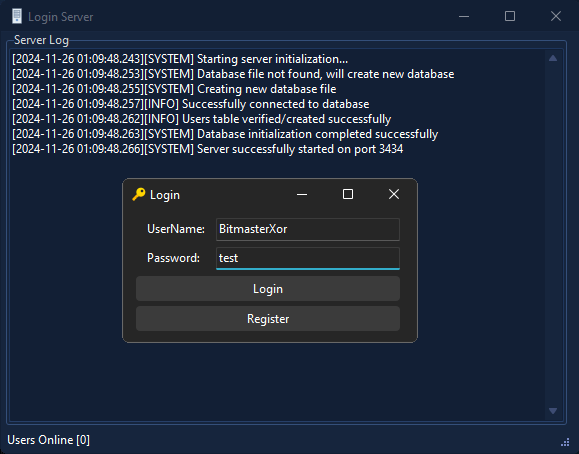
📋 Features
- Client Login and Registration:
- Clients can register with a username and password, which are encrypted and securely stored on the server.
- Existing users can log in to authenticate against the server.
- Encrypted Communication:
- All socket communication between the client and server is encrypted using LockBox2's 3DES encryption.
- Secure User Credential Storage:
- User credentials (username, password, and creation time) are stored in a local SQLite database (
DB.db) using FireDAC components.
- User credentials (username, password, and creation time) are stored in a local SQLite database (
- Database Schema:
- Table structure:
- USERNAME: The user's unique username.
- PASSWORD: The 3DES-encrypted password.
- TIME_CREATED: Timestamp of account creation.
- Table structure:
- Socket Management:
- Uses NetCom7 for reliable socket-based communication between the client and server.
🔍 Overview
- Client Features:
- Register new users by sending encrypted username and password to the server.
- Log in by validating credentials stored on the server.
- Server Features:
- Handles multiple client connections for registration and login.
- Encrypts and stores user credentials securely in a SQLite database.
- Logs client activities and system events for monitoring.
🛠️ Requirements
🔧 Tools and Components
- Delphi RAD Studio:
- IDE required to compile the client and server applications.
- Delphi RAD Studio Download
- NetCom7 Components:
- Used for implementing socket-based communication.
- NetCom7 GitHub Repository
- LockBox2:
- Provides 3DES encryption for secure communication and data storage.
- LockBox2 GitHub Repository
- FireDAC Components:
- Required for database operations with SQLite.
- Bundled with Delphi RAD Studio. Ensure FireDAC libraries are installed and linked to your project.
🗃️ Database
- Ensure the SQLite database file (
DB.db) is located in your Documents folder. - Use the provided database schema or create the required table manually:
CREATE TABLE USERS (
    USERNAME TEXT PRIMARY KEY,
    PASSWORD TEXT,
    TIME_CREATED DATETIME DEFAULT CURRENT_TIMESTAMP
);
🧩 Usage
- Server Setup:
- Install and configure the required components.
- Run the server application to start listening for client connections.
- Client Setup:
- Install the required components.
- Run the client application.
- Use the interface to register a new user or log in with existing credentials.
- Encryption:
- Ensures all traffic and credentials are securely encrypted using the built-in LockBox2 3DES implementation.
📜 License
This project is provided as freeware. Use it at your own risk for educational and research purposes.
📧 Contact
Developed with ❤️ In RAD Studio by BitMasterXor