Xbox-360-HD-DVD-Player

Xbox 360 HD DVD Player driver download & installation guide
- Active · last change 6-26-2025
- ★ 3 on GitHub
README
The Xbox 360 HD DVD Player
Xbox 360 HD DVD Player driver download & installation guide
The drive used internally is a Toshiba SD-S802A (MC08 or MC09) IDE/ATAPI drive using a proprietary laptop style adapter port to a custom USB translator hub. No evidence of any laptop adapter directly fitting the SD-S802A has been found.
In Windows, the device is seen as "TOSHIBA DVD/HD X807616 USB Device" enumerated on the USBSTOR device path:
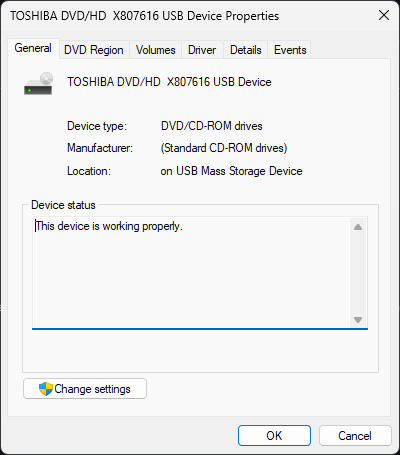
Device Instance Path:
USBSTOR\CDROM&VEN_TOSHIBA&PROD_DVD/HD__X807616&REV_MC08\A&141E7BF6&0 (MC08 firmware)
Hardware IDs:
USBSTOR\CdRomTOSHIBA_DVD/HD__X807616_MC08
Device Stack:
\Driver\cdrom \Driver\USBSTOR
Modern Driver Support & Info
This repository is dedicated to preserving support and documentation for the Xbox 360 HD DVD Player on modern Windows systems.
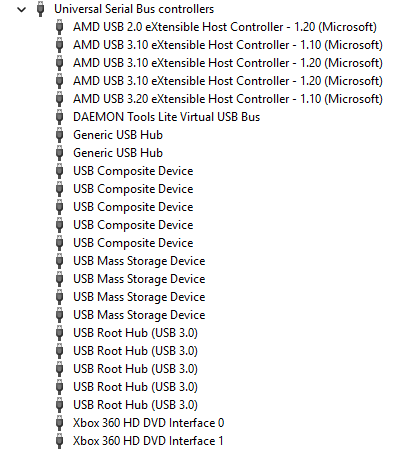
The Xbox 360 HD DVD Player was a discontinued accessory (2006–2008) allowing playback of HD DVD movies. On modern Windows releases, the optical drive works out of the box, but the "Xbox 360 Memory Unit" device (a 256MB flash partition) shows up as Xbox 360 HD DVD Interface 0 and Xbox 360 HD DVD Interface 1, requiring a driver.
Official Microsoft "Null" Drivers
Microsoft still offers the original "null" drivers, which simply suppress the yellow exclamation mark and set a friendly name for the interfaces.
Microsoft Update Catalog links:
Direct CAB download:
20021667_7b6ddf62cdeb07d7c3ba4a0d902124e7212a34c2.cab
These drivers are Microsoft-certified and safe.
They do not add extra functionality—just assign a proper device name and remove the warning icon for the memory unit interfaces.
The cab file contains 2 files: XBoxHDDVD.cat (8kb) XBoxHDDVD.inf (2kb)
; Copyright 2006 Microsoft Corporation
;
; XBOXHD.INF
;
; Sets user friendly names for unsupported interfaces in the XBOX HD/DVD Drive.
; Installs a NULL driver service for the two memory unit interfaces
;

[Version]
Signature="$WINDOWS NT$"
Class=USB
ClassGUID={36FC9E60-C465-11CF-8056-444553540000}
Provider=%MSFT%
CatalogFile=XBoxHDDVD.cat
DriverVer=11/09/2006,1.0.0.0

; Add source disk to allow chkinf to work properly
[SourceDisksNames]
1=%XBoxHDDVD.DiskName%

[SourceDisksFiles]

[DestinationDirs]

[ControlFlags]
ExcludeFromSelect = *

[Manufacturer]
%MSFT%=MSFT,NTx86,NTia64,NTamd64

[MSFT]  ; Added to keep chkinf from complaining
%Interface0.DeviceDesc%=Nullx,USB\VID_045e&PID_029E&MI_00
%Interface1.DeviceDesc%=Nullx,USB\VID_045e&PID_029E&MI_01

[MSFT.NTx86]
%Interface0.DeviceDesc%=Nullx,USB\VID_045e&PID_029E&MI_00
%Interface1.DeviceDesc%=Nullx,USB\VID_045e&PID_029E&MI_01

[MSFT.NTia64]
%Interface0.DeviceDesc%=Nullx,USB\VID_045e&PID_029E&MI_00
%Interface1.DeviceDesc%=Nullx,USB\VID_045e&PID_029E&MI_01

[MSFT.NTamd64]
%Interface0.DeviceDesc%=Nullx,USB\VID_045e&PID_029E&MI_00
%Interface1.DeviceDesc%=Nullx,USB\VID_045e&PID_029E&MI_01

[NullX]
CopyFiles = NullX.CopyFiles
AddReg    = NullX.AddReg

[NullX.CopyFiles]

[NullX.AddReg]

[NullX.Services]
AddService= ,0x00000002 ; null service install

[Strings]
MSFT                  = "Microsoft"
XBoxHDDVD.DiskName    = "XBOX HD-DVD installation media"
Interface0.DeviceDesc = "Xbox 360 HD DVD Interface 0"
Interface1.DeviceDesc = "Xbox 360 HD DVD Interface 1"

; Copyright 2006 Microsoft Corporation
;
; XBOXHD.INF
;
; Sets user friendly names for unsupported interfaces in the XBOX HD/DVD Drive.
; Installs a NULL driver service for the two memory unit interfaces
;

[Version]
Signature="$WINDOWS NT$"
Class=USB
ClassGUID={36FC9E60-C465-11CF-8056-444553540000}
Provider=%MSFT%
CatalogFile=XBoxHDDVD.cat
DriverVer=11/09/2006,1.0.0.0

; Add source disk to allow chkinf to work properly
[SourceDisksNames]
1=%XBoxHDDVD.DiskName%

[SourceDisksFiles]

[DestinationDirs]

[ControlFlags]
ExcludeFromSelect = *

[Manufacturer]
%MSFT%=MSFT,NTx86,NTia64,NTamd64

[MSFT]  ; Added to keep chkinf from complaining
%Interface0.DeviceDesc%=Nullx,USB\VID_045e&PID_029E&MI_00
%Interface1.DeviceDesc%=Nullx,USB\VID_045e&PID_029E&MI_01

[MSFT.NTx86]
%Interface0.DeviceDesc%=Nullx,USB\VID_045e&PID_029E&MI_00
%Interface1.DeviceDesc%=Nullx,USB\VID_045e&PID_029E&MI_01

[MSFT.NTia64]
%Interface0.DeviceDesc%=Nullx,USB\VID_045e&PID_029E&MI_00
%Interface1.DeviceDesc%=Nullx,USB\VID_045e&PID_029E&MI_01

[MSFT.NTamd64]
%Interface0.DeviceDesc%=Nullx,USB\VID_045e&PID_029E&MI_00
%Interface1.DeviceDesc%=Nullx,USB\VID_045e&PID_029E&MI_01

[NullX]
CopyFiles = NullX.CopyFiles
AddReg    = NullX.AddReg

[NullX.CopyFiles]

[NullX.AddReg]

[NullX.Services]
AddService= ,0x00000002 ; null service install

[Strings]
MSFT                  = "Microsoft"
XBoxHDDVD.DiskName    = "XBOX HD-DVD installation media"
Interface0.DeviceDesc = "Xbox 360 HD DVD Interface 0"
Interface1.DeviceDesc = "Xbox 360 HD DVD Interface 1"
After installation via Device Manager > Search computer or Right-clicking > Install on the .INF:
UDF 2.5 Driver: Required for HD DVD Playback on Older Windows
What is UDF 2.5?
UDF 2.5 (Universal Disk Format 2.5) is the filesystem used on most HD DVD and Blu-ray movie discs.
Without UDF 2.5 support, Windows can't read the contents of these discs—you'll see a blank disc or a prompt to format.
Is UDF 2.5 included with Windows?
| Windows Version | UDF 2.5 Support | Notes |
|---|---|---|
| Windows XP | No | Needs extra driver to read HD DVD/Blu-ray discs |
| Windows Vista+ | Yes | Native support; no driver needed |
| Linux, macOS | Partial/Yes | Most modern distros support UDF 2.5 |
UDF 2.5 Driver for Windows XP
Microsoft released a UDF 2.5 driver update for Windows XP called “Windows Feature Pack for Storage 1.0,” which enables Windows XP to read UDF 2.5 discs (required for most HD DVD and Blu-ray media).
As of 2025, this update is no longer available from Microsoft, but is preserved on Internet Archive:
SHA1 (original EXE): f1e0b16ff6d4a451ff54b6e76fbed4b491c81121
Uploaded for community preservation by ThisOldCPU).
Note:
There is no official UDF 2.5 driver for Windows 2000 or earlier.
TODO
Issues
CD, DVD, or HD DVD Disc is not visible in Explorer

CyberLink PowerDVD 7.3 and Updates
- There is currently no publicly available, official, full installer download link for CyberLink PowerDVD Ultra 7.3 (OEM or Retail) from CyberLink or any verified source online.
- CyberLink’s official website and servers no longer host or provide downloads for version 7.3.
- Trusted archives, forums, and legacy software sites do not legally offer the full original 7.3 Ultra installer.
- Any online “download” claiming to be 7.3 is either a scam, a partial update, or a redirect to newer unsupported versions.
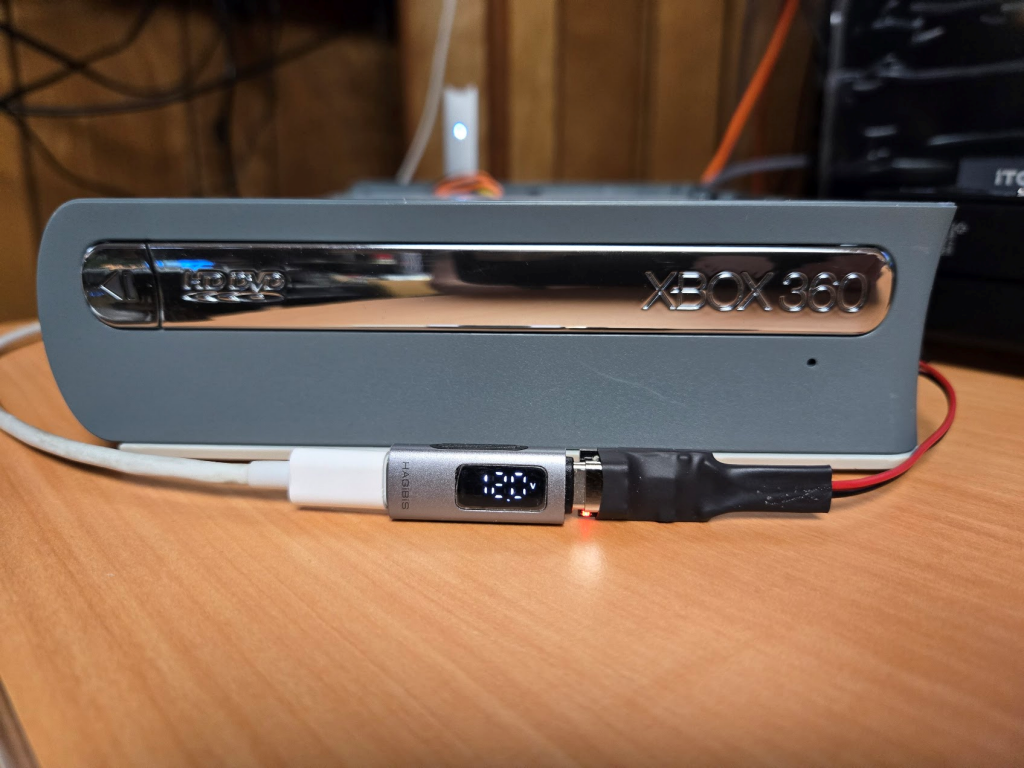
USB C - USB PD 12v + USB mini is silly, we can do better.
- The drive I recieved for documenting had a broken DC socket, so I wired in a pigtail to use various DC sources, benchtop, AC Adapter, or USB C for power only.
- Aliexpress 12V USB PD board - This has been tested drawing up to 5A without issue, but it does mean two cables as the PD boards I have do not include access to data.