

Catalog · How the catalog works
UNIGUI

- ★ 3 on GitHub
Anyone may press Interesting, signed in or not. It helps others find this project.
README
Delphi-GCharts
Delphi-GCharts is a Delphi library of components to generate charts in uniGUI Framework using the Google Charts API.
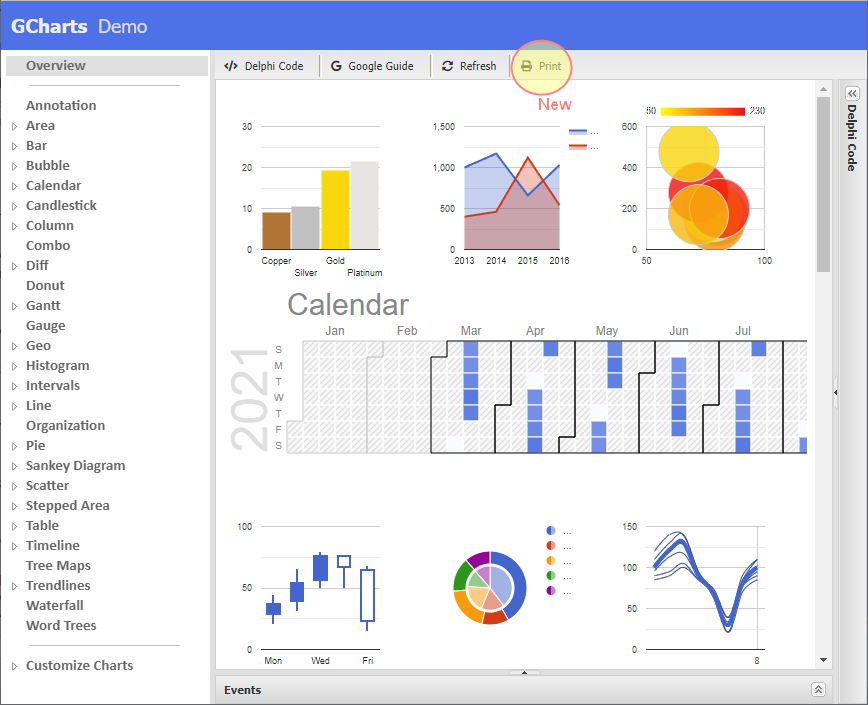
Currently it supports the following Google Chart classes:
- Annotation
- Area
- Bar
- Bubble
- Calendar
- Candlestick
- Column
- Combo
- Diff
- Donut
- Gantt
- Gauge
- Geo
- Histogram
- Intervals
- Line
- Organization
- Pie
- Sankey Diagram
- Scatter
- Stepped Area
- Table
- Timeline
- Tree Maps
- Trendlines
- Waterfall
- Word Trees
Components
The library has two main components:
- TcfsGChartProducer(non visual): this component is responsible for generating the javascript code according to the data and options of the class chart to be generated.
- TuniGChartsFrame: this component is used to view and interact with the Chart produced by TcfsGChartProducer.
Install
Delphi-GCharts has been coded and tested in Delphi 10.4 Sydney with uniGUI Version: 1.90.0 build 1557, but surely can be compiled into earlier or newer versions.
Install the visual component cfs.Charts.uniGUI.xxx.dpk that is in the package folder and also add to the library search path the sources folder.
Basic Use Example
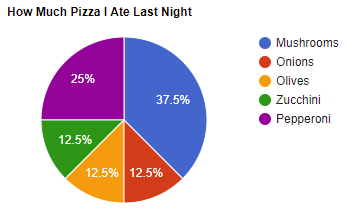
Basic example to generate this Pie Chart:
unit Main;

interface

uses
  Windows, Messages, SysUtils, Variants, Classes, Graphics,
  Controls, Forms, uniGUITypes, uniGUIAbstractClasses,
  uniGUIClasses, uniGUIRegClasses, uniGUIForm, uniGUIBaseClasses,
  cfs.GCharts.uniGUI;

type
  TMainForm = class(TUniForm)
    uniGChartsFrame1: TuniGChartsFrame;
    procedure UniFormCreate(Sender: TObject);
  private
  public
  end;

function MainForm: TMainForm;

implementation

{$R *.dfm}

uses
  uniGUIVars, MainModule, cfs.GCharts; // <--- Add this unit

function MainForm: TMainForm;
begin
  Result := TMainForm(UniMainModule.GetFormInstance(TMainForm));
end;

procedure TMainForm.UniFormCreate(Sender: TObject);
var
  Chart: IcfsGChartProducer; //Defined as TInterfacedObject. No need try..finally
begin
  Chart := TcfsGChartProducer.Create;
  Chart.ClassChartType := TcfsGChartProducer.CLASS_PIE_CHART;

  // Data
  Chart.Data.DefineColumns([
    TcfsGChartDataCol.Create(TcfsGChartDataType.gcdtString, 'Topping'),
    TcfsGChartDataCol.Create(TcfsGChartDataType.gcdtNumber, 'Slices')
  ]);
  Chart.Data.AddRow(['Mushrooms', 3]);
  Chart.Data.AddRow(['Onions', 1]);
  Chart.Data.AddRow(['Olives', 1]);
  Chart.Data.AddRow(['Zucchini', 1]);
  Chart.Data.AddRow(['Pepperoni', 2]);

  // Options
  Chart.Options.Title('How Much Pizza I Ate Last Night');

  // Generate
  uniGChartsFrame1.DocumentInit;
  uniGChartsFrame1.DocumentSetBody('');
  uniGChartsFrame1.DocumentGenerate('Chart', Chart);
  uniGChartsFrame1.DocumentPost;
end;
Demo Application
The library includes in demos folder the GChartsDemo project with several examples that show how to build the different class charts.
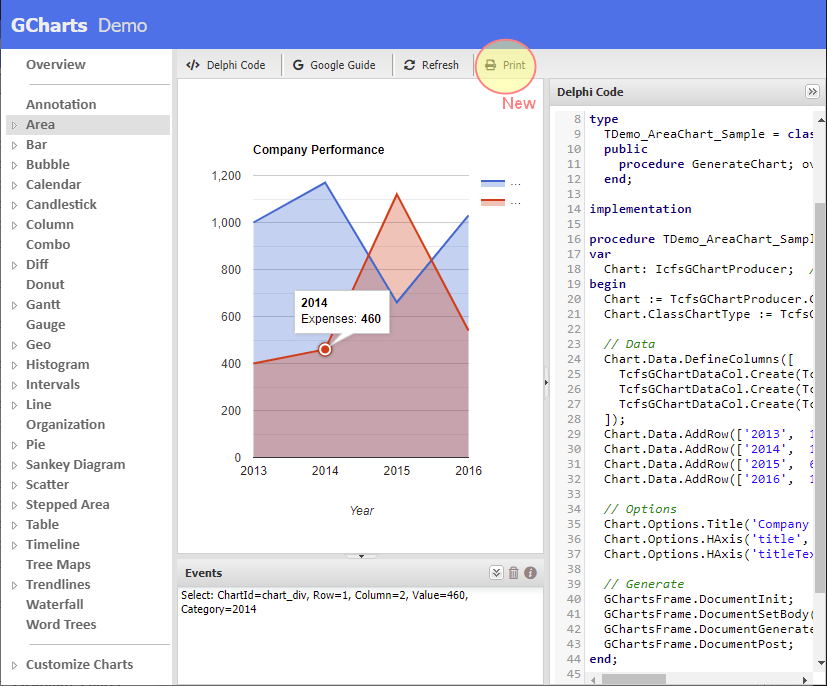
When running the demo you can:
- Display the Delphi Code used to generate the Chart
- Click Google Guide button to see the official documentation of Google Charts.
- Click on the Chart to see fired events
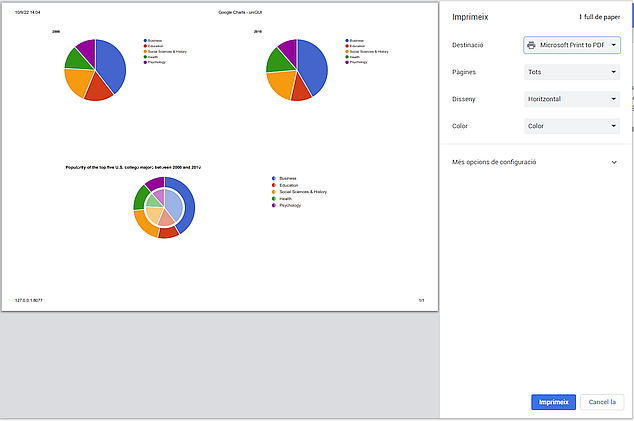
- Click on Print button to print current frame with the chart/charts (new)
Change Log
- 1.2: added to the package folder *.dpk for Delphi
11.2 Alexandria - 1.1: added print method to print the frame with the chart/charts (see Demos)
- 1.0: Initial Version
Star this project
Please, if you use Delphi GCharts, "Star" this project in GitHub!
It cost nothing to you but helps other developers to reference the code.