

Catalog · How the catalog works
Fuze_Code_Screenshot_Decoder

Export Your Fuze source code to an image and decode to text on pc
- ★ 3 on GitHub
Anyone may press Interesting, signed in or not. It helps others find this project.
README
Fuze Code Screenshot Decoder
This tool will decode pictures where each character as been encoded in the pixel data. It decodes pictures where each characters data is represented with 8 pixels, one pixel per bit to form a byte / character. White pixels equals bit 1 and black pixels equals 0. It then checks for R < 128, G < 128, B < 128 to decode the pixels back.
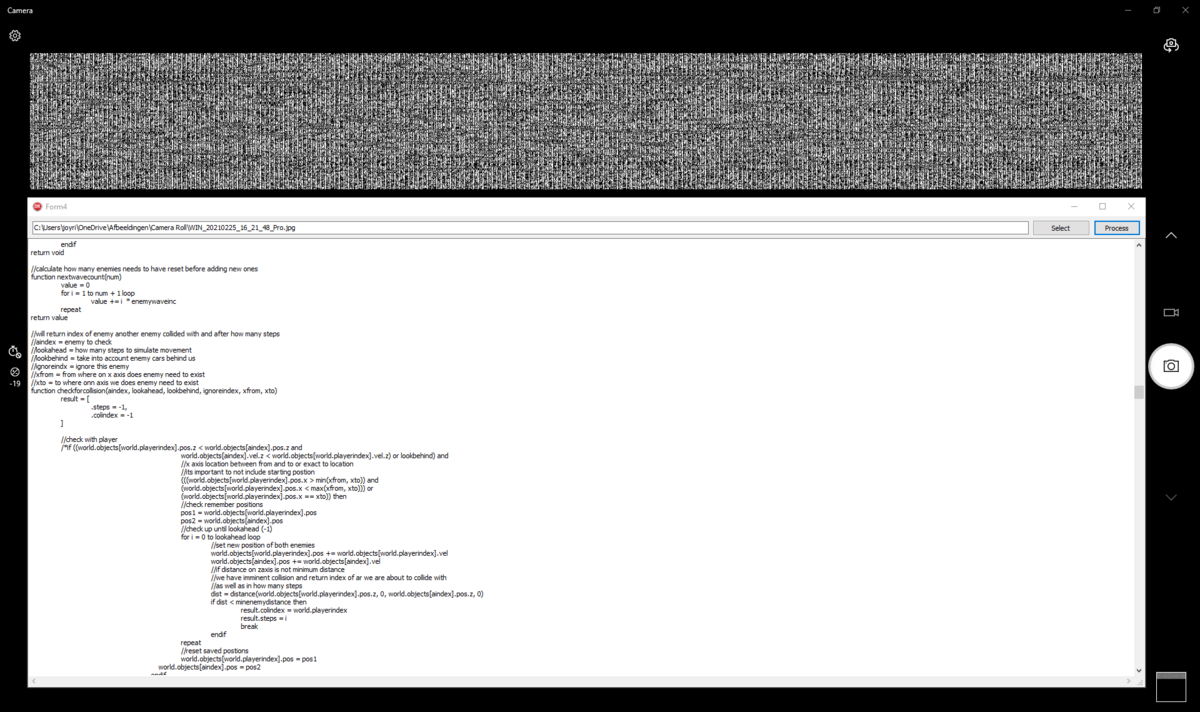
needed code on fuze 4 nintendo switch
The code below is needed to encode the pictures and you need to take a screenshot of the screen.
//fuze Code exporter to image created by willems davy aka joyrider3774
//
//use 1280x720 when using switches build in screenshotting system
//when using hdmi capture card can use 1920x1080 but make sure your viewer app
//can screenshot at this resolution in best quality. I personally use windows 10 camera app
//
//copy / paste your program's code to the test variable below.
//make sure to escape strings by replacing a single double quote ["] with [" + chr(34) + "]
//for every occurance of it or your multiline string defintion of your code will be wrong and
//fuze does not give an error on it but it will not export full code then. Also if you have
//very very long code and fuze gives an error on the string constant off your code
//split up the string in multiple string constants and concatenate them when calling the encode
//function
//
//
screenwidth = 1920
screenheight = 1080

setmode(screenwidth, screenheight)

function initcrctable()
    for k = 0 to 256 loop
        rem = k
        for j = 0 to 8 loop
            if rem & 1 then
                rem >>= 1
                rem ^= 0xEDB8 << 16 + 0x8320
            else
                rem >>= 1
            endif
        repeat
        table[k] = rem
    repeat
return void

//encode a single character and put pixels for it on screen
function encodecharpixel(char, x,y)
    value = chrVal(char)
    bit1 = value & 1
    bit2 = (value >> 1) & 1
    bit3 = (value >> 2) & 1
    bit4 = (value >> 3) & 1
    bit5 = (value >> 4) & 1
    bit6 = (value >> 5) & 1
    bit7 = (value >> 6) & 1
    bit8 = (value >> 7) & 1

    box(x,y, 1,1, {bit1, bit1, bit1, 1}, false)
    box(x+1,y, 1,1, {bit2, bit2, bit2, 1}, false)
    box(x+2,y, 1,1, {bit3, bit3, bit3, 1}, false)
    box(x+3,y, 1,1, {bit4, bit4, bit4, 1}, false)
    box(x+4,y, 1,1, {bit5, bit5, bit5, 1}, false)
    box(x+5,y, 1,1, {bit6, bit6, bit6, 1}, false)
    box(x+6,y, 1,1, {bit7, bit7, bit7, 1}, false)
    box(x+7,y, 1,1, {bit8, bit8, bit8, 1}, false)
return void

//put all characters on screen
//calulate crc etc
function encodetext(text)
    var x = 0
    var y = 0
    var i = 0
    var lentext = len(text)
    crc = 0xF * 0x11111111

    for i = 0 to lentext step 1 loop
        char = text[i]
        ord = chrVal(char)
        crc = ( crc >> 8 ) ^ table[( crc & 0xFF ) ^ ord]

        encodecharpixel(char,x,y)
        x += 8
        if x >= screenwidth then
            x = 0
            y += 1
            update()
            if y >= screenheight then

                while !( (!prevc.a and c.a) or ((prevkey == "") and (keyb != "")))  loop
                    prevc = c
                    c = controls(0)
                    prevkey = keyb
                    keyb = getKeyboardBuffer()
                    update()
                repeat

                prevkey = keyb
                prevc = c
                crc ^= 0xF * 0x11111111

                while !((!prevc.a and c.a) or ((prevkey == "") and (keyb != "")))  loop
                    clear()
                    prevkey = keyb
                    keyb = getKeyboardBuffer()
                    prevc = c
                    c = controls(0)
                    print("crc:", crc)
                    update()
                repeat

                crc = 0xF * 0x11111111
                y = 0
                clear()
            endif
        endif
    repeat
    crc ^= 0xF * 0x11111111
    prevkey = keyb
    prevc = c
return void

var c = controls(0)
var prevc = c
var keyb = getKeyboardBuffer()
var prevkey = keyb
var table = []
var crc = 0

test = "
<put multiline code here with adapted double quotes (see comments above)>
"

initcrctable()
encodetext(test)

while !( (!prevc.a and c.a) or ((prevkey == "") and (keyb != "")))  loop
    prevc = c
    c = controls(0)
    prevkey = keyb
    keyb = getKeyboardBuffer()
    update()
repeat

loop
    clear()
    print("crc: ", crc)
    update()
repeat