Catalog · How the catalog works
areditor

Automatic rule editor for Android devices (Mageia/Ubuntu)
- ★ 3 on GitHub
Anyone may press Interesting, signed in or not. It helps others find this project.
README
ArEditor - automatic rule editor for Android devices
51-android.rules: https://github.com/M0Rf30/android-udev-rules
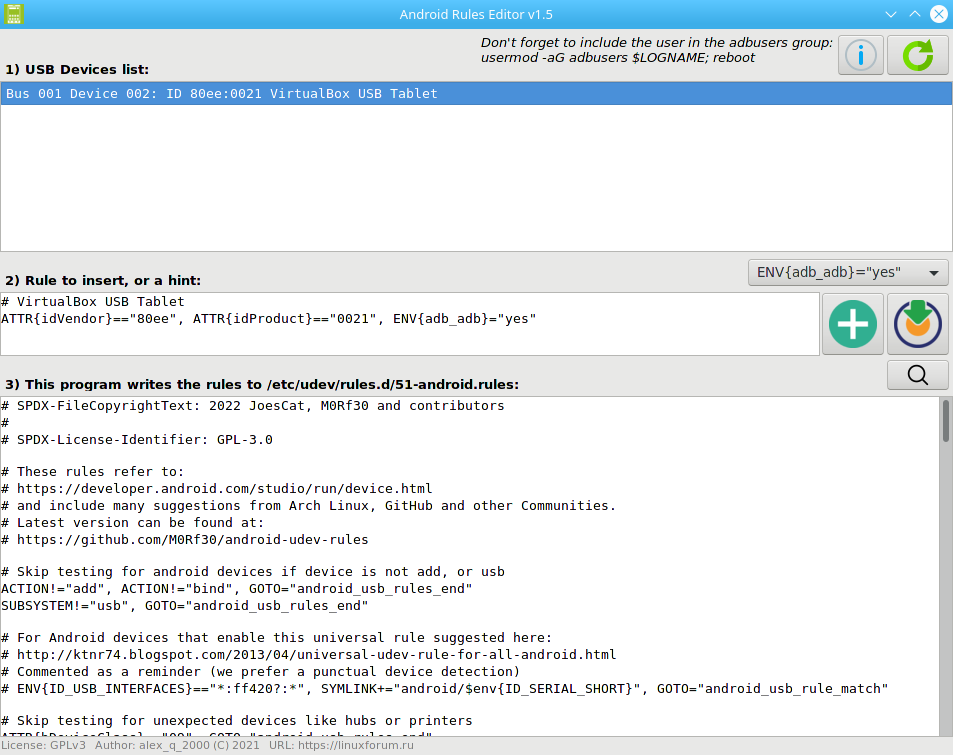
- In the list of connected USB-Devices (1), find your device that is not recognized when working with ADB and select it with the mouse
- If the device is not in the list of rules, the necessary line (2) will be offered to insert into the file with the rules
- Specify the environment variable (
ENV{adb_adb}="yes"- adb only by default) - Click the button "Plus" (Add & Apply) and reconnect the device
- Now the device is contained in the list of rules and should be recognized after the
adbrestart
Reasons why Android devices may not be displayed:
- The USB debugging mode is not enabled on the smartphone
- The device is not in the list of rules
/etc/udev/rules.d/51-android.rules - The User is not included in the group described in
/etc/udev/rules.d/51-android.rules - The connection is hindered by the old key, which you need to delete and restart
adb:
adb kill-server; rm -rf ~/.android/*; adb start-server
ArEditor works with the new versions android-tools: https://github.com/AKotov-dev/android-tools-rpm