

Catalog · How the catalog works
ciscobar

Ciscobar is a user-friendly search bar designed to streamline the process of searching for Cisco contacts by name or phone number.
- ★ 4 on GitHub
Anyone may press Interesting, signed in or not. It helps others find this project.
README
Ciscobar
Ciscobar is a user-friendly search bar designed to streamline the process of searching for Cisco contacts by name or phone number.
https://github.com/abdelbenbaha/ciscobar/assets/45561892/f76b99d0-16ba-4bf5-9268-79b5610d0c29
Features
- Effortless Search: quickly and easily find contact information without any hassle or extra effort.
- Swift Call: effortlessly initiate, and end a telephone call with the mere tap of a button.
- Easy Access: simplified Connection to Cisco Unified Communications Manager services at the click of a button.
- Secured Data: your data is protected using logon credentials, ensuring that only you can access it.
Supported platforms
Supported languages
- English
- Spanish
- French
Explore the src/locales directory to contribute or help correct any typos!
Get started
To begin using Ciscobar, you need to provide three essential parameters either through the user interface or the command line
Via User Interface:
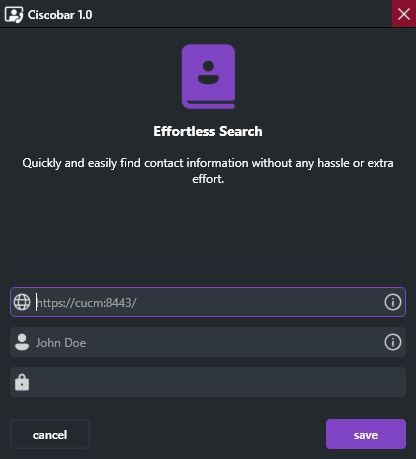
- CUCM Base URL: The base URL for connecting to the Cisco Unified Communications Manager (CUCM) should be provided in the following format:
https://{cucm_hostname}. - Username: You need to enter a valid username to authenticate with CUCM and access its resources.
- Password: The corresponding password for the provided username is required for secure authentication.
Via Command Line:
Alternatively, you can also use the command line to set up Ciscobar with the following syntax:
ciscobar -s:{cucm_hostname} -u:{username} -p:{password}For detailed instructions on creating a dedicated AXL (Administrative XML) user, please refer to the authentication guide.