Catalog · How the catalog works
bsBalloonHint

Nice little Ballon Hint component with a close button and user defined position and display time
- ★ 4 on GitHub
Anyone may press Interesting, signed in or not. It helps others find this project.
README
bsBalloonHint
Nice little Ballon Hint component with a close button and user defined position and display time
USAGE:
uses
  bsBaloonHint;

procedure TForm1.Button1Click(Sender: TObject);
var lToolTipPoint: TPoint;
begin
  Button1.bsBalloonTip(TIconKind.Eror_Large,'Balloon Title','Balloon text', Button1.ClientToScreen(Point(0,0)));
  //tip appears in the top left corner of the Button1
  //or
  lToolTipPoint := Form1.DBGrid.ClientToScreen(Point(Round(Form1.DBGrid.Width/2),Round(Form1.DBGrid.Height/2)));
  //getting DBGrid center to show a hint there and
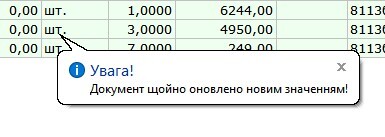
  bsBalloonTip(TIconKind.Info, 'Увага!', 'Документ щойно оновлено новим значенням!', lToolTipPoint, 2222);
  //showing hint for about 2 seconds
end;
It looks like this on my machine: