

Catalog · How the catalog works
StartScreenCustomizer

Windows 8 and Windows 8.1 Start Screen Customizer
- ★ 4 on GitHub
Anyone may press Interesting, signed in or not. It helps others find this project.
README
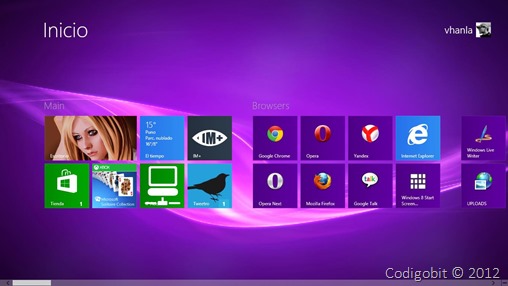
Windows 8 Start Screen Customizer, is a tool that customizes Windows 8/8.1 StartScreen as its name suggests.
http://lh3.ggpht.com/-vQLT0ovXAdQ/UK6yCUDrGII/AAAAAAAAF8w/oeQOtojC1MQ/win8customizer1.jpg?imgmax=800
Features:
- It changes the StartScreen background picture immediately, no need to edit system files, you can even close it after changing.
- Since the changes are volatile, i.e., they dissapear on Windows restart or explorer.exe restart, you can set this tool to start with Windows.
- Three ways to use:
- Single picture mode: You can choos a single picture and select the area you want to use it as background picture, click Apply&Save button and that's it.
http://lh5.ggpht.com/-cF_jSZe7oA0/UK6yH-oTSZI/AAAAAAAAF84/VhtHR2UYOYM/fondopersonal1.jpg?imgmax=800 - Desktop wallpaper as background picture: You can also set your desktop wallpaper as the StartScreen background picture. And if you hide this application, it will monitor system changes and see if the wallpaper has been changed to update accordingly, it is recommended to use a group of pictures as your Windows desktop wallpaper, so you can enjoy a different picture everytime you access the Start Screen.
http://lh6.ggpht.com/-MIpUIPewYOc/UK6yMvttYqI/AAAAAAAAF9A/Ps69O5h0Xxs/fondo1.jpg?imgmax=800 - Slidehow: If you just want a different set of pictures as a slideshow, you can set it as Slideshow, it will cycle pictures in seconds (intervals that you can change), and also randomized.
http://lh6.ggpht.com/-7jQYpqYxXps/UK6yQ9dQoFI/AAAAAAAAF9I/IR8VDphIMVI/slideshow1.jpg?imgmax=800
- Single picture mode: You can choos a single picture and select the area you want to use it as background picture, click Apply&Save button and that's it.
- Gaussian Blur effect: If you like a blur effect in your background picture, you can select this option (not reccommended for big screen resolutions as it takes its time).
http://lh3.ggpht.com/--MmuDt08zAg/UK6yVkBG_iI/AAAAAAAAF9Q/4pxDvliyQTU/gasussian1.jpg?imgmax=800 - You can restore the original background pictures with a click.
http://lh6.ggpht.com/-Vq5yzaFskSI/UK6yaOMvZ2I/AAAAAAAAF9Y/prxzCTvaCY4/restaurarfondo.jpg?imgmax=800 - There are handy shortcuts to change your color accents and also the system wallpaper.
http://lh6.ggpht.com/-yofVf5AGgZY/UK6yetI5OFI/AAAAAAAAF9g/Eq-rnlv3j7k/accesso1.jpg?imgmax=800 - You can modify the opacity of the StartScreen, and also the Tiles' opacity (limited to a dimmed effect).
http://lh3.ggpht.com/-UbxxuSoWz8k/UK6yia0PL8I/AAAAAAAAF9o/Jbj0thkCc7k/fondotransparente.jpg?imgmax=800 - You can also reduce the amount of rows the Tiles are shown, it depends on your screen size.
http://lh5.ggpht.com/-T7IovWaPF_s/UK6ymt6EeuI/AAAAAAAAF9w/cB51A2-figU/reducirtiles1.jpg?imgmax=800 - When click Hide button, it will stay in the systray.
http://lh6.ggpht.com/-6FGgbGDCxr0/UK6yqeNe0qI/AAAAAAAAF94/xL7nsUzdc3k/systraywin8customizer.jpg?imgmax=800


Notice:
- Pictures are set as static background only.
- It is compatible with Windows 8 RTM or newer, older versions are incompatible.