

DzSocket

- Quiet · last change 4-29-2019
- ★ 3 on GitHub
README
DzSocket
Delphi TCP Socket Client and Server communication with Unicode support
- What's New
- Description
- Delphi native component differences
- Installing
- Server Component
- Client Component
- How to send stream
What's New
- 03/31/2019
- Include support to Unicode characters on commands and messages text
Description
These components allows you to establish TCP Socket asynchronous communication between computers on LAN network or the Internet.
The DzTCPServer and DzTCPClient uses TClientSocket and TServerSocket of System.Win.ScktComp unit. These classes is available on Delphi, but is a little difficult to implement because you need to read and write buffer data and there are not many resources available.
The usage is very simple. You gonna need to drop the server component on server-side app and the client component on client-side app and start coding the command messages.
You can do a lot of stuff, like chat app, remote commands app, remote monitoring app, and even send streams like files. The sky is the limit. :wink:
Delphi native component differences
- Cache structure: When you are using Delphi native socket component, If you send multiple messages simultaneously, the recipient may receive the messages grouped or divided, so you need always to deal with this problem. DzSocket controls socket messages automatically, so you always receive one event per message.
- KeepAlive: When you establish a socket connection, if one side of connection is lost, the other side will not be communicated until a new message attempts to be send. So you can implement a manual ping, but this will give a lot of unnecessary work. DzSocket has the KeepAlive resource, enabling network native keep-alive protocol.
- Commands: The native socket allows you to send string segment, but if you want to send commands and identify this commands in the other side of the connection, you will need to manually implement this. With DzSocket, you have a Char command always available. Ready, fast and easy.
- Auto Free Data Objects on Server: The Client object list available on Server component has a Pointer property, allowing you to store informations about the client connection, usually using a object. With DzSocket, you don't need to worry about this object destruction. You just need to enable a property to take care of these objects.
- Enumerator: The native Server component does not have a enumerator to iterate Client List connections. Using DzSocket, you can simply do a
for .. indirectly on Server component, iterating client list connections. - SendAll: Easily send command to all clients. Besides that, you can use
SendAllExto send command to all clients except a specific client connection. - Connection Monitor: There is a Connection Lost event allowing you to know when the connection was closed without the client request.
- Unicode support: The Delphi native component does not support sending messages using Unicode strings, unless you write your own code to convert data stream on the both sides. This is really boring and takes time. Using DzSocket you can simply send message text using directly method parameter as string type, so Delphi will consider Unicode characters as WideString by default.
And much more! :wink:
Installing
Auto install
Close Delphi IDE and run CompInstall.exe app to auto install component into Delphi.
Manual install
- Open DzSocket package in Delphi.
- Ensure Win32 Platform and Release config are selected.
- Then Build and Install.
- If you want to use Win64 platform, select this platform and Build again.
- Add sub-path Win32\Release to the Library paths at Tools\Options using 32-bit option, and if you have compiled to 64 bit platform, add sub-path Win64\Release using 64-bit option.
Supports Delphi XE2..Delphi 10.3 Rio
Server Component
Server Properties
KeepAlive: Boolean = Allow enable KeepAlive socket native resource. This will send a keep-alive signal using KeepAliveInterval property.
KeepAliveInterval: Integer = Specify the KeepAlive interval in milliseconds (default 15000 / 15 seconds).
Port: Word = Specify the Server listen TCP Port. This property is required to start server socket.
Connection[Index: Integer]: TDzSocket (public) = Returns the TDzSocket client connection object by Index.
Count: Integer (public) = Returns the client connections list count.
Server Events
procedure OnClientConnect(Sender: TObject; Socket: TDzSocket);This event is triggered when a client connects to the server. The Socket parameter is the client socket.
procedure OnClientDisconnect(Sender: TObject; Socket: TDzSocket);This event is triggered when a client disconnects from the server. The Socket parameter is the client socket.
procedure OnClientError(Sender: TObject; Socket: TDzSocket;
  const Event: TErrorEvent; const ErrorCode: Integer; const ErrorMsg: string);
This event is triggered when occurs an error on a client connection. The Socket parameter is the client socket.
procedure OnClientRead(Sender: TObject; Socket: TDzSocket;
  const Cmd: Char; const A: string);
This event is triggered when a client sends a message to the server. The Socket parameter is the client socket.
Server Methods
procedure Open;Turn On the server listening socket port.
procedure Close;Turn Off the server listening socket port.
procedure Lock;
procedure Unlock;
Use these methods to iterate the Connections list (thread-safe), because a connection may be closed when you are iterating the connection list.
Example:
var CSock: TDzSocket;
begin
  Server.Lock;
  try
    for CSock in Server do
    begin
      //...
    end;
  finally
    Server.Unlock;
  end;
end;
Also, the TDzTCPServer component has a default enumerator pointing to the Connections List, resulting in a TDzSocket object. So you can iterate the connection list using a
for .. instatement, just like the previous example.
procedure Send(Socket: TDzSocket; const Cmd: Char; const A: String = '');Sends commands and messages to a client socket specified by Socket parameter. You should use Cmd parameter to specify a command character, that will be received by the client. The A parameter is optional and allows you to specify a message text.
procedure SendAll(const Cmd: Char; const A: String = '');Send a message to all connected clients.
procedure SendAllEx(Exclude: TDzSocket; const Cmd: Char; const A: String = '');Send a message to all connected clients, except to the client specified by Exclude parameter.
function FindSocketHandle(const ID: TSocket): TDzSocket;Returns the TDzSocket object by Socket Handle ID.
Client Component
Client Properties
KeepAlive: Boolean = Allow enable KeepAlive socket native resource. This will send a keep-alive signal using KeepAliveInterval property.
KeepAliveInterval: Integer = Specify the KeepAlive interval in milliseconds (default 15000 / 15 seconds).
Host: String = Specify the IP or Host Name (DNS) to connect to the server. This property is required to connect to the server socket.
Port: Word = Specify the Client connection TCP Port, which the server is listening or the port is mapped. This property is required to connect to the server socket.
Connected: Boolean (public) = Returns true if the connection is established.
SocketHandle: TSocket (public) = Returns the Socket Handle ID of the connection.
Client Events
procedure OnConnect(Sender: TObject; Socket: TDzSocket);This event is triggered when the client establish the connection to the server.
procedure OnConnectionLost(Sender: TObject; Socket: TDzSocket);This event is triggered when the connection is lost between client and server. This will occur if the client detects that the connection was closed without a disconnect command by client itself.
procedure OnDisconnect(Sender: TObject; Socket: TDzSocket;
  const WasConnected: Boolean);
This event is triggered when the client disconnects from the server, even if connection is lost. The WasConnected allows you to know if the OnDisconnect event came from a established connection, because this event will be fired even if you are trying to connect and the connection is not successful established.
procedure OnError(Sender: TObject; Socket: TDzSocket;
  const Event: TErrorEvent; const ErrorCode: Integer; const ErrorMsg: string);
This event is triggered when occurs an error on the client connection. It's always recommended to set this event, otherwise the component will raise uncontrolled asynchronous errors.
procedure OnRead(Sender: TObject; Socket: TDzSocket;
  const Cmd: Char; const A: string);
This event is triggered when the server sends a message to the client.
Client Methods
procedure Connect;Connects to the server.
procedure Disconnect;Disconnects from the server.
procedure Send(const Cmd: Char; const A: String = '');Sends commands and messages to the server. You should use Cmd parameter to specify a command character, that will be received by the server. The A parameter is optional and allows you to specify a message text.
How to send stream
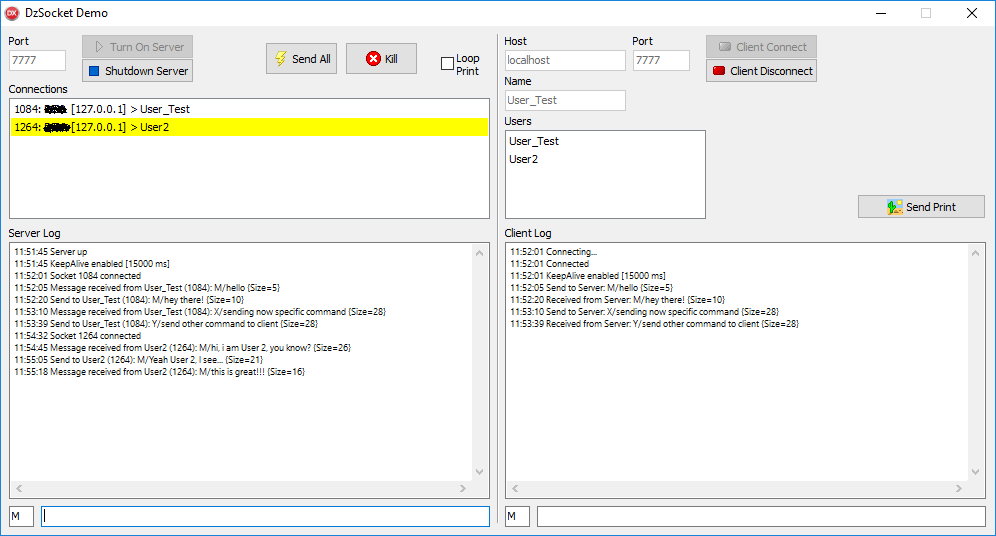
Please check the demo application and look the Send Print command to know how to send and receive data stream, and also using compression to increase communication speed. :wink: