

Catalog · How the catalog works
JD-VPN-Manager

Keep Windows VPNs Always Connected via Rasdial
- ★ 3 on GitHub
Anyone may press Interesting, signed in or not. It helps others find this project.
README
JD VPN Manager
Keep Windows VPNs Always Connected via Rasdial
Summary
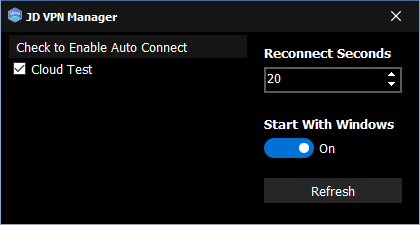
This tool helps fix the issues presented in the Windows VPN: They don't automatically connect. They require that a user interact to get a VPN to stay connected at all times. This tool automatically keeps select Windows VPN connections always connected, so that users don't have to explicitly connect.
Source Code
The Source Code is in Delphi 10.1 Berlin, but should work in most older versions (with some modifications). It uses the VCL framework, and requires the Jedi library. One goal is to re-implement the Rasdial API so that it doesn't require Jedi.
Installer
There is an installer script made in Inno Setup 5.5.9 Unicode. It's extremely simple and has no actual pascal code.
Tray Icon
The application runs in a tray icon. When the application starts, by default, the configuration window will not show. It will only show an icon in the system tray. However, upon first startup, it will show the window so that the user can configure it for the first time. Otherwise, double-click on the tray icon, or right-click to use the popup menu.
Select VPNs to Auto Connect
Any Windows VPN configured will be listed when showing the app. Check on the checkbox next to each one you'd like to auto-start.
Start with Windows
Use the switch on the right to start this application with Windows when you login.