

Catalog · How the catalog works
AdvancedHtmlDesigner

Visual HTML table designer for Lazarus / Free Pascal
- ★ 5 on GitHub
Anyone may press Interesting, signed in or not. It helps others find this project.
README
Advanced Html Designer
Visual HTML table designer for Lazarus / Free Pascal — as a ready-to-use program for Windows and Linux, and as reusable Lazarus components.
Nederlandstalige uitleg: zie onderaan.
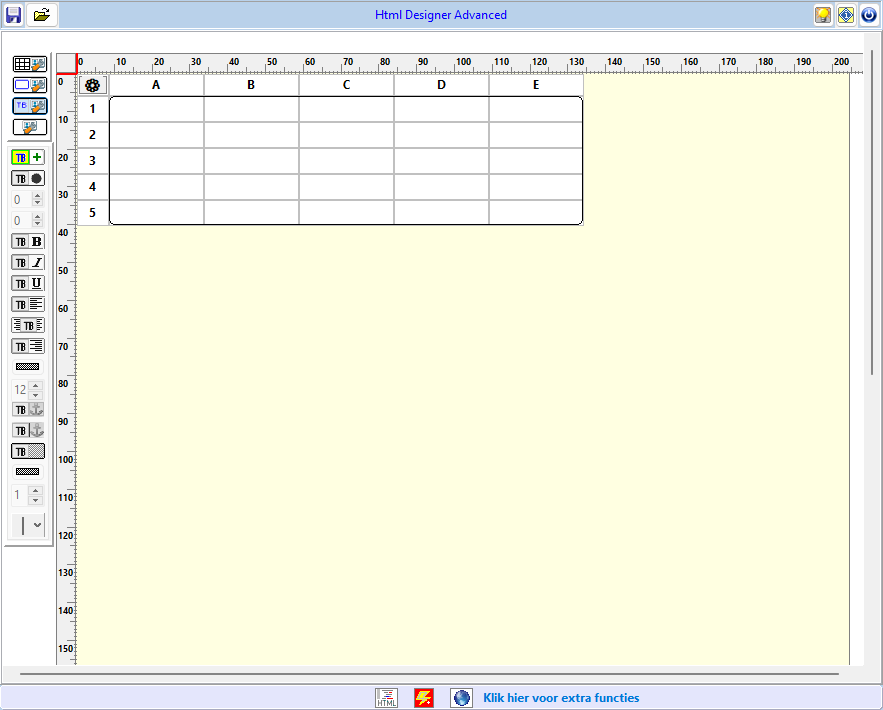
Features
- Design an HTML table on a page with rulers in mm
- Add, delete, merge and unmerge rows, columns and cells
- Cell formatting: bold, italic, underline, alignment, colours, font size, borders, rounded corners
- Images in cells (left / centre / right, size), text and image hyperlinks
- Free-floating text blocks anywhere on the page, positioned with the mouse or to the millimetre
- Export as a complete HTML document or as table-only HTML, preview in the built-in browser
- Save as PDF in the paper size of the page, with colours, images, text blocks and clickable links (made by the built-in browser, also on Linux: no Chrome needed)
- Save and load designs (
.htd) - Re-open a saved HTML document and keep editing it: the design (including images) is embedded invisibly in the
.html - User interface in Dutch, English, French and German, with a built-in translation editor
- Built-in help in all four languages — also online
- A learning path of 8 lessons with examples and exercises (in all four languages), from a first table to your own web page
Download
All downloads are on the Releases page.
Windows (10 and 11)
Recommended: download and run AdvancedHtmlDesigner-<version>-setup.exe.
It installs the program for your user account (no administrator rights needed)
in %LOCALAPPDATA%\Programs\Advanced Html Designer and adds it to the Start menu.
Your designs, settings and translations are kept on updates and when you uninstall.
Without installing: download the zip, unzip it anywhere and run
Advanced Html Designer.exe. Keep talen.lng and the help and ceflib folders
next to the program.
Linux (Debian, Ubuntu, Linux Mint …)
Download the .deb package and install it:
sudo apt install ./advanced-html-designer_<version>_amd64.debThe program appears in the menu under Development and can also be started
with advanced-html-designer. Your designs, settings and translations are kept in
~/.local/share/advanced-html-designer. To remove the program:
sudo apt remove advanced-html-designerOther Linux distributions (Fedora, openSUSE, Arch …)
Download AdvancedHtmlDesigner-<version>-linux-x86_64.tar.gz, extract it into a
folder of your own (for example in your home folder) and start
Advanced Html Designer in that folder. The program needs GTK 2
(libgtk2.0 / gtk2).
Linux with Wine
The Windows version also runs under Wine:
unzip the Windows download and start it with wine "Advanced Html Designer.exe".
Also available on SourceForge. Do you find Advanced Html Designer useful? Please leave a review on SourceForge.
Building from source
Requirements: Lazarus 4.x with Free Pascal 3.2.2 or newer.
git clone https://github.com/willem750-win/AdvancedHtmlDesigner.gitThis repository contains two Lazarus packages and a demo program:
| Folder | Package / project | Description |
|---|---|---|
core/ |
tabledesignerhtml.lpk (TableDesignerHtml) |
Base component THtmlTableDesigner |
advanced/ |
htmltabledesigner_advanced.lpk |
THtmlTableDesignerAdvanced with floating toolbox, translations and settings |
advanced/project/ |
project1.lpi |
The Advanced Html Designer program |
Steps:
- In Lazarus, open
core/tabledesignerhtml.lpkand choose Use > Install. - Open
advanced/htmltabledesigner_advanced.lpkand choose Use > Install. Lazarus rebuilds the IDE; the components appear on the JanWilly palette tab. - For the demo program, also install the ExpandPanels package
(it provides the roll-out panel
TMyRollOut). - For the built-in browser (preview, help and PDF), also install the
CEF4Delphi package (CEF 156) and put the matching CEF runtime in a folder
ceflibnext to the program. - Open
advanced/project/project1.lpiand build it.
The same steps work in Lazarus on Linux (GTK2 widgetset). Without ceflib the
program opens the preview and the help in your default browser. To turn the
Linux build into a .deb package, run on Linux:
sh advanced/project/tools/make-deb.sh 1.5.0The package is written to advanced/project/tools/deb/.
License
MIT © 2026 Willy Jansen
Nederlands
Advanced Html Designer is een visuele ontwerper voor HTML-tabellen, gemaakt met Lazarus / Free Pascal. Het bestaat uit een kant-en-klaar programma voor Windows en Linux, en herbruikbare Lazarus-componenten.
Een HTML-document dat je met het programma bewaart, kun je later opnieuw
openen en verder bewerken: het ontwerp (met de afbeeldingen) zit onzichtbaar
in het .html-bestand.
Je ontwerp kun je ook als PDF bewaren. Een leerpad van 8 lessen in de help (Nederlands, Engels, Frans en Duits) leidt leerlingen en cursisten stap voor stap van een eerste tabel naar een eigen webpagina.
Het voorbeeld, de help en de PDF gebruiken een ingebouwde browser, ook onder Linux; Chrome is niet meer nodig.
- Windows (10 en 11): start
AdvancedHtmlDesigner-<versie>-setup.exevan Releases. Het programma wordt voor jou geïnstalleerd (geen beheerdersrechten nodig) en staat in het Startmenu; je ontwerpen, instellingen en vertalingen blijven bij een update en bij verwijderen behouden. Zonder installatie: pak de zip uit en startAdvanced Html Designer.exe. Laattalen.lngen de mappenhelpenceflibnaast het programma staan. - Linux (Debian, Ubuntu, Linux Mint …): download het
.deb-pakket bij Releases en installeer het metsudo apt install ./advanced-html-designer_<versie>_amd64.deb. Het programma staat daarna in het menu onder Ontwikkeling; je ontwerpen en instellingen komen in~/.local/share/advanced-html-designer. Verwijderen gaat metsudo apt remove advanced-html-designer. - Andere Linux-versies (Fedora, openSUSE, Arch …): download
AdvancedHtmlDesigner-<versie>-linux-x86_64.tar.gz, pak het uit in een eigen map (bv. in je persoonlijke map) en start daarAdvanced Html Designer. Het programma heeft GTK 2 nodig. - Linux met Wine: de Windows-versie werkt ook onder Wine:
wine "Advanced Html Designer.exe". - Zelf compileren: installeer in Lazarus eerst
core/tabledesignerhtml.lpk, daarnaadvanced/htmltabledesigner_advanced.lpk. Voor het voorbeeldprogramma heb je ook het pakket ExpandPanels nodig, en voor de ingebouwde browser CEF4Delphi (CEF 156) met de mapceflibnaast het programma. Open danadvanced/project/project1.lpi. Dat werkt ook in Lazarus onder Linux (GTK2); metsh advanced/project/tools/make-deb.sh 1.5.0maak je daar een.deb-pakket. - De help (in het programma via de Help-knop) is beschikbaar in het Nederlands, Engels, Frans en Duits, en ook online.
- Ook te downloaden via SourceForge. Vind je Advanced Html Designer handig? Laat dan een review achter op SourceForge.