

ATARITOSSPLIT

Simple GUI for splitting Atari TOS ROM for burning
- Active · last change 9-11-2025
- ★ 5 on GitHub
README
Atari TOS ROM Splitter
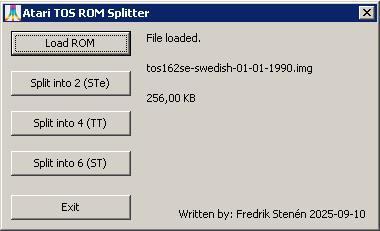
Overview
A Lazarus/Free Pascal tool to split Atari TOS ROM files into smaller parts for backup, modification, or flashing. Supports Atari ST, STe, and TT ROMs with 2, 4, or 6 output files.
Features
- Split ROMs into 2 parts (Atari STe), 4 parts (Atari TT), or 6 parts (Atari ST).
- Simple GUI for loading and splitting ROMs.
- Outputs files with standard extensions (
.HI,.LO,.TT0, etc.).
Requirements
- Lazarus 4 (or Free Pascal with LCL).
- Tested on Windows.
Usage
1. Load a ROM
- Click "Load ROM" and select your TOS ROM file (e.g.,
tos206se.img). - The filename and size will appear in the GUI.
2. Split the ROM
Choose the split option based on your Atari model:
| Option | Typical Use Case | Output Files |
|---|---|---|
| Split into 2 | Atari STe | .HI (even bytes), .LO (odd bytes) |
| Split into 4 | Atari TT | .TT0, .TT1, .TT2, .TT3 |
| Split into 6 | Atari ST | .HI0, .HI1, .HI2, .LO0, .LO1, .LO2 |
How Splitting Works
- 2 parts: Even bytes →
.HI, odd bytes →.LO. - 4 parts: Every 4th byte →
.TT0(bytes 0,4,8,...),.TT1(bytes 1,5,9,...), etc. - 6 parts: Even bytes split into 3 →
.HI0,.HI1,.HI2; odd bytes split into 3 →.LO0,.LO1,.LO2.
3. Verify Output
Use a hex editor (e.g., HxD) to check the split files:
- For 2 parts,
.HIshould contain bytes at offsets 0, 2, 4, ... and.LOshould contain bytes at offsets 1, 3, 5, ... - For 4 parts,
.TT0contains bytes 0, 4, 8, ...,.TT1contains bytes 1, 5, 9, ..., etc. - For 6 parts,
.HI0/.HI1/.HI2contain even bytes split into 3, and.LO0/.LO1/.LO2contain odd bytes split into 3.
Code Logic
Splitting
- 2 parts: Separates even/odd bytes.
- 4 parts: Treats the ROM as 512KB (pads with zeros if smaller) and splits into 4 interleaved chunks.
- 6 parts: Splits even/odd bytes, then splits each half into 3 parts.
Merging (Not Yet Implemented)
To merge split files back into a ROM:
- Read all split files.
- Interleave bytes in the correct order.
- Save as a new ROM file.
Example Workflow
Splitting for Atari STe (2 parts)
- Load
tos104.img(256KB). - Click "Split into 2".
- Output:
.HI,.LO.
Splitting for Atari ST (6 parts)
- Load
tos104.img(192KB). - Click "Split into 6".
- Output:
.HI0,.HI1,.HI2,.LO0,.LO1,.LO2.
Splitting for Atari TT (4 parts)
- Load
tos306.img(512KB). - Click "Split into 4".
- Output:
.TT0,.TT1,.TT2,.TT3.
Notes
- Backup your ROM before splitting/modifying.
- If the ROM is <512KB, the tool pads it with zeros for 4-part splits.
- Merge functionality is not yet implemented in the GUI.
Troubleshooting
- "File not loaded": Check file permissions and validity.
- Incorrect output: Verify the input ROM size and type (ST/STe/TT).
- Missing files: Ensure write permissions in the output directory.
Future Improvements
- [ ] Implement merge functionality in the GUI.
- [ ] Add CRC checking for TOS 2.06.
- [ ] Support drag-and-drop for ROM loading.
License
MIT