

Catalog · How the catalog works
FMX-WinMinimize

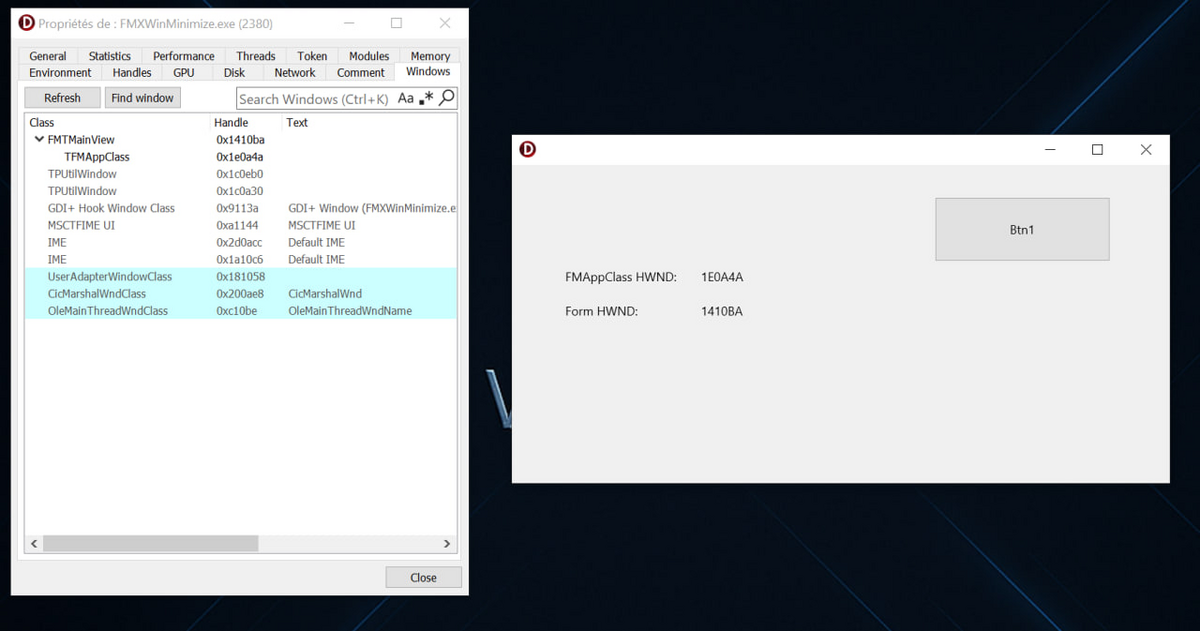
FMX Taskbar Fix (Windows): Fixes the long-standing **FireMonkey (FMX)** issue where: - Two taskbar icons appear (`TFMAppClass` + main form) - Minimize / restore animations don't play correctly - App hides completely when minimized
- ★ 5 on GitHub
Anyone may press Interesting, signed in or not. It helps others find this project.
README
🧩 FMX Taskbar Fix (Windows)
Fixes the long-standing FireMonkey (FMX) issue where:
- Two taskbar icons appear (
TFMAppClass+ main form) - Minimize / restore animations don't play correctly
- App hides completely when minimized
✅ Solution
The fix detaches the hidden TFMAppClass host window and promotes the visible form as the true app window, preserving proper DWM minimize/restore animation and single taskbar integration.
See FMX.TaskbarFix.Win for the implementation.
Usage
uses
  FMX.TaskbarFix.Win;

procedure TForm1.FormCreate(Sender: TObject);
begin
  TFMXTaskbarFix.Apply(Self);
end;
the video here shows the result in Action
🚀 My Pre-Release here try to Fix the FMX Taskbar behaviors on Windows
For years, FMX apps on Windows have suffered from a strange behavior — that mysterious extra taskbar icon or the missing animation when minimizing the main window.
After some deep digging, I found the real secret:
In VCL, everything revolves around the TApplication object. But in FMX, Windows uses a hidden internal form called TFMAppClass, which silently acts as the host and owner of your main form.
The twist?
This hidden window interferes with proper taskbar registration and DWM animations.
My pre-release fix isolates and detaches that host form safely, restoring native minimize/restore animations, single taskbar behavior, and full control — without closing or breaking the app!
Stay tuned — code and details coming soon 👇
#Delphi #FMX #Windows #TaskbarFix #NativeUI #Win32 #FireMonkey