

Catalog · How the catalog works
Delphi_Discord_Bot_Example

Delphi made project showing how to setup and use eSeGeCe_sgcWebSockets_API Components For Discord API Interaction.
- ★ 5 on GitHub
Anyone may press Interesting, signed in or not. It helps others find this project.
README
Delphi Discord Bot Example
This Delphi VCL application demonstrates how to set up and use the eSeGeCe_sgcWebSockets_API components to create a simple Discord bot. The bot allows users to send and receive messages in Discord channels with an intuitive graphical interface.
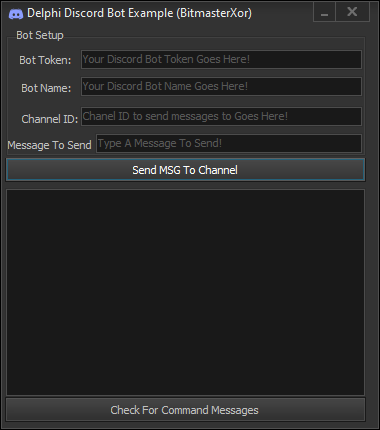
Features
<ul> <li>Send Messages: Easily send messages to a specified Discord channel using your bot token.</li> <li>Fetch Messages: Retrieve messages from a specific channel to view previous interactions.</li> <li>Discord Event Handling: Receive and display Discord events directly in the application.</li> <li>User-Friendly Interface: Simple and clear interface with controls for entering bot token, channel ID, and message content.</li> </ul>
Installation
<ol>
<li>YOU MUST HAVE SGCWebsockets installed!!!!!!! IMPORTANT: They can be obtained from here: https://www.esegece.com</li>
<li>Open Delphi Project: Open the .dpr file in the Delphi IDE.</li>
<li>Compile: Build the project to generate the executable.</li>
<li>Run: Execute the application to start using the bot.</li>
</ol>
Usage
<ol> <li>.DLL's are important libeay32.dll and ssleay32.dll must reside in .exe run location SGCWebsocket components must be installed to compile this project!</li> </ol>
Contributing
Contributions are welcome! If you have suggestions or bug fixes, please fork the repository and submit a pull request.
License
This project is provided "as is" without warranty. Use it at your own risk.
📧 Contact
Discord: bitmasterxor
Made with ❤️ by: BitmasterXor, using Delphi RAD Studio