

Catalog · How the catalog works
FileEye

Know when a file changes, on Linux, Windows and macOS. A Lazarus component on Free Pascal's DirWatch.
- ★ 1 on GitHub
Anyone may press Interesting, signed in or not. It helps others find this project.
README
FileEye
Know when a file changes, on Linux, Windows and macOS.
TFileEye reports when a file, or a file in a folder, is created, changed
or deleted. Set Path, set Enabled and handle OnChange. No threads to
manage, no polling to write, and nothing to install on the user's machine.
Use it
On a form: drop TFileEye from the System tab, set Path, set Enabled to True and double-click OnChange:
procedure TForm1.FileEye1Change(Sender: TObject; const FileName: string;
  Change: TFileEyeChange);
begin
  if Change = fcChanged then
    Memo1.Lines.LoadFromFile(FileName);
end;
In code:
uses FileEye;

Eye := TFileEye.Create(Self);
Eye.Path := '/home/me/notes.md';
Eye.OnChange := @NotesChanged;
Eye.Enabled := True;
Path |
A file or a folder. A folder reports the files directly in it, not those in its subfolders. A file does not have to exist yet, but its folder does. |
Enabled |
True watches. Set in the Object Inspector, it starts with the form. Nothing is watched in the designer. |
OnChange |
FileName (the full path) and Change: fcCreated, fcChanged or fcDeleted. Runs on the main thread, once per file per check (every 200 ms), however many events the system sent. |
MarkOwnWrite, OnOwnChange |
Mark a file this program just wrote; its events then go to OnOwnChange instead. See below. |
OnError, LastError |
Watching could not start, for example because the folder is missing. Enabled goes back to False. |
Inside OnChange you can load the file, change Path or set Enabled to
False.
To keep a program's own saves out of OnChange, call MarkOwnWrite right
after writing:
Memo1.Lines.SaveToFile(FileName);
Eye.MarkOwnWrite(FileName);
While the file's contents still match that write, its events go to
OnOwnChange instead of OnChange. After another program changes it, events
go to OnChange again. The comparison uses an MD5 of the contents, not the
file time, so coarse file times do not matter.
What counts as a change
Programs save files in different ways. FileEye reports the result for the file, not the method the program used:
- Written in place (most programs):
fcChanged. - Saved by writing a new file and renaming it over the old one (gedit,
Kate, LibreOffice, often vim): also
fcChanged. The temporary file is created and deleted within one check and is not reported. - Renamed:
fcDeletedfor the old name andfcCreatedfor the new one. - Deleted, or the watched folder itself removed:
fcDeleted.
FileEye checks five times a second and merges what it found, so a file
written in many small pieces is reported as one fcChanged.
How it works
The watching is Free Pascal's own DirWatch unit from fcl-base, by Michaël
Van Canneyt. It uses inotify on Linux, change notifications on Windows and
FSEvents on macOS. On Windows and macOS the system only reports that a folder
changed; comparing the folder listing finds which file.
DirWatch is only in Free Pascal's development branch so far, so FileEye
carries a copy in src/fpc, under its own name so it cannot clash, with
its fixes marked FileEye: in the source:
- On Linux it did not report files renamed into or out of the folder, so a save by rename was missed, and its two rename events were swapped.
- On macOS it watched folders with kqueue, which reports added and removed names but not writes to an existing file. A small FSEvents driver replaces it.
- On Windows and macOS it compared file times in whole seconds, two of them on Windows, so a second write of the same size soon after the first was missed. It now uses the full time the system keeps.
The fixes are being submitted to Free Pascal. Once a release has them, the copy will be removed and FileEye will use FPC's unit; the API stays the same.
Limits
- Subfolders are not watched.
- On Windows and macOS a change is found by the file's size and time. NTFS and APFS keep the time to a fraction of a microsecond, but FAT drives keep it to two seconds and HFS+ to one, and there two writes of the same size inside that count as one.
- Network shares report changes only as well as the server tells the system, which on some shares is not at all.
Install
Open fileeyepkg.lpk in Lazarus, compile, and use Install. The
component is on the System tab. A program that only uses it from
code can just add the package to its project's required packages.
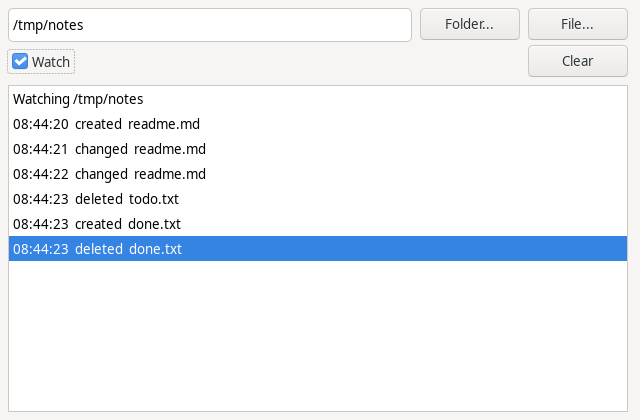
demo/FileEyeDemo.lpi is the program in the picture. tests/eyetest.lpi
runs every case above in a temporary folder and prints the results.
Tested on
Linux Mint (GTK3), Windows 10 and macOS Sequoia 15 on Intel, the last two
in virtual machines: tests/eyetest passes all twenty-three cases on each. Built
with Free Pascal 3.2.4 and Lazarus 4.8 on the Mac, and with the development
versions on Linux, where Windows is cross-built.
License
FileEye is 0BSD. The copy of Free Pascal's DirWatch in
src/fpc keeps Free Pascal's license, the LGPL with a linking exception
(COPYING.FPC), which lets it go into programs under
any license.