

gittan

Git Diff Tool
- Active · last change 11-4-2026
- ★ 5 on GitHub
README
Gittan
Git Tree Analyzer & Navigator
A free, native git client built around the diff. See what you changed as you change it, who wrote each line and the history behind it, then commit, sync and merge without leaving it. The AI features are off until you turn them on.
Download · gittan.app · Build from source · GPLv3
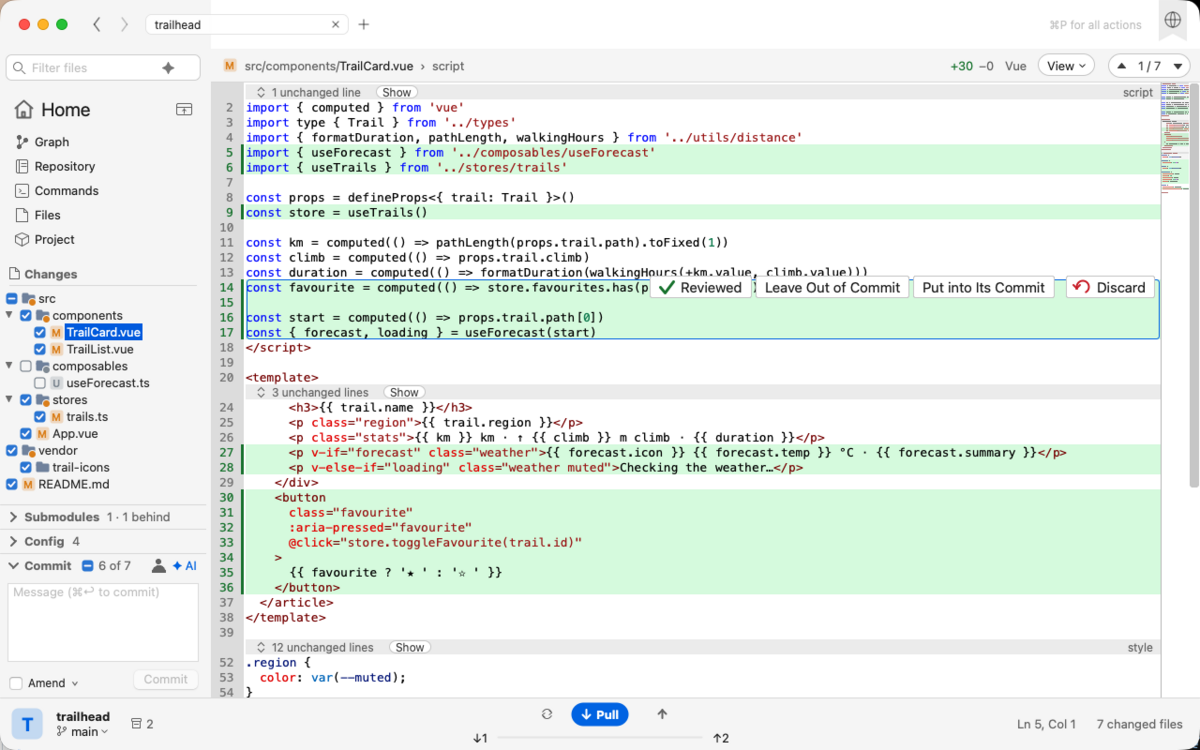Gittan runs on macOS, Windows and Linux, and more. It is written in Free Pascal with Lazarus and talks to the git command line tool, so it works with whatever git, hooks and signing you already have set up.
Download
Packaged builds for every platform are on the Releases page. Every push to main is built on GitHub Actions and published as the next build-<n> release.
| Platform | File |
|---|---|
| macOS (Apple Silicon) | Gittan-macos-silicon.dmg |
| macOS (Intel) | Gittan-macos-intel.dmg |
| Windows (x64; Windows 11 on Arm runs it emulated) | Gittan-windows-x64-setup.exe, or Gittan-windows-x64.zip without installing |
| Windows on Arm (arm64) | Gittan-windows-arm64.zip, without installing; added to a release when its build makes it |
| Haiku (x86_64) | Gittan-haiku-x86_64.tar.gz, without installing; needs Qt 6 (pkgman install libqt6pas); added to a release when its build makes it |
| Linux (amd64, GTK 3) | Gittan-linux-amd64.deb, Gittan-linux-x86_64.rpm, or Gittan-linux-amd64.tar.gz without installing |
| Linux (arm64, GTK 3; Raspberry Pi OS 64-bit) | Gittan-linux-arm64.deb, Gittan-linux-aarch64.rpm, or Gittan-linux-arm64.tar.gz without installing |
Gittan needs git 2.30 or later on your PATH. The macOS build is signed ad hoc, so macOS blocks it at first: drag it to Applications, then run xattr -cr /Applications/Gittan.app in Terminal. The GitHub features (pull requests and review comments) use the gh CLI when it is installed and signed in. The AI features use Claude Code or GitHub Copilot CLI with your own sign-in.
What it does
The diff first. The work tree against HEAD, or against any branch, tag, commit or snapshot. A background thread watches the repository, so the tree, the counts and the diff follow your editor as you save. Unified or side by side, with changed words marked within a line, unchanged lines hidden with a few lines of context, folding, and syntax highlighting from the CudaText lexer collection. A changed image shows as two pictures at the same scale, a .po file as originals and translations row for row, and a Markdown, HTML or SVG file can be drawn beside its diff with its changes marked on the page, with no browser engine.
History beside the code. Blame puts who last changed each line, and when, in a column beside the diff. Code History lays the earlier versions of the selected lines, or the function the caret is in, under the lines themselves, one color per commit. Time-lapse plays a file through every version it has had, the lines each commit brought in lit up and the ones it took away struck through on their way out. The commit graph draws every branch and tag, marks what is not pushed or not pulled, and filters as you type (author:, since:, until:, path:, and change: for the commits that added or removed a text, or lines matching a /regex/). Browse the files of any commit as they were then, or turn the graph into commits per week and author.
Commit, sync and merge. Tick the files that belong together, skip a block of a file for a later commit, write the message and commit. Pull, push and fetch sit in the status bar with the ahead and behind counts; a failed command tells in a banner with git's reason instead of a dialog. Branches, stashes, tags, reflog, remotes, clone and init, patches, cherry-pick, revert, reset, interactive rebase, bisect, a conflict view with Use Mine, Use Theirs and one conflict at a time, and a merge editor that takes the lines you want from both sides. Branch > Undo takes back a commit, a merge, a reset, a switch or a deleted branch, and Redo does it again. Anything that would throw work away asks first.
AI when you want it. Turn it on in the settings and pick Claude Code or GitHub Copilot, whichever you already use; Gittan runs its command line tool in the repository with your own sign-in and has no account or API key of its own. ✦ AI in the Commit section writes the message for the ticked files, short and in the style of the repository's recent commits. Review Changes with AI goes through what the diff compares and puts what it finds, bugs, risks and questions, as cards under the lines they are about, beside a pull request's review comments. The agent may read the repository to check a finding but gets no tool that writes, runs a command or goes to the network, and nothing is sent until you ask.
Extensions. A JavaScript file in Gittan's extensions folder can add a command to the Extensions menu and the command palette, watch commits, pushes and pulls and stop one with a reason, read the repository, run git, call a webhook and put a card under a line, with a settings page of its own. Each file declares what it needs and Gittan asks before loading one that wants to read the repository, the network, programs or Gittan's settings. See docs/extensions.
At home on each desktop. The actions sit in the title bar on every platform, the window follows the system's dark mode (on Windows the native controls too), and Tools > Install CLI Command gives you a gittan command that opens a folder in it.
|
|
The website has the full tour, and the files in spec/ describe how each area works. UNIQUE.md lists what I have not found in other git clients.
Build from source
You need Lazarus 5.0 (the CI uses 5.0RC1) with Free Pascal 3.2.2 or later, and git. The editor, the lexers, dark mode on Windows and the preview come from packages vendored as submodules under vendor/, so clone with them:
git clone --recursive https://github.com/slicke/gittan.git
cd gittan
A fresh Lazarus knows none of the vendored packages. make deps (.\make.ps1 deps on Windows) registers each with lazbuild --add-package-link and compiles it, in dependency order: ATFlatControls, EncConv, BGRABitmap, ATSynEdit, EControl, ATSynEdit_Ex, MetaDarkStyle and LazInk (VENDOR_PACKAGES in the Makefile, make.ps1 and .github/workflows/build.yml). Run it again after a submodule moves. If you build from the IDE or open the forms in its designer, make ide (.\make.ps1 ide) installs the vendored ATFlatControls and ATSynEdit in Lazarus (lazbuild --add-package, EncConv and BGRABitmap coming with ATSynEdit) and rebuilds the IDE with them; run it after make deps, and again when one of them moves.
Then build with make:
make            # build Gittan.lpi optimized (cocoa on macOS, gtk3 on Linux)
make run        # build and start
make debug      # debug info (DWARF 2 on macOS)
make rebuild    # recompile every unit
make test       # build and run the unit tests with plain fpc
make help       # every target
On macOS, make finds lazbuild in /Applications/lazarus when it is not on PATH. On Linux you need GTK 3's headers (libgtk-3-dev on Debian and Ubuntu, gtk3-devel on Fedora); make desktop then installs a launcher and the icons in ~/.local/share, without which a Wayland desktop shows a generic icon for Gittan. On Windows there is no make: .\make.ps1 has the same targets and finds lazbuild on PATH, in C:\lazarus or in C:\fpcupdeluxe\lazarus.
Every build copies the lexers into lexlib/, which must sit beside the executable (inside Contents/Resources in the macOS bundle), and the extensions' engine (libqjs and tqshim from externals/quickjs/prebuilt/) beside the executable (inside Contents/MacOS). A build from the IDE does neither, so run make once (.\make.ps1 build on Windows).
Repository layout
src/core/: the units without the LCL, which plainfpcbuilds and the tests use: the git wrapper, the diff and history parsing, settings, the CLI command, updates.src/ui/: the controls, the main form (umain.ppand itsumain.*.incfiles) and everything that needs a widgetset.tests/: fpcunit tests, run withmake teston every CI leg.spec/: one file per area, describing how it works and which units it covers. AGENTS.md has the rules that apply everywhere.vendor/: the submodules. Nothing in there is edited here; a package is updated by moving its submodule.externals/quickjs/: the extensions' JavaScript engine, quickjs-ng with the C shim Trndi wrote for it, prebuilt per platform and copied beside the executable by every build.docs/extensions/: the guide for extension writers, the type declarations and sample extensions.lexers/: Gittan's own lexers, copied intolexlib/together with the CudaText collection.icons/andtools/: the application icon and the script that regenerates it (make icons).
Contributing
Issues and pull requests are welcome at github.com/slicke/gittan. Read AGENTS.md and the spec file for the area you change before you start; CI builds every pull request on all three platforms and runs the tests.
License
Gittan is free software under the GNU General Public License, version 3. The packages under vendor/ are separate projects with licenses of their own, kept in their submodules.