

Catalog · How the catalog works
ICS_OverByte_Sockets_Example

Delphi Example (ICS Overbyte Sockets With Multiple Clients Connected)
- ★ 6 on GitHub
Anyone may press Interesting, signed in or not. It helps others find this project.
README
📡Delphi Server/Client Messaging Application
This repository features a Server/Client messaging application built in Delphi, utilizing the ICS Overbyte sockets library. This project enables real-time text communication and demonstrates robust server-client interaction.
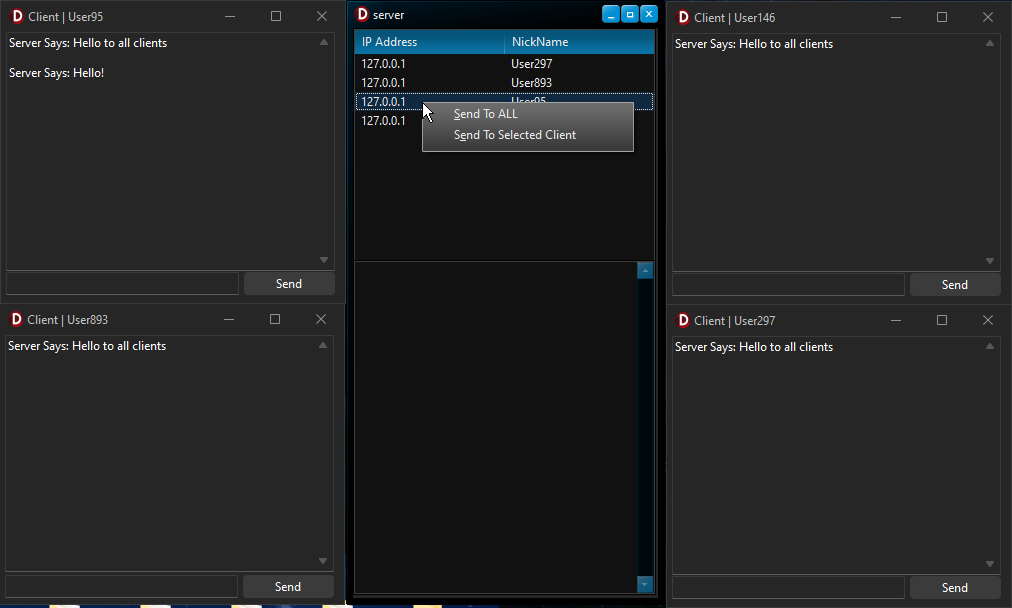
📋Projects Overview
<ul> <li>Server Application: Handles multiple client connections, displays client IP addresses and nicknames in a ListView, and manages both broadcast and private messaging.</li> <li>Client Application: Connects to the server, enabling users to send and receive text string messages.</li> </ul>
✨Features
<ul> <li>NEW: New Project Uploaded to show you how to send images accross these socket components from Client > to Server! find it in folder named: Delphi ICS Send Image Example.</li> <li>Multiple Client Connections: The server can manage connections from multiple clients simultaneously.</li> <li>Broadcast Messaging: Send messages to all connected clients at once.</li> <li>Private Messaging: Select specific clients from the server's ListView to send direct messages.</li> <li>Real-Time Updates: The server dynamically updates the ListView with client details, including IP addresses and nicknames.</li> </ul>
⚙️Installation
<ol> <li>Requirements: Delphi IDE and the ICS Overbyte sockets library.</li> <li>Download and Open Project: Clone this repository and open the .dpr files for the server and client projects in Delphi.</li> <li>Compile: Build both the server and client applications to generate the executables.</li> <li>Run: Start the server application, then connect with the client application.</li> </ol>
🔌Usage
<ol> <li>Server Setup: Start the server, which will listen for incoming connections on the configured port.</li> <li>Client Connection: Enter the server's IP address and port in the client application and connect using a nickname.</li> <li>Messaging: Use the chat interface to send messages: <ul> <li>Broadcast: Send messages to all clients connected to the server.</li> <li>Private Messaging: Select a client from the server’s ListView and send a direct message.</li> </ul> </li> <li>Disconnection: Clients can disconnect gracefully by simply closing the client application.</li> </ol>
🤝Contributing
Contributions are welcome! Fork this repository, make improvements, and submit a pull request with your changes.
📜License
This project is open-source and distributed under the MIT License. Use at your own discretion and risk.
📧Contact
For questions or feedback, reach out via email or open an issue in this repository.
Built with ❤️ By BitmasterXor using Delphi and ICS Overbyte Sockets