

Catalog · How the catalog works
PasFLTK

Free Pascal bindings for FLTK / CFLTK GUI
- ★ 6 on GitHub
Anyone may press Interesting, signed in or not. It helps others find this project.
README
PasFLTK
Free Pascal bindings for FLTK / CFLTK GUI. But should also work in Embarcadero Delphi.
FLTK is a lightweight, cross‑platform C++ GUI toolkit designed for speed, small binaries, and minimal dependencies. It provides modern GUI functionality without relying on Qt or GTK or Windows controls, making it ideal for portable, statically linked applications.
<ins>Key Advantages</ins>
- Lightweight architecture — FLTK is intentionally small, fast to compile, and produces compact executables.
- Cross‑platform — Supports Linux/UNIX (X11 & Wayland), Windows, and macOS with consistent APIs.
- No Qt or GTK or Windows controls required — FLTK provides its own widget set and rendering system, avoiding heavy external GUI frameworks.
- Static linking support (or optionally shared linking) — Designed to be modular and small enough for fully static builds.
- OpenGL support — Built‑in OpenGL and GLUT‑style API for 2D/3D graphics.
- FLUID UI designer — Includes a visual interface builder for rapid GUI creation.
- Simple, clean API — Focuses on straightforward event handling and minimal abstraction layers.
- Permissive licensing — LGPL with exceptions allowing static linking in commercial apps.
<ins>Additional Features</ins>
- Consistent native‑style widgets across platforms.
- Fast startup time — ideal for utilities and embedded tools.
- Small dependency chain — avoids large frameworks and runtime engines.
- Active open‑source development with clear documentation.
<ins>About Pango and Cairo in FLTK</ins>
Even though FLTK does not require GTK, it can optionally use Cairo and Pango when compiled with those features enabled:
- Cairo integration — FLTK can use Cairo as an alternative 2D drawing backend for high‑quality vector rendering.
- Enables anti‑aliased shapes, scalable graphics, and better text rendering.
- Some Linux distributions compile FLTK with Cairo enabled by default.
- Pango support — optional text layout engine for advanced international text shaping.
- Useful for complex scripts (Arabic, Indic, etc.).
- Not required for basic Latin text.
Screenshots
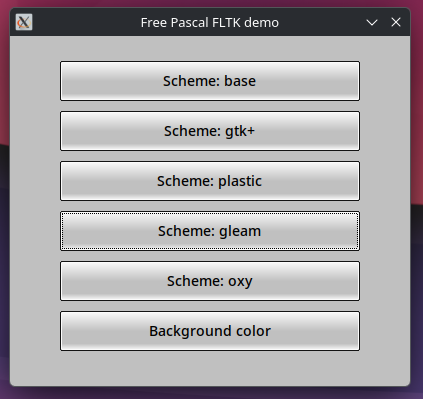
"Scheme" example (examples/scheme/scheme.lpr)
"Fusion style" example (examples/fusion_style_demo/fusion_style_demo.lpr)
This is a PasFLTK theme written in Free Pascal that tries to imitate native system look and colors
| Windows Dark | Windows Light | Kubuntu Dark | Kubuntu Light | Ubuntu Dark | Ubuntu Light |
|---|---|---|---|---|---|
 |
 |
 |
 |
 |
 |
| (click to enlarge) | (click to enlarge) | (click to enlarge) | (click to enlarge) | (click to enlarge) | (click to enlarge) |
Versioning
Version number is synchronized with CFLTK version. So "1.5.23.6" mean that binding was made on CFLTK version 1.5.23. The last part "6" is actualy PasFLTK version which will be increased in case of bug fixes / missing features
Version: 1.5.23.6
For CFLTK version: 1.5.23
For FLTK version: 1.4.5
History
-
- .23.6
- Created "Fusion style" which imitate native system look and colors (see examples/fusion_style_demo). You need to patch your CFLTK source for some missing callbacks. I have created merge request on CFLTK repository so I hope that these changes will be soon included in official CFLTK.
- Fixes for building with
-dUSE_FLTK_CAIROand-dUSE_FLTK_PANGOswitch on linux.
- .23.6
-
- .23.5
- Added support for windows. So far it wasn't tested by me so I didn't know if it really works. Now I tested it and added fixes. Shared libs mode works perfectly, static linking has one issue wich I can't solve for now. I had to disable Drag&Drop to make it work. If you need it then you must switch to shared libs mode.
- Fixed wrong descendants
- Added dedicated
Fl_Grid_Alignenum for TFL_Grid.Align. So farFl_Alignwas used as replacement - Code refactor for static linking fixes. Moved everything into one
static_patches.pas - Updated README sections for static and dynamic linking, added also section for building CFLTK on Windows
- .23.5
-
- .23.4: Finally fixed static linking issues and make it as default instead of shared libs
-
- .23.3: Experimental static linking
-
- .23.2: New demos
-
- .23.1: First version
Tested platforms
- Linux CachyOS KDE (arch), Xubuntu XFCE
- Windows 10
- I need help to someone test it also on macos
Tested toolchains
- Linux gcc (GCC) 16.1.1 20260625 64bit
- Windows msys2 MinGW64 GCC 16.1.0-5 64bit
Building CFLTK and FLTK libs (Linux)
You need to get FLTK and CFLTK sources first and build them. Make sure that you download official release supported by PasFLTK, clones from git could be incompatible. Also, before building CFLTK, you need to patch CFLTK source for missing callbacks which were added in PasFLTK ver. 1.5.23.6.
Depending on whether you want to make your app as statically linking libs (libcfltk.a, libfltk.a, etc) whis is default (but still experimental) or use shared library (PasFLT -dUSE_FLTK_SHARED_LIBS option), you need to build CFLTK and FLTK with -DFLTK_BUILD_SHARED_LIBS and -DCFLTK_BUILD_SHARED set to ON or OFF:
- Static linking (default from version 1.5.23.4): Your executable will contain all necessary C / C++ code. You don't need to deploy any libraries related to CFLTK / FLTK, only OS / platform. This will produce larger executable file but in summary it is smaller than prividing shared libs because linker use only necessary objects from *.a libs. This mode is still experimental and I'm still fixing linking issues. On
Linuxeverything should works fine. OnWindowsthere is issue with linkingole32.a- there is not solved yet Access Violation in Drag&Drop functionality so I had to disable it for time beeing. If you need Drag&Drop in your app then you must switch to shared libs mode. For static linking you need also set-Xeparam for Free Pascal compiler, otherwise you may get errorFailed reading coff file, invalid section index while reading libcfltk.a(cfl_window.cpp.obj). You can set it in compiler options in your Lazarus project options or pass to FPC compiler command. - Shared linking. Your executable will be smaller but you need to deploy CFLT / FLTK libraries with your app (libcfltk.so, lifltk.so / cfltk.dll, fltk.dll). See "Deploying your app" section for more info.
For shared linking I recommend also set options
-DCFLTK_MSVC_CRT_STATIC=ONandset(CMAKE_CXX_FLAGS "${CMAKE_CXX_FLAGS} -fno-exceptions -static -static-libgcc -static-libstdc++")inCMakeLists.txtwhen building CFLTK so you don't need deploylibstdc++-6.dll,libwinpthread-1.dllandlibgcc_s_seh-1.dllwith your app, only onecfltk.dll. Another thing for static linking. On Windows you may notce compiler errorDwarf Error: found dwarf version '5', this reader only handles version 2, 3 and 4 information. Free Pascal doesn't support version 5 for debug symbols. In this case you need to strip MinGW *.a files with--strip-debug. Look atBuilding CFLTK and FLTK libsfor more info.
Prepare CFLTK and FLTK:
- Extract CFLTK to some directory, for example "cfltk".
- Then extract FLTK and move everything to the "cfltk/fltk" directory
- Copy files from
<PasFLTK source dir>/src/patches/cfltk_1_5_23by replacecfl.cppin<CFLTK source dir>/srcdir andcfl.hin<CFLTK source dir>/include/cfltkdir. - In "cfltk" root directory, call
cmakecommand. Depending if you want static linking or shared libs, you must use-DFLTK_BUILD_SHARED_LIBSand-DCFLTK_BUILD_SHAREDswitch. For example (if you need pango or cairo, swith it on) for static linking:
cmake -B bin -S . \
                -DCMAKE_BUILD_TYPE=Release \
                -DFLTK_USE_SYSTEM_LIBPNG=OFF \
                -DFLTK_USE_SYSTEM_LIBJPEG=OFF \
                -DFLTK_USE_SYSTEM_ZLIB=OFF \
                -DFLTK_BUILD_SHARED_LIBS=OFF \
                -DCFLTK_BUILD_SHARED=OFF \
                -DBUILD_SHARED_LIBS=OFF \
                -DFLTK_BUILD_GL=OFF \
                -DFLTK_BUILD_EXAMPLES=ON \
                -DFLTK_BUILD_TEST=ON \
                -DFLTK_OPTION_LARGE_FILE=ON \
                -DFLTK_BUILD_HTML_DOCS=OFF \
                -DFLTK_BUILD_PDF_DOCS=OFF \
-DFLTK_USE_PANGO=OFF- Then build libraries:
cmake --build bin --parallel- This will produce series of *.a libs or in case of shared libs - one single libcfltk.so / cfltk.dll library containing CFLTK and also FLTK source. In shared libs mode you don't need separated libfltk.so, libfltk_images.so, libfltk_forms.so etc. Everything your app need will be in one libcfltk.so / cfltk.dll. You can find libcfltk.a / libcflt.so/dll in "cfltk/bin" directory and FLTK *.a libs in "cfltk/bin/fltk/lib" directory.
Building CFLTK and FLTK libs (Windows)
On windows, steps are very similar to Linux one so read section above. For build toolchain I recommend MSYS2 from [www.msys2.org](https://github.com/dibok/PasFLTK/blob/HEAD/www.msys2.org) where you get GCC compiler, CMake and all what you need.
- Install MSYS2
- Run
mingw64.exefrom your install directory (for example C:\msys64\mingw64.exe) - When console open, make sure that you have neccessary tools, run
pacman -S mingw-w64-x86_64-binutils - In opened console mode go to CFLTK directory by
cd <path to CFLTK> - Use
cmakecommand described inBuilding CFLTK and FLTK libs (Linux) - In case if you get DWARF errors while compiling your project then you need strip MinGW libs. To do so:
cd C:\msys64\mingw64\lib- Run command
strip --strip-debug *.a - Repeat the same for C:\msys64\mingw64\lib\gcc\x86_64-w64-mingw32\16.1.0 directory
Building project using PasFLTK
Using Lazarus
Open some example or create new project and use this very simple hello demo:
program hello;

{$mode objfpc}{$H+}

uses
  {$IFDEF UNIX}
  cthreads,
  {$ENDIF}
  Classes,

  cfl,
  cfl_button,
  cfl_widget,
  cfl_image,
  cfl_window;

// the button's callback
procedure cb(w: PFl_Widget; data: Pointer); cdecl;
begin
  Fl_Widget_set_label(w, 'Works!');
end;

function main: Integer;
var
  w: PFl_Window;
  b: PFl_Button;
begin
  Fl_init_all();        // init all styles
  Fl_register_images(); // necessary for image support
  Fl_lock();            // necessary for multithreaded support
  w := Fl_Window_new(100, 100, 400, 300, nil);
  b := Fl_Button_new(160, 210, 80, 40, 'Click me');
  Fl_Window_end(w);
  Fl_Window_show(w);
  Fl_Button_set_callback(b, @cb, nil);
  Result := Fl_run();
end;

begin
  main;
end.
In lazarus Project->Project options. Go to Compiler options -> Paths and add path to PasFLTK source (-Fu) and your *.a / libcfltk.so / cfltk.dll libraries (-Fl). In case of static linking, you also need to add path to GCC lib (e.g. /usr/lib/gcc/x86_64-pc-linux-gnu/16 on linux or C:\msys64\mingw64\lib and C:\msys64\mingw64\lib\gcc\x86_64-w64-mingw32\16.1.0 on windows). If you are using shared libs, then you need to set -dUSE_FLTK_SHARED_LIBS in your Project->Project options -> Compiler options -> Other options or in commandline.
On linux, in case of static linking, you need to also add path (-Fl) to libgcc which in most cases is in /usr/lib/gcc/x86_64-pc-linux-gnu/16.1.1/. Otherwise you may get linking errors about missing crtbeginS.o and crtendS.o. If you are using commandline to compile your project then you can set it by adding -Fl/usr/lib/gcc/x86_64-pc-linux-gnu/16.1.1.
Now you can build your project.
Using command line
Go to your project or demo dir and run this command. It expect that *.a / libcfltk.so / cfltk.dll libs are in local "libs" dir and PasFLTK source in local "PasFLTK" dir. Change that for your need. Also remember about -dUSE_FLTK_SHARED_LIBS in case of shared linking.
/usr/bin/fpc
-MObjFPC
-Scghi
-CX
-Cg
-O3
-Xs
-XX
-l
-vewnhibq
-Filib/x86_64-linux
-Fl/usr/lib/gcc/x86_64-pc-linux-gnu/16.1.1
-Fl./libs
-Fu/PasFLTK/examples/hello/
-Fu./PasFLTK
-FUlib/x86_64-linux
-FE.
-ohello
-Xe <---- required for static linking
hello.lpr
Deploying your app
- On windows, if you are using shared libs, simply copy cfltk.dll into executable directory and that is it. In case of static linking, you don't need to do anything.
- On linux, if you are using shared libs and you want your app use libcfltk.so from directory where executable is, then you have two options:
Create
run.shscript which point to your local dir:
#!/bin/bash
set -e
DIR="$(cd "$(dirname "${BASH_SOURCE[0]}")" && pwd)"
export LD_LIBRARY_PATH="$DIR/libs:${LD_LIBRARY_PATH:-}"
exec "$DIR/hello" "$@"
Make it executable and run script.
Second option is special -rpath linker option. You can set it in Lazarus Project -> Project options -> Compiler options -> Compile and linking by setting -k option. Or in command line:
/usr/bin/fpc
....
-k-rpath=$ORIGIN/libs
....
hello.lpr
Now your app will run without LD_LIBRARY_PATH and use libcfltk.so from "libs" dir where your executable is. Make sure to copy it there.
In case of static linking on linux, you don't need to provide this lib. But you may need some OS missing libs (especially when using cairo or pango). You can check this by running ldd <your_app_executable>
Other compiling options
If you want to use cairo or pango in FLTK, then in your project you need to set -dUSE_FLTK_PANGO / -dUSE_FLTK_CAIRO. This functionality is not tested yet.
Building project using PasFLTK and static libs (experimental with not solved bugs)
Fixed in version 1.5.23.4
<del> Free Pascal can link C static *.a libs. I was able to make app which doesn't use libcfltk.so and libfltk.so at all. Just one single and small executable which contain C/C++ binary code. But it has bug which I'm not able to solve. I think it is "Static Initialization Order Fiasco" issue but then why exactly the same demo written in C works fine?
To enable static linking:
- Build CFLTK and FLTK with
-DFLTK_BUILD_SHARED_LIBS=OFFand-DCFLTK_BUILD_SHARED=OFFwhich produce *.a libs only. Then in simple demo I linked these libs and all dependencies (order has matter!): - Make sure that
Project -> Project options -> Compiler options -> Pathspoint to directory which contain *.a libs instead of *.so / *.dll. - Switch PasFLTK to static linking by setting
-dUSE_FLTK_STATICinProject -> Project options -> Compiler options -> Other optionsor in command line:
/usr/bin/fpc
....
-dUSE_FLTK_STATIC
....
static_error_to_solve.lpr- You can use a demo which shows problematic SIGSEGV error. You can find it in
/test/static_error_to_solve.lpr - Demo is running but has bugs, for example
Fl_file_chooser_showis crashing with SIGSEGV. Problem is inFl_File_Chooser2.cxxin const:
const char *Fl_File_Chooser::filesystems_label = Fl::system_driver()->filesystems_label();Seems like Fl_File_Chooser is initialized before Fl_System_Driver class which result with const beeing empty (null). Is it "Static Initialization Order Fiasco"? But then why the same demo written in C works? ldd command shows that C and FPC demo link to the same libs and even in the same order. I guess that this is not possible or even is not a good practice. Shared libraries are better solutions but you need to deploy extra ~4MB lib, static linking would produce extremely small executable without dependencies but don't know if it is possible to solve this issue, --whole-archive switch didn't fix it either.
If someone could help me with this I would be grateful </del>