

Catalog · How the catalog works
ImageWriter

🔥 Disk image writing utility for Windows
- ★ 6 on GitHub
Anyone may press Interesting, signed in or not. It helps others find this project.
README
💾 ImageWriter
A modern disk image writing utility for USB drives and SD cards
📸 Screenshot
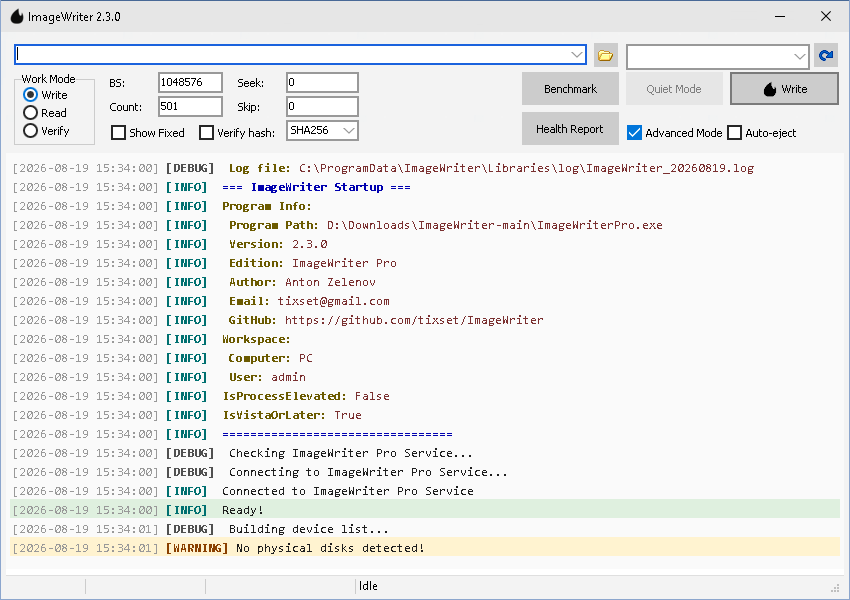
📖 About
ImageWriter is a modernized and enhanced version of the dd for Windows utility, originally developed by John Newbigin. This project provides a graphical interface and additional features for writing disk images to removable media.
👤 Credits
Original Project: dd for Windows by John Newbigin (jn@chrysocome.net)
Current Developer: Anton Zelenov (tixset@gmail.com)
GitHub: https://github.com/tixset/ImageWriter
License: GNU General Public License v3.0
📁 Project Structure
ImageWriter/
????????? install.bat                   # Complete elevated Pro installation
????????? ImageWriter.dpr/.dproj       # Standard elevated application
????????? ImageWriterPro.dpr/.dproj    # Pro GUI using the Windows service
????????? ImageWriterSvc.dpr/.dproj    # LocalSystem service
????????? src/                         # Pascal units and VCL forms
???   ????????? MainForm.pas/.dfm        # Shared main form
???   ????????? IPCPipe.pas              # Bounded and authenticated named-pipe transport
???   ????????? ServiceIPC.pas           # Pro GUI service client
???   ????????? WorkerCommands.pas       # Privileged command implementation
???   ????????? SecurityUtils.pas        # Protected installation/data directories
???   ????????? managers/                # 16 business-logic units
???   ????????? studio/                  # Hashing, RNG, and legacy helper units
????????? resources/                   # Manifests, icons, RC/RES files, and compression DLLs
???   ????????? README.md                # Resource regeneration and DLL deployment notes
????????? lib/
???   ????????? HtmlViewer/              # Git submodule required by the GUI projects
???   ????????? README.md                # HtmlViewer source and setup instructions
????????? tests/                       # DUnit sources and PowerShell test scripts
????????? docs/                        # English/Russian guides and technical notes
????????? reports/                     # Dated audit reports (historical snapshots)
????????? assets/screenshots/          # Documentation images
????????? .github/workflows/           # Repository checks; no Delphi build runner
????????? BUILD_CONFIGURATION.md       # Canonical build instructions
????????? CONTRIBUTING.md              # Contribution guidelines
????????? SECURITY.md                  # Security policy
????????? CHANGELOG.md                 # Release history
????????? LICENSE                      # GNU GPL v3.0
✨ Features
- 🌙 Dark / Light Theme - automatic theme switching following Windows system setting (VCL Styles)
- 🖥️ Graphical User Interface - Easy-to-use Windows GUI
- ⌨️ Command-Line Interface (CLI) - Console mode for automation and scripting
- 💾 Multiple Image Formats - Support for raw, GZIP (.gz), ZIP (.zip), XZ, BZIP2, 7z, TAR
- ✅ GUI Hash Verification - MD5 and SHA-256 support in GUI workflows
- 📊 Partition Information - Display MBR and GPT partition tables (even from archives!)
- 🔒 UAC Elevation - Automatic privilege elevation on Vista and later
- ⚡ High Performance - Optimized I/O operations with progress tracking
- 🎯 Drag & Drop - Simple file selection via drag and drop
- 🔧 Advanced Options - Block size, count, seek, and skip parameters
- 🛡️ Safe Operations - Volume locking and dismounting for data safety
- 📊 Progress Tracking - Real-time progress bar and status updates with ETA and speed
- 🌐 Network Shares - Pro version supports network-mounted drives (UNC paths)
- 🔄 Dynamic Loading - On-demand library loading for better startup performance
- 📝 Comprehensive Logging - Detailed per-user operation logs
- 🔧 Clean Code Architecture - Modular design with 15+ manager modules
- 🧪 Test Sources - DUnit and PowerShell tests are present; see the current limitations in
tests/README.md - 🎯 Active Development - Recent refactoring and GitHub-ready infrastructure
- 🛡️ Repository Automation - GitHub workflows perform structural checks; Delphi compilation requires a configured Windows runner or the IDE
- 🔬 Device Benchmarking - Test disk performance with read/write benchmarks
- 🏥 Device Health Monitoring - Automatic diagnostics with WMI, SMART, and partition validation
- 🛡️ Smart Safety Features - Visual health indicators and write protection for critical devices
- 🔄 Settings Persistence - Automatic save/load of BS, Count, Hash algorithm to INI file
- 🔊 Sound Notifications - Audio feedback on operation completion
- 📌 Taskbar Progress - Windows 7+ taskbar progress indication
- 🎵 Auto-eject - Optional automatic device ejection after successful write
🚀 Quick Start
Prerequisites
- Windows 7 or later (Vista supported with limitations)
- Administrator privileges for writing to disk devices
- The bundled 32-bit compression DLLs are installed or extracted automatically
Building from Source
Initialize the HtmlViewer submodule after cloning:
git submodule update --init --recursiveOpen the project in Delphi 12 IDE (Embarcadero Studio 23.0) and use Project → Build All.
Build order: ImageWriter.dproj → ImageWriterPro.dproj → ImageWriterSvc.dproj.
Note: Delphi 12 Community Edition does not support command-line (
dcc32/msbuild) compilation. Use the IDE.
Usage
GUI Mode
- Run ImageWriter.exe or ImageWriterPro.exe
- Select source image file or device
- Select target device
- Configure options (block size, count, etc.)
- Click "Write" or "Read"
Versions:
- ImageWriter.exe - Standard version for local drives
- ImageWriterPro.exe - Extended version with network share support and Windows Service
- ImageWriterSvc.exe - Windows Service for privileged disk operations (used by Pro version)
Windows Service Setup (ImageWriter Pro, requires Administrator):
install.batThis performs the protected installation, verifies the service, and creates
all-users Desktop and Start Menu shortcuts. Keep install.bat,
ImageWriterPro.exe, and ImageWriterSvc.exe together when running it.
Installation also stops and disables the Windows ShellHWDetection service to
suppress AutoPlay format prompts for Linux partitions. This is a system-wide,
persistent change that disables Windows AutoPlay/AutoRun detection. See the
user guide for the
effect and restoration commands.
For manual service-only setup:
ImageWriterPro.exe --installThis installs and starts the service, enabling disk writes without UAC prompts.
To remove: ImageWriterPro.exe --uninstall
CLI Mode (Console)
Current status: device listing, help and version output are suitable for use. Destructive CLI workflows are experimental: post-write verification, read hashing and archive creation have known correctness defects documented in
CHANGELOG.md. Prefer the GUI for disk operations.
List available devices:
ImageWriter.exe --cli --listShow help:
ImageWriter.exe --cli --helpDo not rely on --hash or post-write --verify until the open P1 issues in the changelog are fixed.
📖 Documentation
Full documentation is available in the docs/ directory:
- User Guide (EN)
- Руководство пользователя (RU)
- Commit Conventions
- Device Health Features
- Contributing Guidelines
🧪 Testing
The DUnit and PowerShell test sources are under tests/. The current DUnit runner has a known
compilation defect in IPCIntegrationTests.pas, and the public GitHub workflows do not compile or
execute the product. See tests/README.md for safe, currently available checks.
🤝 Contributing
We welcome contributions! Please read CONTRIBUTING.md before submitting pull requests.
📜 License
GNU General Public License v3.0 - see LICENSE for details.
🔒 Security
If you discover a security vulnerability, please see SECURITY.md for responsible disclosure guidelines.
🛠️ Technology Stack
- Delphi 12 (Embarcadero Studio 23.0)
- Win32 API for low-level disk access
- Named Pipes for IPC in Pro version
- WMI (Windows Management Instrumentation) for device info
- ZLib / BZip2 / XZ / LZMA for compressed image support (dynamic loading)
- 7-Zip (external) for 7z/XZ/BZIP2 compression
🙏 Acknowledgments
- John Newbigin - Original author of dd for Windows
- The ZLib team for the compression library
- The 7-Zip team for the archiver
- All contributors to this project
📞 Contact
- Author: Anton Zelenov
- Email: tixset@gmail.com
- GitHub: https://github.com/tixset/ImageWriter
- Original dd for Windows: John Newbigin (jn@chrysocome.net)
🔗 Links
Made with ❤️ for the open-source community
Note: This is a derivative work based on dd for Windows.
Original project © Chrysocome and John Newbigin, available under the GPL license.