

Catalog · How the catalog works
SnappyCleaner

SnappyCleaner — Comprehensive system junk remover
- ★ 6 on GitHub
Anyone may press Interesting, signed in or not. It helps others find this project.
README
SnappyCleaner
SnappyCleaner — A comprehensive system cleanup and maintenance utility for Mageia Linux.
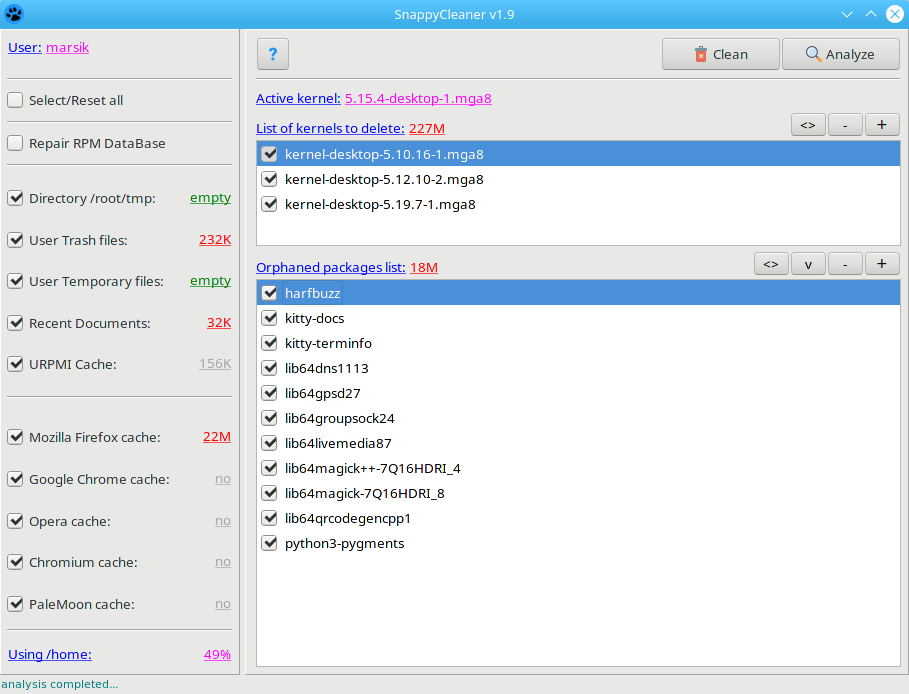
🚀 Features
The utility automatically performs the following actions:
- Kernel Management: Deletes inactive kernels to free up boot space.
- System Cleanup:
- Removes temporary root and user files.
- Empties the user trash bin.
- Clears recent documents history.
- Wipes
bashhistory for all system users. - Deletes thumbnail cache (
~/.cache/thumbnails/large/*).
- Package Manager Maintenance:
- Flushes directory caches for both URPMI and DNF5.
- Repairs and rebuilds the RPM database.
- Browser Cache Cleaning: Clears caches for Mozilla Firefox, Google Chrome, Opera, Chromium, PaleMoon, and Brave.
- Orphaned Packages (Optional): Searches for and removes orphaned packages (including arbitrary package orphans).
💻 Usage
[!IMPORTANT] SnappyCleaner requires root privileges to perform most cleanup tasks.
After installation, you can launch SnappyCleaner in two ways:
- GUI: Find it in the Utilities → System desktop menu.
- CLI: Run the
scleanercommand from a normal user terminal (it will prompt for root privileges).
Automation Mode
To run a quick cleanup without touching kernels or orphaned packages, use the auto flag:
scleaner --auto🐧 Compatibility
- Developed and tested exclusively on Mageia Linux 9 / 10.