

Delphi_WebCamCapture_WITH_AVICAP32.DLL

Delphi project showing how to use external DLL AVICAP32.DLL to capture webcam devices by index!
- Active · last change 3-10-2026
- ★ 6 on GitHub
README
Webcam Capture Project
This Delphi VCL application allows users to capture video from a selected webcam. It features an intuitive user interface with a button to start/stop the video capture and a ComboBox to select from available webcam devices. The captured video is displayed in an Image control.
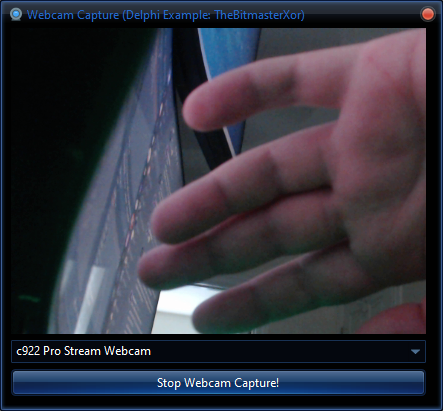
Features
- Webcam Selection: Lists all available video capture devices.
- Video Capture: Start and stop video capture from the selected webcam.
- Preview Mode: Enables live preview of the webcam feed.
Components
TImage:Displays the video feed from the webcam.TButton:Starts and stops video capture.TComboBox:Lists available video capture devices.
Usage
- Start the Application: Run the application to see the
ComboBoxpopulated with available webcams. - Select a Webcam: Choose a webcam from the dropdown list.
- Start Capture: Click the "Start Webcam Capture!" button to begin capturing video.
- Stop Capture: Click the "Stop Webcam Capture!" button to stop capturing video.
Dependencies
AVICAP32.DLL:Required for video capture functionality. This DLL is typically pre-installed with Windows.
License
This project is provided free of charge and comes with no warranties.
📧 Contact
Discord: BitmasterXor
Made with ❤️ by: BitmasterXor, using Delphi RAD Studio