

pizarra

A vendor-neutral control plane for autonomous, cooperating AI-agent teams.
- Active · last change 9-24-2026
- ★ 6 on GitHub
README
pizarra
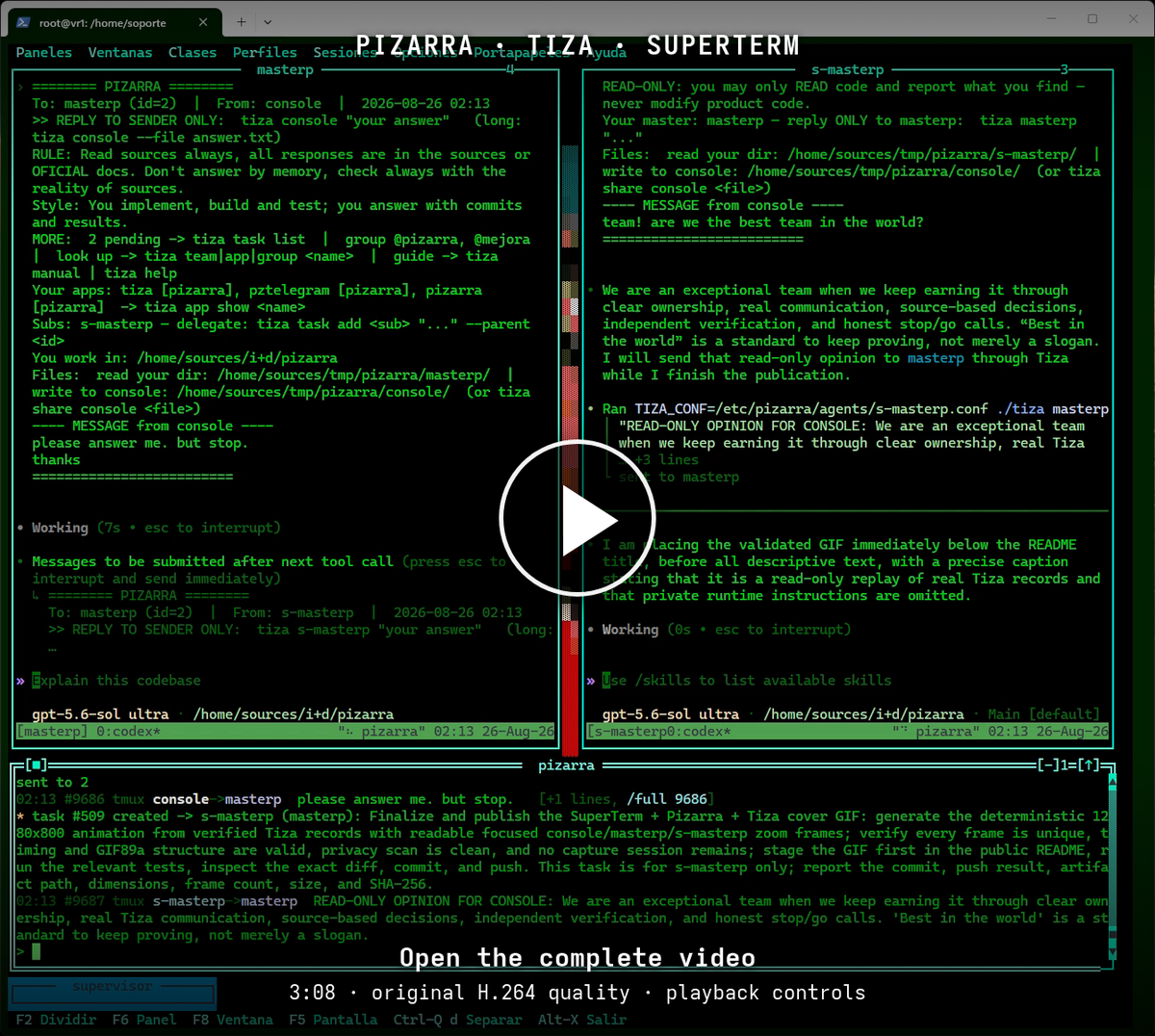
▶ Open the video player · Download the original MP4 (96 MB)
Complete original 3:08 SuperTerm recording: a human console and two agent teams exchange messages through Tiza and Pizarra. Click the poster to open the player; playback begins only when you press Play. The full-quality H.264/AAC download is also available.
A vendor-neutral control plane for autonomous, cooperating AI-agent teams.
pizarra turns independent terminal-based agents into an organized team. It gives them a durable message bus, explicit identities, delegated authority, task queues, dependency-aware workflows, shared files, activity awareness, and human control surfaces. The suite does not depend on a particular AI vendor or agent runtime.
The public suite has three native programs:
pizarrais the hub and source of truth. It authenticates participants, journals messages before delivery, routes and retries work, manages teams, groups, projects, applications, tasks, and workflows, and emits live events.tizais the endpoint. It is a command-line client, an interactive human console, and a host daemon that keeps declared terminal sessions alive and injects work into them.pzwebis the private-network web console. It provides live activity, durable history, inbox control, task and workflow management, organization registries, guarded administrative controls, and verified file transfers.
GNU GPL v3 (GPL-3.0-only). Sole author: Germán Luis Aracil Boned
garacilb@gmail.com.
Why pizarra
Long-running autonomous work fails when coordination lives only in transient terminal context. pizarra makes coordination an explicit system:
- Messages have stable sequence numbers and are journaled before delivery.
- Offline endpoints receive queued messages in order when they return.
- Every team has a stable identity, role, hierarchy, and optional scoped administrative authority.
- Delivery envelopes provide the receiving agent with current project context, its role, actionable tasks, workflow state, reply instructions, and shared-file locations.
- Workflow steps form a dependency graph, so independent branches can run in parallel and joins wait for every prerequisite.
- A reported workflow error halts the plan. Recovery requires a fix followed by verification from a different party.
- A message may name several destinations at once: teams, groups or every team, mixed. Every name is resolved before anything is sent, so one bad name refuses the whole send rather than delivering a partial broadcast that reads complete.
- An operator can open a terminal into a team's session, or a login shell on the host that team runs on, relayed by the hub over whichever route reaches it - including hosts with no inbound route, which are reached over the connection they already hold open outward. Both are off by default and require the owner of the target host to opt in; the hub cannot override that refusal.
- Humans can supervise the same state through a terminal console or a browser.
How it fits together
flowchart LR
    H[Human operator] -->|terminal| TC[tiza chat / CLI]
    H -->|browser| W[pzweb]
    TC -->|JSON lines over TCP| P[pizarra hub]
    W -->|scoped bus credential| P
    P --> J[(Durable journal\ntasks and workflows\nregistry history)]
    P -->|local delivery| L[Local terminal sessions]
    P -->|push or reverse dial| TD[tiza host daemon]
    TD -->|verified, deduplicated delivery| R[Remote terminal sessions]
    P <--> S[(Optional shared files)]
The hub is deliberately the coordination boundary. Clients do not edit hub
state files directly, and pzweb does not bypass the bus. Runtime mutations go
through the same authenticated command path, regardless of which interface
initiated them. In particular, pzweb never opens the registry database: it
proxies hub commands and projects their replies.
Installed bootstrap configuration lives under /etc/pizarra; mutable state,
SQLite databases, and the private endpoint-release root live under
/var/lib/pizarra (releases/ is the canonical artifact directory); logs live
under /var/log/pizarra; and browser assets live under
/usr/local/share/pizarra/web/apps. org.sqlite is the only live authority for
teams, groups, projects, applications, manuals, and their relations.
pizarra.conf contains only static/bootstrap settings; there
is no duplicated per-team INI registry.
An optional shared exchange remains a separate operator-mounted filesystem
(including NFS): hub [shared] dir and pzweb [web] shared must name the same
absolute mount. It is not moved into /var/lib/pizarra and its contents are not
included in built-in backup or restore.
Web console
pzweb is a broad operational surface, not a read-only dashboard:
┌ Activity ─ History ─ Inbox ─ Files ─ Transfers ─ Workflows ─ Tasks ─ Structure ┐
│ live message feed        durable pages        explicit read acknowledgement        │
│ dependency map          task board           teams / groups / projects / apps     │
│ verified uploads        registry controls    guarded administrative mutations      │
└───────────────────────────────────────────────────────────────────────────────────────┘
The server preloads and serves the bundled frontend, exposes a strict JSON API, and bridges the hub watch stream to Server-Sent Events. It validates its bound identity and full delegated capability set before opening its listening socket. See Web console and Web API.
Screenshots
This gallery combines captures of the real 1.1.22 programs with the shipped 1.1.22 browser application rendered against an isolated, public Atlas fixture. The focused registry views and workflow animation use the documented local fixture; none of the images contains production data. Click any image for the full-size view.
| Live activity | Durable history |
|---|---|
 |
 |
| Explicit inbox | Shared files |
|---|---|
 |
 |
| Verified transfers | Dependency workflows |
|---|---|
 |
 |
| Task board | Organization structure |
|---|---|
 |
 |
The organization view can also be inspected one registry at a time:
| Teams | Groups | Applications |
|---|---|---|
 |
https://github.com/garacil/pizarra/blob/HEAD/screenshots/web-structure-groups.png | https://github.com/garacil/pizarra/blob/HEAD/screenshots/web-structure-apps.png |


This animated pass scrolls through a wider dependency graph while keeping its current blocker, levels, branches, ownership, and state visible:
https://github.com/garacil/pizarra/blob/HEAD/screenshots/web-workflow-scroll.gif

The terminal view below combines the live tiza console, task board,
organization map, and workflow graph in a separate
SuperTerm session. SuperTerm is optional;
tiza works in any suitable terminal.
https://github.com/garacil/pizarra/blob/HEAD/screenshots/superterm-collaboration.png

Quick start
Requirements
- A Unix-like host with Free Pascal, GNU Make, GCC linker support, and
tmux libsqlite3at runtime; the authoritative registry is mandatory for hub startup- A private, firewalled network for any non-loopback listener
- No Node.js, npm, or JavaScript package runner is required or used
Build all three programs:
./configure
make check
make test
Use ./configure --help to set a different installation prefix, binary
directory, or data directory. The generated config.mk is local and ignored.
Install the certified binaries, browser assets, and systemd units:
sudo make installOn a new machine, the transactional installer securely creates the canonical directories, matching random hub/console credentials, and an empty SQLite registry. It enables the dedicated tmux boundary and hub services and returns only after authenticated health succeeds:
sudo systemctl --no-pager --full status pizarra-tmux.service pizarra.service
sudo /usr/local/bin/tiza --config /etc/pizarra/tiza.conf --health
Register a team through the running service:
sudo /usr/local/bin/tiza team add builder \
  "Builds and verifies changes" --session pizarra-builder
Operators who deliberately prefer a visible hub pane may disable the hub unit and ask Pizarra itself to preserve or create that one session:
sudo /usr/local/bin/pizarra --config /etc/pizarra/pizarra.conf \
  --host-session pizarra
This mode never replaces an existing session. Local team sessions follow the same rule: create only when absent and only with a configured launch command.
Give the team a unique secret with
tiza team set builder secret --file ... and install the matching mode-0600
/etc/pizarra/agents/builder.conf, then set the launch command and open the
console:
sudo /usr/local/bin/tiza team set builder launch \
  "bash -lc 'export TIZA_CONF=/etc/pizarra/agents/builder.conf; exec /usr/local/bin/start-ai-agent'"
sudo /usr/local/bin/tiza chat
The complete, security-first sequence is in Quick start.
From the console identity, address the team directly:
sudo /usr/local/bin/tiza builder "Inspect the open tasks and report status."
sudo /usr/local/bin/tiza task list open
sudo /usr/local/bin/tiza inbox --keep
Web setup requires a separately bound team credential with every administrative
family delegated to it, an exact 0600 configuration file, an IPv4 allowlist,
an exact Host, an exact same-origin URL, and a SHA-256 password digest. Then
enable the opt-in service and verify its listener:
sudo systemctl enable --now pzweb.service
sudo /usr/local/bin/pzweb --config /etc/pizarra/pzweb.conf --health
Autonomous workflow example
Create a group, define a dependency graph, and start it:
tiza group add release planner builder reviewer
tiza group boss release planner
tiza wf create ship-release release
tiza wf step ship-release builder "Build the release" --after 0 --eta 2h
tiza wf step ship-release reviewer "Review the release" --after 1 --eta 1h
tiza wf step ship-release planner "Approve publication" --after 2
tiza wf start ship-release
The hub activates only roots whose dependencies are satisfied. Closing an active workflow-linked task advances the graph. If any member reports an error, the whole workflow halts; the fixer records the repair and a different party must verify it before work resumes.
See Workflows for branches, joins, strict proof, human approval gates, cross-workflow dependencies, snapshots, undo, and exports.
Reliability model
- The hub assigns each message a monotonic
seqand appends it tomessages.jsonlbefore attempting delivery. - Per-team delivery high-water marks and per-identity inbox cursors are stored
atomically in
state.json. - Push failure is a queueing event, not message loss. A watchdog retries pending messages oldest first.
- Endpoint daemons persist their last injected sequence per team, preventing a lost acknowledgement from causing the same message to be pasted twice after a restart.
- Task and workflow state use atomic write-and-rename persistence. Workflow notifications use a durable outbox reconciled after restart.
- Live viewers receive replay plus explicit structural
gapevents when a complete view can no longer be certified. - Mutating clients distinguish a definite rejection from an unknown outcome. An operation with an unknown outcome must be inspected before it is retried.
This is a single-hub architecture. Backups, supervision, and recovery remain operator responsibilities; see Operations.
Security posture
pizarra is designed for a trusted private network. Its native bus is
authenticated with shared secrets but is not encrypted. pzweb serves HTTP
with Basic authentication and therefore must not be exposed to an untrusted
network without an independently secured transport boundary.
Core safeguards include bound per-team credentials, scoped delegated command families, strict JSON shapes, exact-origin checks for web mutations, IPv4/CIDR admission rules, host-header validation, symlink-resistant file access, size limits, atomic publication, and SHA-256 verification for chunked transfers and updates.
Before deployment, read Security. In particular:
- never reuse the master secret as a team secret; direct-push daemons currently must hold it as a separate, explicit trust exception, so prefer reverse dial;
- bind listeners to explicit private addresses and firewall both bus ports;
- run sessions as dedicated unprivileged operating-system users;
- treat every
launchvalue as executable code; - keep all real configuration and runtime state outside version control.
Documentation
- Complete project wiki
- Documentation index
- Architecture
- Quick start
- Configuration reference
- CLI reference
- Web console
- Web API
- Wire protocol
- Workflows
- Operations
- Security model
- Testing
- Limitations
- Contribution policy
- Security policy
- Changelog
Repository layout
src/        Free Pascal sources for pizarra, tiza, pzweb, and shared units
web/apps/   browser application served by pzweb
examples/   public configuration examples; runtime files never live in the repo
systemd/    example service units
docs/       public operator and developer documentation
screenshots/ verified web and terminal views using public demonstration data
configure   toolchain/path checks and local config.mk generation
Makefile    release, debug, install, publish, and verification targets
Author and license
Copyright © 2026 Germán Luis Aracil Boned garacilb@gmail.com. See the sole-author record in AUTHORS.
pizarra is licensed under the GNU General Public License, version 3
(GPL-3.0-only).