

ATARISTIMAGE

Atari .ST Image File Manager
- Active · last change 11-4-2026
- ★ 7 on GitHub
README
STIMAGE - Atari .ST Image File Manager
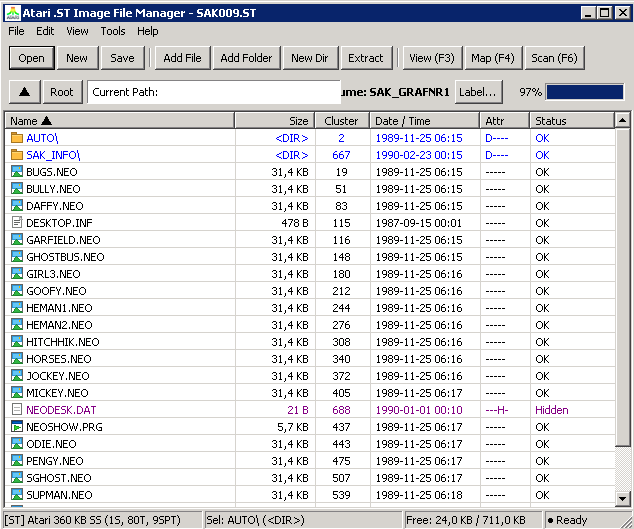
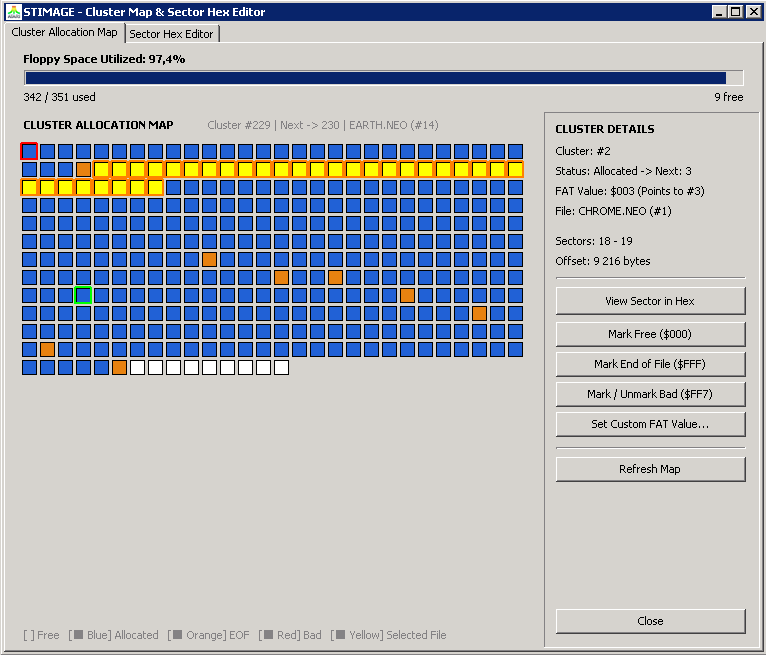
A Lazarus / Free Pascal project for managing and browsing Atari ST disk image files (.st, .msa,.dim).
File List Indicators
*h*— Hidden File: File has the FAT12 hidden attribute bit set (e.g.R1PP3R.PRG *h*).*d*— Deleted File: Existing deleted entry on disk (e.g._EADME.DOC *d*). Can be restored using the Undelete button.*A*— Pending Addition: Staged file/directory to be written upon clicking "Write Image".*D*— Pending Deletion: File/directory marked for deletion upon clicking "Write Image".
Atari ST Packer Detection & Depacking
STIMAGE includes a built-in Atari ST packer detection and decompression engine supporting 32+ packer formats and variants:
- Pack-Ice (v2.11, v2.31, v2.40, v3.0, etc.)
- Atomik Cruncher (v3.3, v3.4, v3.5, v3.6, ATM5)
- Automation Packer (v5.01, AU5!)
- JAM Packer (v4.0)
- Rob Northen Compression / RNC ProPack (Methods 1 & 2)
- Thunder Packer (v1.0 & v2.0)
- JEK Packer / Bytekiller
- FIRE Packer (v2.0)
- Pompey Pirates Packer (v1.5, v1.9+,
POPI/PUFFraw & executables) - Sentry Packer (v2.05, v2.11,
Snt2raw & executables) - 4PAK Executable Packer
- Happy Computer Packer (v1.0 & v2.0)
- PFX / PFXPAK Packer (v1.13, v1.6, v1.8, v2.1,
-lz5-sliding dictionary) - PowerPacker v2.0 (
PP20, raw data & executable wrappers with backward LZSS and variable efficiency bit tables) - Crunch-Mania (
CrM!,CrM2,Crm!,Crm2,DCS!,Iron,MSS!, raw data & executables, standard and LZH modes with delta decoding) - Degas Elite RLE Compressed Images (
.PC1,.PC2,.PC3) - Heuristic Signature Scanner for embedded compressed streams
How to Use:
- In File Viewer / Hex Inspector:
- Double-click any file (or select and click View File).
- If the file is compressed with a supported packer, the packer name and status are shown in the header.
- Click View Depacked to decompress and inspect the depacked data in Hex or Text view (with automatic GEMDOS
$601Aexecutable header decoding). - Click View Packed to toggle back to the raw packed bytes.
- Click Save Depacked... to save the decompressed file directly to host disk.
- From the Main Window:
- Select any file in the list and click File -> Extract Depacked File... to automatically detect, depack, and save to your computer in one step.
Atari ST Picture Viewer
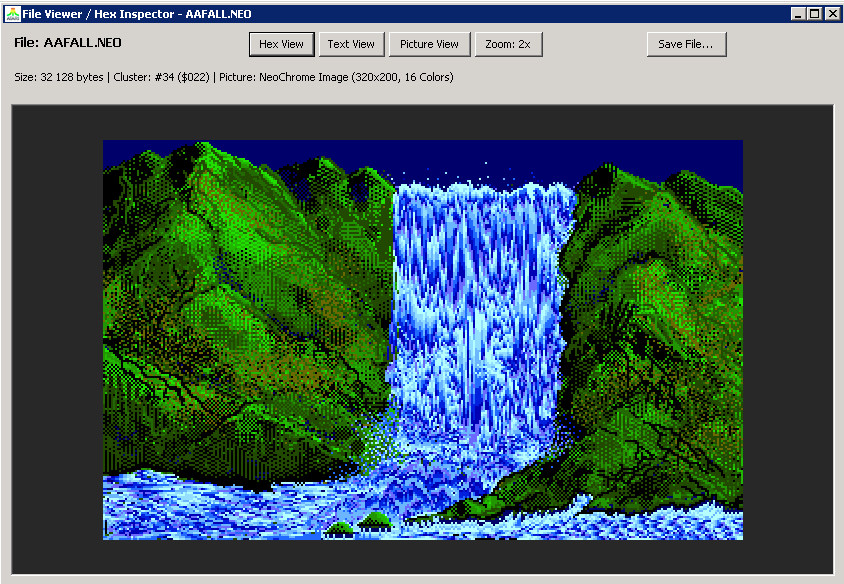
STIMAGE includes a built-in image viewer that detects and renders the most common Atari ST graphic formats:
- DEGAS & DEGAS Elite:
.PI1— Low Resolution (320x200, 16 colors from 512 palette).PI2— Medium Resolution (640x200, 4 colors, aspect-ratio corrected).PI3— High Resolution (640x400, monochrome).PC1,.PC2,.PC3— DEGAS Elite RLE Compressed images (automatically uncompressed on the fly)
- Spectrum 512:
.SPU— Uncompressed 320x200 images with 3 dynamic palettes per scanline (up to 512 colors).SPC— Compressed Spectrum 512 images (RLE screen + bitmask scanline palettes).SPS— Smooshed Spectrum 512 images (SPS RLE screen + bitstream packed palettes)
- Neochrome & Neochrome Master:
.NEO— 320x200 16-color images with animation palettes
- Art Director:
.ART— 320x200 16-color images with trailer palette
- Tiny Stuff:
.TNY,.TN1,.TN2,.TN3— Tiny compressed pictures across all ST resolutions
- Doodle:
.DOO— 640x400 high-resolution monochrome pictures
- C.O.L.R. Object Editor Mural:
.MUR— 320x200 16-color bitmaps rendered with the standard GEM palette
- Additional Atari Graphics:
.PBX(Quantum Paintbox),.PAC(STAD Monochrome & STOS Compact),.IMG(GEM Monochrome),.SQ(Titus compressed)
- Raw Atari ST Screen Dumps:
- 32,000 / 32,032 bytes raw screens with embedded or default Atari ST system palette
- Depacked Graphics:
- Files compressed with Pack-Ice, Atomik, JAM, etc. can be depacked with the View Depacked button and immediately inspected in Picture View!
Picture Viewer Features:
- Instant Preview: Double-clicking any recognized picture automatically opens it in Picture View.
- Zoom Modes: Click the Zoom button to toggle between:
Zoom: 2x(640x400 authentic display scaling)Zoom: 1x(1:1 native pixel resolution)Zoom: Fit(scale to window)
- Export to Modern Formats: Click Save File... while in Picture View to export the picture directly as a standard Windows 24-bit
.BMPbitmap file or raw image.
Undelete Feature
To recover a deleted file:
- Select any file marked with
*d*in the file list. - Click the Undelete button.
- Enter the restored filename or missing first character in the dialog prompt.
- The tool validates cluster availability in the FAT table, re-links the cluster chain, restores the directory entry, and refreshes the display.
Physical Floppy Writing (720 KB & 1.44 MB)
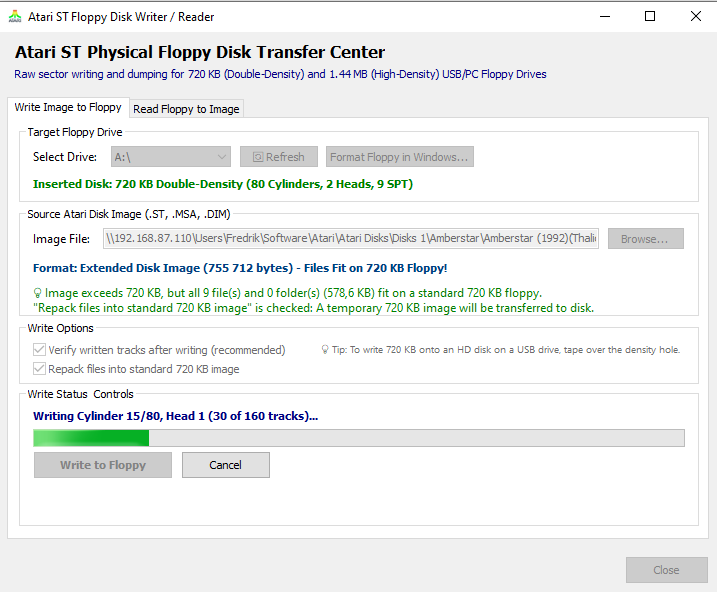
STIMAGE includes a built-in low-level track-by-track physical floppy disk writer accessible via Tools -> Write Disk Image to Floppy... (or the Floppy toolbar button):
- Supports standard internal PC floppy controllers (
\\.\A:) and external USB floppy drives. - Automatically handles standard Atari ST / PC formats (720 KB Double-Density and 1.44 MB High-Density).
- Offers track-by-track progress, write verification, and formatting before write.
Transfer & Repack Files to 720 KB Floppy
Many Atari ST disk images were created with non-standard extended geometries (e.g. 800 KB with 10 sectors/track, or 880 KB with 11 sectors/track), 1.44 MB HD images, or 360 KB single-sided images. USB floppy drives frequently fail or corrupt when attempting to write non-standard sector layouts or single-sided disks. If the actual payload of files and subdirectories can fit on a standard 720 KB floppy (<= 711 clusters / 728,064 bytes and <= 112 root directory entries):
- Checkbox Option in Floppy Writer: In the Floppy Disk Writer / Reader form, the checkbox option "Repack files into standard 720 KB image" is available under Write Options.
- Supported Image Sizes:
- Smaller than 720 KB / 360 KB Single-Sided: Option is fully enabled. Checking it repacks single-sided or custom-sized floppy files into a pristine 2-sided 720 KB Double-Density Atari ST floppy.
- Standard 720 KB: Option is available to cleanly rebuild and defragment files into a freshly formatted 720 KB image.
- Extended (> 720 KB, 800K, 880K, non-standard): Automatically detected and checked if payload fits, enabling direct writing to USB floppy drives.
- 1.44 MB HD: Option is enabled if contents fit on 720 KB, allowing easy transfer of HD image files onto Double-Density 720 KB disks.
- Temporary Image Creation: When checked, clicking Write to Floppy generates a temporary standard 720 KB Atari ST disk image (80 tracks, 2 sides, 9 sectors/track = 737,280 bytes) containing all repacked files, transfers it track-by-track to the physical floppy, and cleans up the temporary image upon completion.
- Capacity Check: If the files on an image exceed 720 KB, the tool prevents writing and alerts why the content cannot fit.
Export Disk Catalog
STIMAGE can generate and export comprehensive disk catalog reports from any loaded Atari ST floppy image via File -> Export Disk Catalog...:
- Disk Geometry & Metrics: Tracks, sides, sectors/track, cluster size, volume label, serial number, and boot sector executable status (including Atari $1234 checksum verification).
- Storage Metrics: Total capacity, used space, free space, cluster allocation metrics, total files, and detected packed files count.
- Recursive File Details: Lists all files and nested subdirectories with file size, cluster allocation count, FAT12 attributes (
[DIR],[RO],[HID], etc.), file timestamps, IEEE 802.3 32-bit CRC, and identified packer name. - Export Formats:
- Interactive HTML (
.html): Modern dark-themed dashboard with summary cards, live search filter, and responsive layout. - CSV Spreadsheet (
.csv): Standard CSV for easy analysis in Excel, Google Sheets, or data pipelines. - JSON (
.json): Structured JSON containing completediskmetadata andfilesarray. - Formatted Text (
.txt): Clean ASCII report with formatted tables and summary statistics.
- Interactive HTML (
Batch Disk Image Converter & Extractor
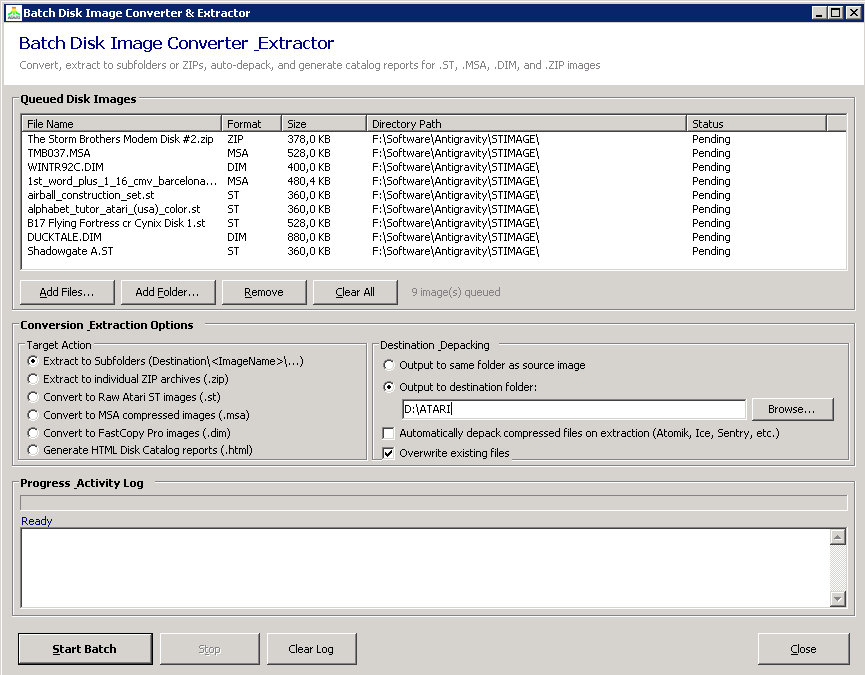
Accessible via Tools -> Batch Disk Image Converter... (or shortcut F8), this tool enables automated bulk conversion and extraction across entire floppy image collections:
- Multiple Input Sources:
- Select individual files (
.st,.msa,.dim) or.ziparchives containing disk images. - Add Folder (Recursive): Scans directories and subfolders for all supported disk image files.
- Drag-and-drop files directly into the batch list.
- Select individual files (
- Batch Actions:
- Extract to Subfolders (
image.st$\rightarrow$folder\image): Extracts the full filesystem of each image into a dedicated subfolder named after the image. - Extract to
.zipArchives: Automatically packages each disk image's extracted contents directly into an individual.ziparchive. - Convert Disk Formats: Batch cross-conversion between raw
.st, compressed Magic Shadow Archiver (.msa), and FastCopy Pro (.dim) disk images.
- Extract to Subfolders (
- In-Flight Depacking:
- Check "Automatically depack compressed files on extraction" (disabled by default) to decompress packed Atari ST files on the fly during extraction using STIMAGE's built-in 35+ packer decompressor engine.
- Control & Logging:
- Live progress bar, real-time log window, pause/cancellation support, and overwrite existing file safeguards.