

Catalog · How the catalog works
FMXWayland

- ★ 7 on GitHub
Anyone may press Interesting, signed in or not. It helps others find this project.
README
FMXWayland
A native Wayland platform for Delphi FireMonkey (FMX) on Linux, written in Object Pascal — without Embarcadero's
closed libfmux.so and without GTK. FMX programs talk to the Wayland compositor directly (libwayland-client and
libxkbcommon, loaded at run time) and draw into shared-memory buffers with FMX's default Linux canvas (cairo and
Pango, as with libfmux) or, optionally, with its Skia canvas.
When Wayland is unavailable, the same executable falls back to a native X11 backend (Xlib, no GTK or libfmux). See X11 fallback for selection, dependencies and current limitations.
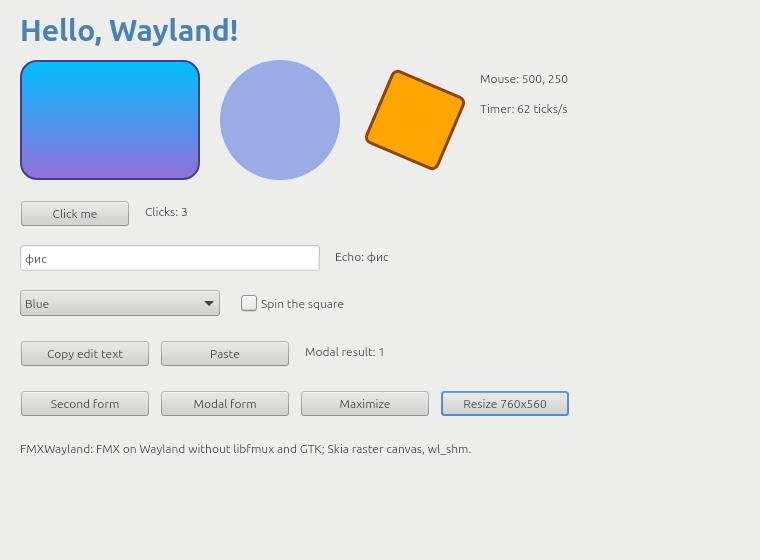
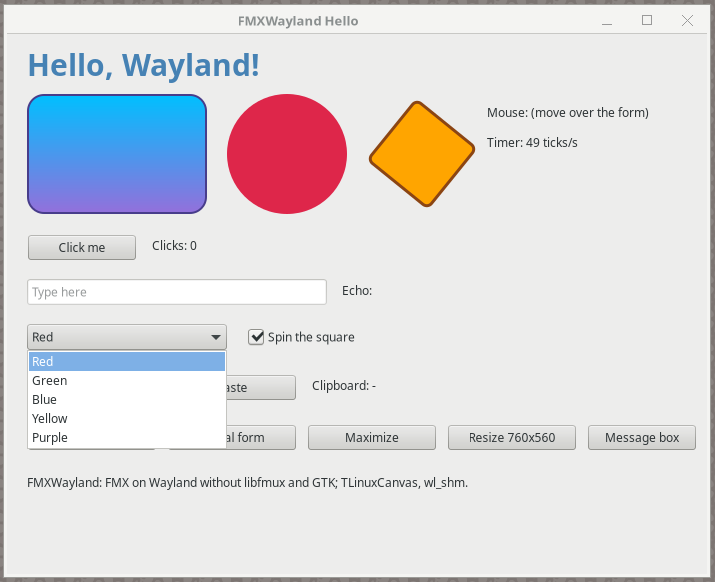
Phase 1 (this state): an FMX program with the usual controls runs on WSLg, Weston, sway, KWin and GNOME Shell —
windows, popups, mouse, keyboard, clipboard, timers, modal forms, message boxes, file dialogs (the desktop's through
xdg-desktop-portal, FMX's own without one), HiDPI scale (integer and fractional), xdg-activation, server-side or
client-side decorations or a title bar drawn by the program itself
(IFMXWaylandWindowFrame), the desktop's font as
FMX's default, on both of FMX's Linux canvases (cairo/Pango and Skia) and on
FastCanvas, a GPU canvas that presents to the windows' surfaces through Vulkan
(VK_KHR_wayland_surface). See Dialogs, Compositors, Status and
What does not work.
How it works
FMX for Linux (FMX.Platform.Linux, FMX.Canvas.Linux, FMX.Clipboard.Linux, FMX.Skia.Canvas, ...) calls the
closed library libfmux (a GTK 3 wrapper) through the ~186 function-pointer variables of the unit FMUX.Api. The
precompiled FMX units accept another FMUX.Api with the same interface section, so FMXWayland generates one at build
time (tools\gen-fmux-api.ps1):
- the interface section is copied verbatim from the local Delphi installation
(
$(BDS)\source\fmx\FMUX.Api.pas). It is Embarcadero's code: the generated file is never committed (.gitignore); - the implementation section is FMXWayland's: every function pointer first gets a generated stub with the
declared signature (logs its name once, returns zero/nil/False), then
FMXWayland.Fmux.AssignFmuxApiassigns the implemented functions; the helper routines of the interface (FmuxStateToShiftState,MsgDlgButtonsToButtons, ...) are insrc\FMXWayland.FmuxApi.inc. There is no libfmux resource and nodlopenof libfmux.
The platform logic of FMX.Platform.Linux (forms, menus loop, text service, ...) stays Embarcadero's; FMXWayland
implements what libfmux did:
| Unit | What it is |
|---|---|
FMXWayland.Fmux |
The FMUX functions: windows (TFmuxWindow forwards Wayland events to FMX's callbacks), the paint context, bitmaps, timers, the loop, clipboard, modal loops, message boxes and file dialogs (through the dialog backend), IFMXWaylandNativeWindow |
FMXWayland.Backend, FMXWayland.X11, FMXWayland.Xlib |
Startup backend selection and native X11 fallback: dynamically loaded Xlib, XImage presentation, input, eventfd/timers, modal loops and ICCCM clipboard; shares the FMUX canvas, bitmap and dialog implementations |
FMXWayland.Cairo, FMXWayland.CairoApi |
FMX's default Linux canvas (FMX.Canvas.Linux) served by the FMUX canvas, text layout, bitmap codec and font functions on the system's cairo, Pango and gdk-pixbuf (loaded with dlopen on first use); contributed by Hemul GM |
FMXWayland.Platform |
The Wayland side, independent of FMX: connection and globals, outputs, the event loop (display fd + eventfd for wake-ups + timers + watched descriptors, prepare_read/read_events so other readers such as Vulkan WSI can share the display), TWlWindow (xdg_toplevel / xdg_popup, wl_shm double/triple buffering, frame callbacks, damage, scale, client-side decorations, export with xdg-foreign), pointer, keyboard (xkbcommon keymap, key repeat, compose/dead keys), cursors (cursor-shape-v1 or an Xcursor theme through libwayland-cursor), clipboard (wl_data_device) |
FMXWayland.Dialogs, FMXWayland.DialogTypes, FMXWayland.Portal, FMXWayland.DBus, FMXWayland.FileDialog |
Dialogs behind a replaceable backend: file dialogs through the xdg-desktop-portal FileChooser (over a small D-Bus client in Pascal, no libdbus), FMX's own file dialog form when there is no portal, message dialogs and input queries with FMX's forms (see Dialogs); contributed by Hemul GM |
FMXWayland.Wayland, FMXWayland.Xkb, FMXWayland.WaylandCursor |
Bindings of libwayland-client, libxkbcommon, libwayland-cursor, loaded with dlopen: programs start without link-time dependencies and say what is missing |
src\Protocols\FMXWayland.Protocol.* |
Generated from the protocol XML files in protocols\ by tools\gen-wayland.ps1, a small wayland-scanner for Pascal |
FMXWayland.Keys |
XKB keysyms / evdev codes -> FMX virtual keys |
FMXWayland.Native |
IFMXWaylandNativeWindow, the contract for GPU canvases (below) |
FMXWayland.FmuxLoad |
Calls FMUX.Api.LoadLib from FMUX.Api's implementation uses, before FMX's units that call the FMUX functions initialize, whatever unit a program reaches first (the cycle FMUX.Api → FMXWayland.Fmux → FMX → FMX.Platform.Linux → FMUX.Api otherwise let FMX.Platform.Linux call FmuxSetLog while it was nil) |
FMXWayland.Frame |
IFMXWaylandWindowFrame, the contract for programs that draw their own title bar (below) |
FMXWayland.SystemFont |
FMX's IFMXSystemFontService: the default font of TFont (GNOME's font-name through the settings portal, else fontconfig's sans-serif) |
Painting on Wayland. Both of FMX's Linux canvases work; the frames go to the compositor as wl_shm buffers, attached with the damaged rectangle and committed; frame callbacks pace the repaints.
- FMX's default canvas (
FMX.Canvas.Linux,TLinuxCanvas: what an FMX program uses unless it setsGlobalUseSkia) calls the FMUX canvas functions (paths, fills, strokes, gradients, clips, bitmaps), text layouts and bitmap codecs. libfmux implemented them with cairo, Pango and gdk-pixbuf;FMXWayland.Cairodoes the same on the system's libraries. The paint context is a cairo context over the window's retained frame: FMX repaints only the damaged region, and each wl_shm buffer (they rotate, so a buffer holds an older frame) gets the regions that changed since its frame. Text is antialiased in grayscale (a Wayland client does not know the subpixel order of the screen). - The Skia raster canvas (
FMX.Skia,GlobalUseSkia := True,libsk4d.sonext to the program) gets the frame as its context, renders the window into an FMUX bitmap (plain memory) and copies it withFmuxCanvasDrawBitmap. - A GPU canvas that presents itself (FastCanvas: Vulkan through
VK_KHR_wayland_surface) takes the window'swl_surfacethrough IFMXWaylandNativeWindow and turns FMXWayland's frames off for it; FMXWayland keeps the window's viewport, geometry and decorations in step with the commits of the canvas's presenting thread.
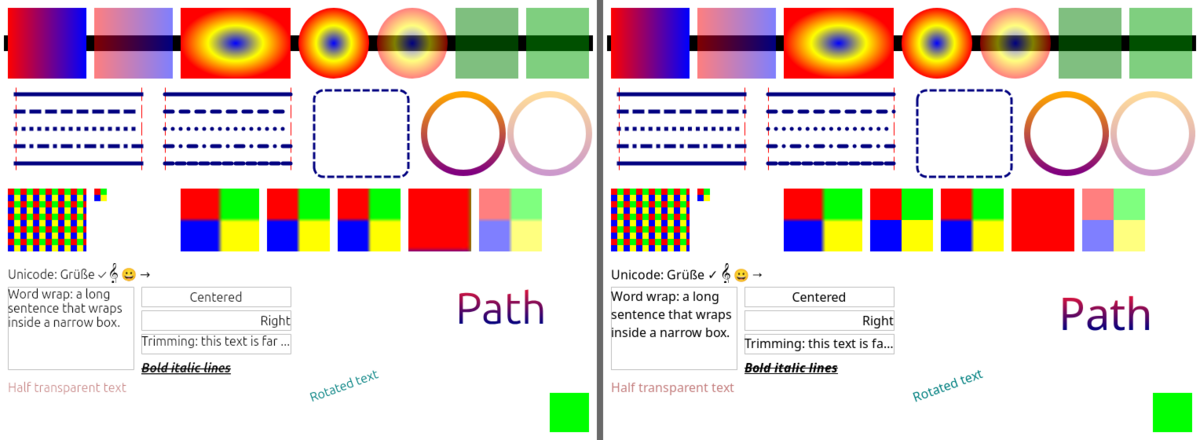
The two draw the same layout; antialiasing, hinting and Pango's line spacing differ a little
(tests\canvas-check.ps1 puts both side by side, below).
X11 fallback
Initial X11 support; see scope, known issues and reproducible checks.
The backend is chosen at startup, before FMX creates any windows:
FMXWAYLAND_BACKEND |
Behaviour |
|---|---|
unset or auto |
Prefer a reachable Wayland compositor; fall back to X11 if the transport or required compositor globals are unavailable. |
wayland |
Require Wayland; fail rather than fall back. |
x11 |
Use X11 directly, including XWayland when DISPLAY points to it. |
./Hello                              # automatic selection
FMXWAYLAND_BACKEND=x11 ./Hello       # requires a working DISPLAY
FMXWAYLAND_BACKEND=wayland ./Hello   # Wayland only
X11 loads libX11.so.6 on demand and uses libxkbcommon.so.0 for Unicode/compose input. Cairo/Pango and Skia
use the existing rendering paths; frames are uploaded with XPutImage. There is no dependency on libfmux or GTK,
and a Wayland-only deployment does not need Xlib. Loss of a display connection after startup does not migrate
existing windows to another backend.
The X11 backend supports toplevels and popups, window-manager decorations, movement/resizing, maximize/minimize,
fullscreen requests, mouse/capture/wheel, keyboard shortcuts and compose, timers and main-thread wake-ups,
modal forms, UTF-8 text clipboard (including cross-process INCR transfers), and the existing dialogs. Portal
dialogs receive an x11:<window-id> parent. Incoming clipboard transfers are limited to 16 MiB and five seconds.
Transparent forms and popups use an ARGB32 visual with a matching colormap and image depth when a compositor
is present (libXrender.so.1 validates the alpha format). Without a compositor, the Shape extension
(libXext.so.6) clips transparent padding; that fallback has binary transparency rather than soft shadows.
Current X11 limitations: scale is 1 and the X screen is reported as one display (no per-monitor RandR/HiDPI);
window rectangles describe the client area; no XIM/IME. Vulkan presentation through IFMXWaylandNativeWindow
remains Wayland-only; the supported X11 canvases are Cairo and Skia.
Custom title bars: the X11 backend also provides the existing IFMXWaylandWindowFrame contract (the name/GUID
is retained for compatibility with FMR Ribbon). It hides/restores WM decorations, reports active/maximized state,
and supports move, resize, minimize and maximize/restore. Modern WMs receive EWMH move/resize/state requests;
legacy WMs such as Xming use pointer-grab-driven move/resize and client-side maximize/restore. The WM menu is
advertised only when _GTK_SHOW_WINDOW_MENU is available. FMR Ribbon's Linux frame attaches to this service
automatically: build Demos/RibbonBasic against this checkout and run with /frame=fullnc.
Tests: build Hello with and without -Define NOSKIA, then run
bash tests/x11-headless.sh <output-directory> <absolute-path-to-Hello> on Linux with Xvfb, Openbox, xcompmgr, xdotool,
xclip, xrandr, ImageMagick, Python 3 and libXfixes. It checks automatic/forced selection, the Hello self-test, real
mouse/keyboard input, clipboard exchange with xclip, resize and WM close, and saves screenshots.
tests/x11-modal.sh also opens and dismisses message boxes and modal forms with mouse clicks, verifies blocked
parent input, and checks cursor visibility and stable cursor identity during movement (x11-cursor.py).
x11-popup.sh checks that a ComboBox list actually stays visible, including when the WM gives it keyboard focus
(Weston/WSLg), then exercises mouse selection, outside-click dismissal and keyboard selection. Hello's greeting,
renderer description and message box use the selected backend name (Hello, X11! / XPutImage on X11).
x11-alpha.py checks the popup's drawable alpha or non-composited Shape outline. With xcompmgr installed,
X11_START_COMPOSITOR=1 enables the composited path in x11-modal.sh (run on a private X display).
x11-frame.sh checks the custom-title-bar service: drag, edge resize, maximize/restore, minimize and close;
X11_LEGACY_WM=1 on a private test display hides _NET_SUPPORTED to exercise the legacy-WM fallbacks.
Optionally build
tests/BackendCheck/BackendCheck.dpr and pass its executable as the third argument to also test the Xlib LP64 ABI,
early clipboard-unit initialization, large UTF-8 clipboard transfers in both directions, popup override-redirect
at creation (as observed by the WM), and live screen/work-area resize. On WSLg, whose
/tmp/.X11-unix is read-only, run the tests in a private mount namespace with a writable tmpfs at that path.
The test server uses display numbers 90–189 to avoid intercepting WSLg's :0 socket. BackendCheck coordinates
checks coordinate conversion against X11 after moving a window, reparenting it into nested WM frames and moving
those frames without client configure notifications, and measures 10,000 conversion pairs. Mouse hit-testing
uses the client origin cached from client/ancestor events and input coordinates, without per-control X server
round-trips. Synthetic ICCCM configure positions are authoritative; the tests also cover a compositor screen
position different from the virtual X window tree, including subsequent frame movement and pointer input.
Root geometry changes update the screen bounds instead of retaining Xlib's initial screen size (WSLg may start
at 640x480). Popup windows are created with override-redirect already set, so Weston does not cache them as
managed toplevels before their first map.
The popup test checks its position relative to the combo before and after moving the owner. For WSLg manual
tests, move windows by dragging their title bars: moving only the Windows-side RDP window with SetWindowPos
can desynchronize it from the compositor's position.
Coordinates. Wayland clients do not know where their windows are. Every window keeps a virtual origin (what FMX
set with SetWindowRect); ClientToScreen/ScreenToClient and the screen positions of mouse events use it, so
FMX's own conversions stay consistent. Popups (combo box lists, popup menus — FMX forms with FormStyle = Popup)
become xdg_popups placed relative to their parent (the form of their placement target) and take the position the
compositor gives them.
Decorations. With zxdg_decoration_manager_v1 the compositor draws the title bar (KWin, sway). Without it
(WSLg, Weston, GNOME), or when the compositor answers "client-side" (sway with border csd), FMXWayland draws
client-side decorations: a subsurface around the window with the title (rendered by FMX's canvas), minimize/maximize/
close buttons (those the window manager offers in xdg_toplevel.wm_capabilities: sway has neither maximize nor
minimize), moving, resizing at the edges and the window menu. FMX's form rectangle includes them, like a frame on
other platforms. FMXWAYLAND_CSD=0 turns them off; a program can turn off both kinds for a window and draw its own
title bar (IFMXWaylandWindowFrame). A press on the
title starts the compositor's interactive move only when the pointer is dragged past 4 pixels (as GTK does), so a
click or a double click stays the window's.
Fonts. FMX's default font (TFont, every control whose style names no family) is the desktop's
(IFMXSystemFontService; without it FMX falls back to "Tahoma", which Linux systems do not have: Skia then fell back
to "Ubuntu", Pango to fontconfig's default). In a GNOME session (XDG_CURRENT_DESKTOP lists GNOME) it is GNOME's
interface font, org.gnome.desktop.interface font-name ("Adwaita Sans 11"), read through the settings portal
(org.freedesktop.portal.Settings, ReadOne or the older Read, over the D-Bus client of the dialogs): the family
as fontconfig resolves it (a substitute when that family is not installed), the size converted from points to FMX's
device-independent pixels (11 pt = 14.7, as Windows reports its 9 pt message font as 12). Elsewhere, without a
portal (it is given 1.5 seconds) or with FMXWAYLAND_PORTAL=0, it is the desktop's sans-serif font as fontconfig
resolves it at FMX's default size of 12 (libfmux registers no such service: FMX used 12 there too).
FMXWAYLAND_FONT="family[,size]" overrides both.
Dialogs
TOpenDialog, TSaveDialog and SelectDirectory (FMX calls FmuxFilesDialog) and FMX's synchronous message
dialogs (FmuxMessageDialog) go to a dialog backend (FMXWayland.Dialogs, IFMXWaylandDialogBackend in
FMXWayland.DialogTypes). The default one:
- File dialogs through xdg-desktop-portal (
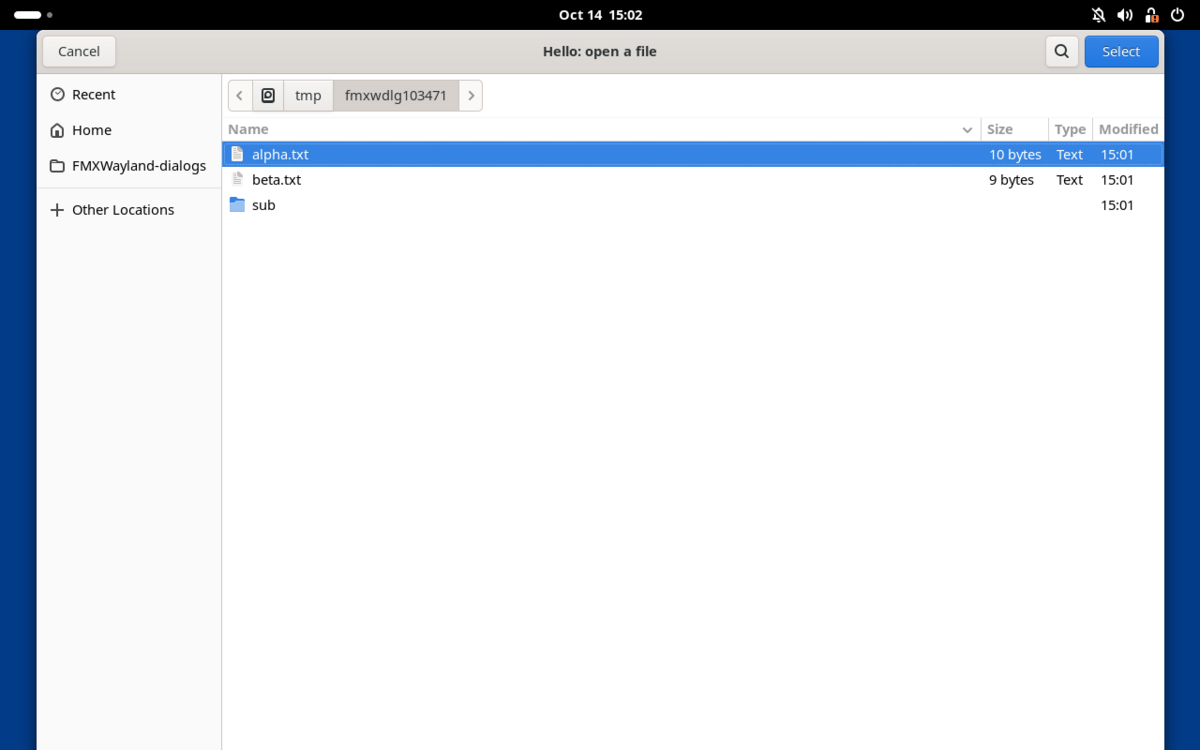
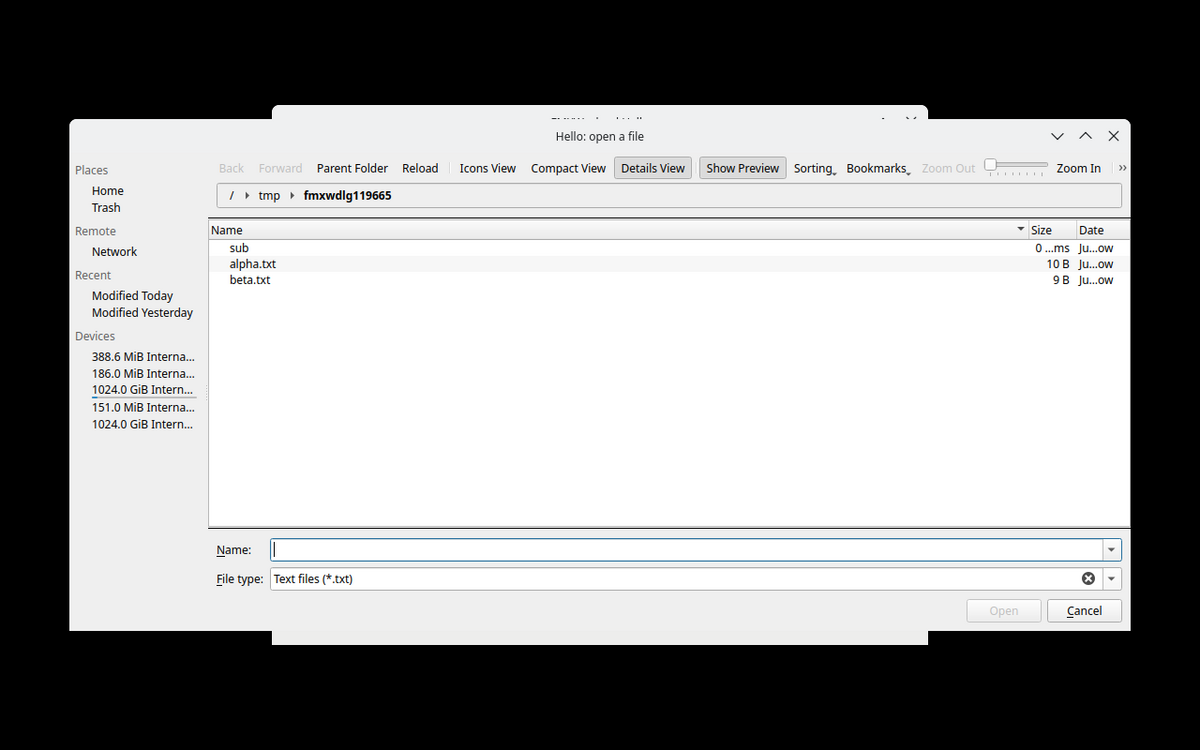
org.freedesktop.portal.FileChooser, the desktop's own dialog: GNOME, KDE, GTK), over a private connection to the session bus made by a small D-Bus client in Pascal (FMXWayland.DBus: Unix socket, SASL EXTERNAL, the wire format; no libdbus). Filters, the chosen filter, the initial folder and name, multiple selection, folders (FileChooser version 3) are passed on. The program's window is exported with xdg-foreign (zxdg_exporter_v2) and named as the dialog's parent (wayland:<handle>), so the compositor keeps the dialog above it (GNOME, KWin, sway have it; without it the parent is ''). While the dialog is open the program's loop goes on (painting, timers, threads: the bus socket is one more descriptor of the event loop's poll) and its windows take no input, as under a modal form. When the program ends meanwhile, its request is closed and the dialog goes away. - FMX's own file dialog (
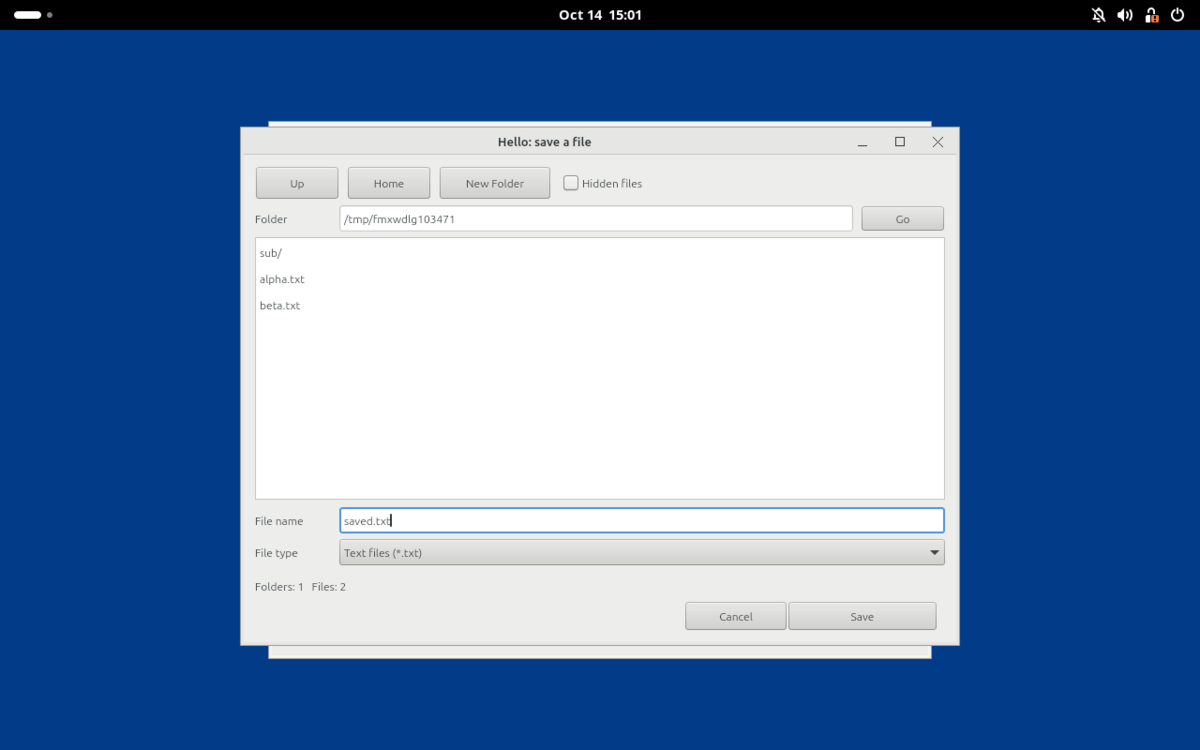
FMXWayland.FileDialog, an FMX form: folders and files with the filter, hidden files, new folder, the location typed, multiple selection, overwrite question) when there is no portal: no session bus, no xdg-desktop-portal, no FileChooser in it, folder selection with FileChooser before version 3, orFMXWAYLAND_PORTAL=0. The fallback is immediate when the portal is not there (the bus says so); a portal that does not answer is given 5 seconds. - Message dialogs with FMX's own dialog form, as before.
Another backend replaces it (for example own forms), and then also serves TDialogService (message dialogs and input
queries, synchronous and asynchronous); nil restores the default:
uses FMXWayland.Dialogs, FMXWayland.DialogTypes;

type
  TMyDialogs = class(TFMXWaylandDialogBackend)
  public
    function FileDialog(const Request: TWaylandFileDialogRequest; out Files: TArray<string>;
      var FilterIndex: Integer): Boolean; override;
  end;

SetWaylandDialogBackend(TMyDialogs.Create);
Limits: FMX reads the result of FmuxFilesDialog from a buffer of 1024 characters, so a multiple selection keeps
the names that fit (a warning in the log names how many); GetWaylandDialogBackend.FileDialog has no such limit. The
portal's dialogs ask before overwriting whatever ofOverwritePrompt says (GTK and KDE always do). Under GNOME
50 the portal's file dialog is Nautilus (xdg-desktop-portal-gnome hands it over), which refuses to run as root.
| GNOME Shell 50: the portal's dialog (GTK) as a child of the program's window | KWin 6.6: the portal's dialog (KDE) | FMX's own file dialog (no portal) |
|---|---|---|
 |
 |
 |
Requirements
- Delphi 13 (RAD Studio 37.0) with the Linux platform (Enterprise/Architect) and FMX for Linux with its sources:
in Delphi 13.0 part of the product (
source\fmx\FMUX.Api.pas, units inlib\linux64), in later releases (13.1) a GetIt package in the catalog repository.tools\delphi-env.ps1finds theFMUX.Api.dcuthe build uses (the Linux64 library path of the IDE, then the catalog repository, thenlib\linux64) and theFMUX.Api.pasnext to it: the generated interface must be the one those precompiled FMX units were compiled with.gen-fmux-api.ps1 -Sourceoverrides it. - A Linux platform SDK to link against:
tools\make-linux-sdk.ps1makes one from a WSL distribution (or use the IDE's SDK manager). The default is Ubuntu 22.04's: programs need glibc 2.35 or later (Ubuntu 22.04+, Debian 12+, Fedora 36+, ...; see Tests,tests\glibc-compat.ps1). - At run time: a Wayland compositor with
wl_compositor,wl_shmandxdg_wm_base; the libraries libwayland-client0 and libxkbcommon0 (libwayland-cursor0 for cursors on compositors without cursor-shape-v1); for FMX's default canvas cairo, Pango, pangocairo and gdk-pixbuf with fontconfig and fonts (Debian/Ubuntu:libcairo2 libpango-1.0-0 libpangocairo-1.0-0 libgdk-pixbuf-2.0-0, present on any desktop); with the Skia canvas instead,libsk4d.so(Skia,$(BDS)\Redist\linux64) next to the program. No GTK, no X11, no libfmux. For the desktop's file dialogs a session bus with xdg-desktop-portal and a backend with a FileChooser (xdg-desktop-portal-gnome, -kde, -gtk; any desktop has one); without them FMX's own file dialog is used.
Using it in a project
- Generate
FMUX.Api.pas(.\tools\gen-fmux-api.ps1 -Out <dir>\FMUX.Api.pas) and put<dir>,srcandsrc\Protocolsfirst on the unit search path (the IDE/dcclinux64then compile it instead of linking Embarcadero's precompiledFMUX.Api). - That is all for FMX's default canvas (cairo). For the Skia canvas instead, in the .dpr:
uses
  System.StartUpCopy, FMX.Forms, FMX.Types, FMX.Skia, MainForm in 'MainForm.pas';
begin
  GlobalUseSkia := True;
  Application.Initialize;
  ...
Nothing else changes in the program. samples\Hello\Hello.dproj does this with ..\..\gen (generate with
-Out gen\FMUX.Api.pas); Hello uses Skia unless it is built with the define NOSKIA.
-
For FastCanvas (Vulkan) instead: its folders after FMXWayland's on the search path, and in the .dpr, as on any platform:
uses
  System.StartUpCopy, FMX.Forms, FastCanvas.Device, FastCanvas.Canvas, FastCanvas.Context3DVk, ...;
begin
  FastCanvasBackend := TFastCanvasBackend.Vulkan;
  InstallFastCanvas;
  InstallFastContext3DVk;
  Application.Initialize;
  ...
Hello does this with the define
FASTCANVAS(samples\Hello\HelloFastCanvas.pas).
Building
.\tools\make-linux-sdk.ps1 -CreateDistro -Install    # once: libc, crt*.o, libgcc, libz of Ubuntu 22.04 (WSL)
.\tools\build.ps1 -Project samples\Hello\Hello.dpr   # Release; -Config Debug
.\tools\build.ps1 -Project samples\Hello\Hello.dpr -Define NOSKIA -BuildRoot D:\Work\FMXWayland-build\cairo
.\tools\build.ps1 -Project samples\Hello\Hello.dpr -Define FASTCANVAS -BuildRoot D:\Work\FMXWayland-build\fastcanvas `
  -SearchPath F:\Projects\FMXFastCanvas\src\Canvas,F:\Projects\FMXFastCanvas\third_party\pasvulkan\src
The SDK decides the oldest glibc the program runs with. make-linux-sdk.ps1 copies it out of a WSL distribution
(default Ubuntu-22.04 into D:\LinuxSDK\ubuntu-22.04; -CreateDistro installs the distribution first when it is
missing, without the first-run prompt: wsl --install -d Ubuntu-22.04 --no-launch --web-download --location D:\WSL\Ubuntu-22.04; -Install installs libc6-dev, libgcc-<n>-dev and zlib1g-dev in it). Linked against it,
Hello needs GLIBC_2.34 at most and libsk4d.so GLIBC_2.29. Another SDK stays selectable:
make-linux-sdk.ps1 -Distro Ubuntu-26.04 -Install makes D:\LinuxSDK\ubuntu-26.04 (glibc 2.43), build.ps1 -Sdk D:\LinuxSDK\ubuntu-26.04 links against it.
build.ps1 generates FMUX.Api.pas into <BuildRoot>\gen, compiles with dcclinux64 (linking with its lld against
the SDK: --syslibroot, --libpath), copies libsk4d.so next to the program when it links FMX's Skia units (its
map file lists System.Skia.API; a program on FMX's default canvas needs none). Everything goes to -BuildRoot
(default D:\Work\FMXWayland-build: bin\Linux64\<Config>\, dcu\). It also works around the missing Linux64
FMX.Filter.res of Delphi 13. msbuild builds the .dproj too, given the SDK:
msbuild samples\Hello\Hello.dproj /p:Config=Release /p:Platform=Linux64 /p:DCC_SysLibRoot=<sdk>
  /p:DCC_LibraryPath=<bds>\lib\linux64\release%3B<sdk>\usr\lib\x86_64-linux-gnu%3B<sdk>\usr\lib\gcc\x86_64-linux-gnu\<n>
The protocol units are committed; after adding or updating an XML file in protocols\ run .\tools\gen-wayland.ps1.
Running
On WSLg (Windows 11, WSL 2):
export XDG_RUNTIME_DIR=/mnt/wslg/runtime-dir WAYLAND_DISPLAY=wayland-0
unset DISPLAY
./Hello --verbose
Environment variables: FMXWAYLAND_LOG = 0 errors only, 1 warnings and "not implemented" notes (default), 2 debug,
3 input traces; FMXWAYLAND_DUMP_DIR=<dir> writes the latest frame of each window as a BMP (debugging);
FMXWAYLAND_CSD=0 no client-side decorations; FMXWAYLAND_APP_ID the xdg app id (default: the program name);
FMXWAYLAND_PORTAL=0 FMX's own file dialogs instead of the portal's (and no settings portal for the font);
FMXWAYLAND_FONT="family[,size]" FMX's default font (size in device-independent pixels); XCURSOR_THEME,
XCURSOR_SIZE for cursor themes.
Tests
tests\hello-e2e.ps1— end to end on WSLg with real input: it moves the Windows mouse and types (WSLg forwards Windows input to its compositor over RDP, so events take the real wl_pointer/wl_keyboard path), takes screenshots of the windows and checks the program's log: pointer, button clicks, typing (any keyboard layout), editing keys, Ctrl+A/Ctrl+X, mouse wheel, clipboard both ways (WSLg shares it with Windows), combo box popup, check box, second form, modal form (the main window must not react meanwhile), close request from the compositor, the close and maximize buttons of the client-side title bar, maximize/restore, resize from code, clean exit. Needs an interactive desktop nobody else is using (it takes the mouse for about a minute).tests\weston-headless.ps1— non-interactive: the sample on a private headless Weston 14 at output scale 1 and 2 (buffer size throughIFMXWaylandNativeWindow, the self-test steps up to a message box answered by a timer, file dialogs without a session bus — FMX's own, driven by timers: the folder listed through the filter without hidden files, two files of a multiple selection, save over an existing file with another filter and the overwrite question, a folder, cancel —, the program's frame dumps, a compositor screenshot, clean exit), the default font (fontconfig's family at 12;FMXWAYLAND_FONTwith a serif family: the canvas measures the default text in it), popups opened before their window is mapped (Hello --early-popup,=paint,=create: the drop-down and the window must both be on the screen, counted in the screenshot's pixels) andHello --own-titlebar --selftest(the window frame service without input, no FMXWayland title bar in the screenshot).-BuildRoot <root of a NOSKIA build> -Canvas TLinuxCanvasruns it on FMX's default canvas,-BuildRoot <root of a FASTCANVAS build> -Canvas TFastCanvason FastCanvas (the frame dump is then the frame FastCanvas presented: FMXWayland has none of such a window). The self-test also hides the second form and shows it again (the window configured twice), and fails on an exception the program got (Application.OnExceptionwrites it to the log).tests\canvas-check.ps1— buildstests\CanvasCheckfor both canvases and runs them on headless Weston at scale 1 and 2: the same drawing (gradients, opacity, dashes and caps, bitmap brushes, scaled and partial bitmaps, the PNG codec, text beyond the BMP, wrapping, alignment, trimming, styles, rotation, text as a path, a degenerate matrix), checks of what the program measures (positions around a surrogate pair, PtInPath, the PNG round trip) and the two frames side by side, Skia left, cairo right.tests\dialog-check.ps1— buildstests\DialogCheckand runs it on headless Weston with a private session bus: the D-Bus client against the real dbus-daemon (an address list with a missing socket first, an abstract socket,guid=,unix:runtime=yes, a non-Unix address; SASL EXTERNAL; strings, arrays and a dictionary of variants; an error reply's name; a timeout; a subscribed signal; a pump that cancels; no portal: unavailable after 1 ms) and the dialog backend with a test backend (whatTOpenDialog,TSaveDialog,SelectDirectory,TDialogServiceand the FMUX dialog functions hand it and get back; 20 of 30 long names fit into FMX's buffer;nilrestores FMX's dialog services) and the default font (Pango font descriptions; GNOME'sfont-namethrough a settings portal on two more private buses,tests\settings-portal.py:ReadOne, and an old portal with onlyRead; asked only in a GNOME session and not withFMXWAYLAND_PORTAL=0; a missing key; no portal: fontconfig at once).tests\glibc-compat.ps1— the glibc symbol versions Hello andlibsk4d.soneed (objdump -T, at most 2.35), then Hello's self-test on the headless Weston of other distributions in Docker containers (no screen, no GPU; images with the run-time libraries, built once asfmxwayland-compat:<image>):ubuntu:22.04(glibc 2.35, Weston 9),debian:12(glibc 2.36, Weston 10),fedora:latest(Fedora 44, glibc 2.43, Weston 15) by default;-Imagestakes others. Needs Docker Desktop (Linux containers). On glibc 2.31 (Debian 11) the loader refuses the program (GLIBC_2.34 not found).tests\compositors.ps1— the sample on real compositors started headless in WSL (nothing on the desktop, no Windows input): see Compositors.
Evidence of the last runs: all checks of the first two passed (WSLg on Windows 11 with Ubuntu 26.04, Weston 14.0.2
headless), and all of glibc-compat.ps1 with the program linked against the Ubuntu 22.04 SDK (2026-10-14);
Hello --selftest also runs to the end on WSLg (its seat appears only after the RDP client connects, a second or so
after the program starts: the clipboard falls back to a process-local one until then). With the dialogs and the
window frame service merged and GNOME's font: weston-headless.ps1 passed on both canvases (153 checks each: Skia,
cairo), dialog-check.ps1 36, canvas-check.ps1 36, glibc-compat.ps1 74 (Ubuntu 22.04, Debian 12, Fedora 44);
the end-to-end test on WSLg was not run again (it takes the Windows desktop). With FastCanvas (2026-10-14, after the
changes for it): weston-headless.ps1 157 checks on each canvas (Skia, cairo, FastCanvas), canvas-check.ps1 36,
dialog-check.ps1 36, all passed; compositors.ps1 with FastCanvas 1028 passed (8 runs, all parts), with Skia 966
(7 runs, all parts; GNOME Shell at 1.5 once more after its shell stayed busy and took no pointer input in the first
run), with cairo 184 (sway, KWin, GNOME Shell at 1.5: self-test, own title bar, popups of unmapped windows), none
failed.
 |
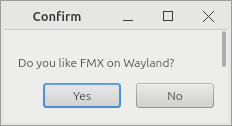 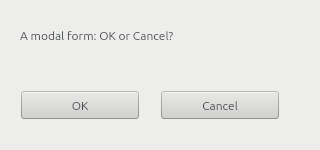 |
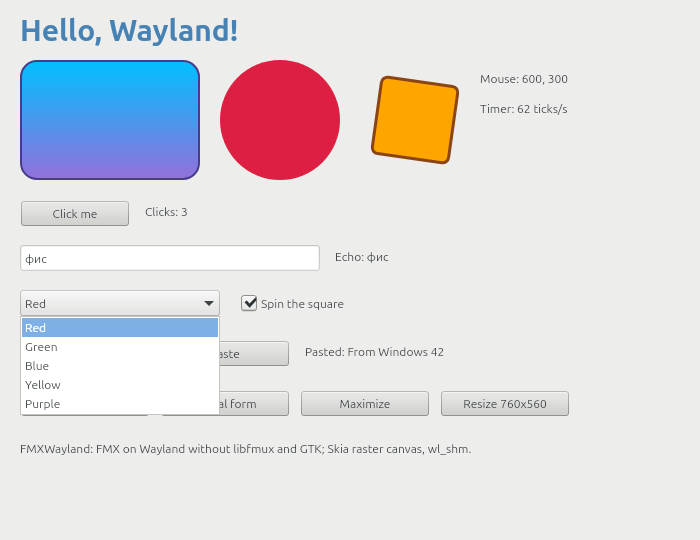
Headless Weston, output scale 2 (2x rendering, client-side decorations, the combo box drop-down as an xdg_popup):
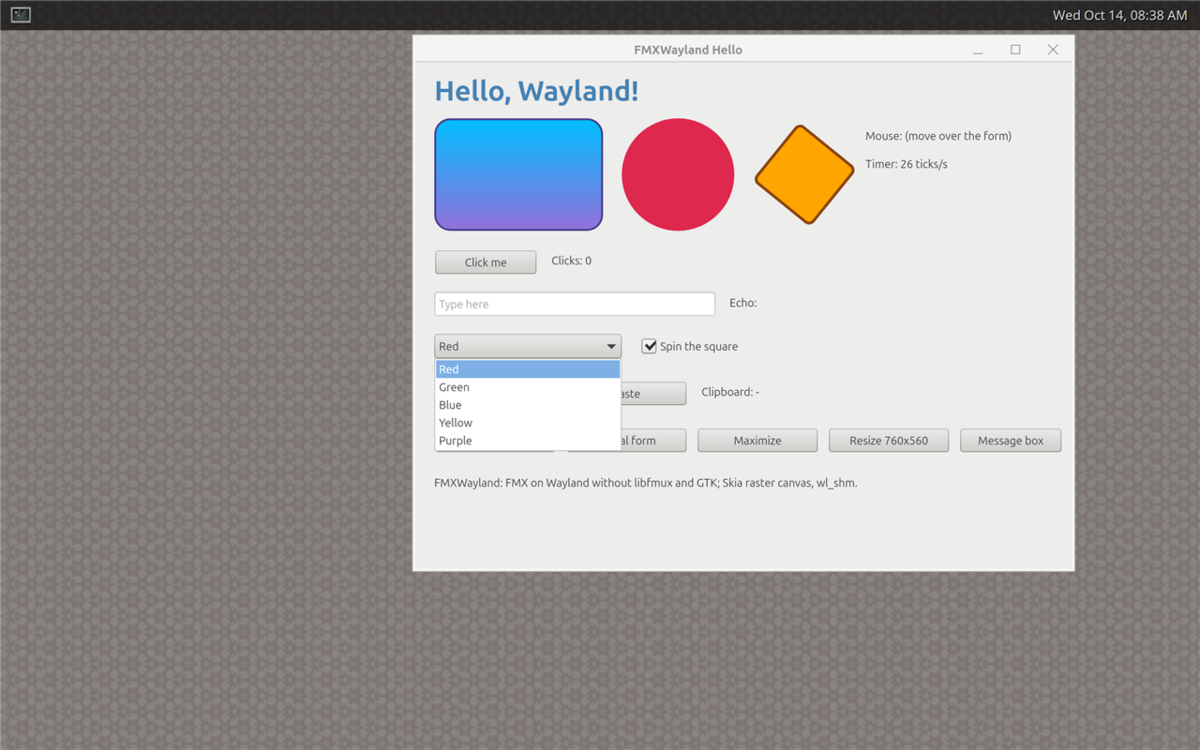
FMX's default canvas (cairo and Pango, -Define NOSKIA) on headless Weston, and tests\canvas-check.ps1 (Skia
left, cairo right): weston-headless and canvas-check passed with both canvases at scale 1 and 2, and the self-test of
both runs to the end on headless sway 1.11 too (which tiles the window: its size there is sway's, not 700x540)
(2026-10-14).
Compositors
tests\compositors.ps1 starts each compositor headless in WSL (Ubuntu 26.04: its own runtime directory, home and
D-Bus session; nothing appears on the desktop and no Windows input is used), runs samples\Hello on it and checks
its log, the compositor's view of the windows and screenshots:
Hello --selftest(the checks oftests\weston-headless.ps1: threads, clipboard, the combo box drop-down, second form, maximize/restore, modal loop, buffer size at the scale, frame dump) with a compositor screenshot while the drop-down is open;- where the compositor can be driven from outside, a scenario with input as a user gives it (
tests\wltool.py, a small Wayland client speaking the wire protocol, plus D-Bus): three clicks on a button, typing intoTEdit, Backspace, Home, End, Ctrl+A, Ctrl+X, Shift, the wheel both ways, the clipboard both ways with another application (data-control on sway and KWin,St.Clipboardon GNOME Shell), the combo box popup (placed where the program asked, then an item clicked at its place), the check box, a second form (focused; its "Activate main form" button activates the main form with xdg-activation from a click's serial; closed by the compositor), the close button of the program's own title bar, a modal form (the main form must not react to a click meanwhile), FMX's own file dialogs (the program's session bus has no portal: a double click opens a file, a typed name saves, Escape cancels), maximize/restore from the program, from the compositor and from the program's title bar, resize from code (the compositor must see the new size), close of the main form by the compositor and a clean exit; Hello --own-titlebar --selftest(IFMXWaylandWindowFramewithout input: decorations off, the listener at once and after the configure, nothing started without a press, a drop-down of the undecorated window, maximize/restore through the service, decorations on and off again; a screenshot without FMXWayland's title bar) and, where the compositor can be driven,Hello --own-titlebarwith input: no decorations (the compositor's frame equals the window geometry and the client area), a drag on the caption moves the window, a drag on the corner grip resizes it, the maximize button and a double click maximize and restore it to its size and place, a right click shows the compositor's window menu (screenshot), another window takes and gives back the activation (listener), a popup at its place, minimize and the compositor showing the window again, the close button;- popups opened before their window is mapped (
Hello --early-popup,=paint,=create): an xdg_popup of the main window once that is mapped, not dismissed, both on the screen (pixels of the screenshot; on compositors that activate the new window FMX closes the popup again, see What does not work); on GNOME Shell these programs run on the session's bus, and their default font must be GNOME'sfont-nameread through the settings portal; - on sway, KWin and GNOME Shell the portal's file dialog: xdg-desktop-portal started by D-Bus activation in the
run's session with the compositor's backend (sway: xdg-desktop-portal-gtk; KWin: -kde; GNOME Shell: -gtk, since
xdg-desktop-portal-gnome hands file dialogs to Nautilus, which does not run as root): the request, the program's
window exported with xdg-foreign as the parent and the dialog its child for the compositor (KWin, GNOME Shell
report it), the program's loop running meanwhile and its main window ignoring the compositor's close, a file chosen
by typing its path, a name typed into the save dialog, Escape,
Request.Closefrom another client refused by the portal, the program ending while a folder dialog is open (its request closed, the dialog gone), a clean exit. What cannot be automated: a click into the portal's dialog at a known place (its layout is the toolkit's; the keyboard answers it), and the program's windows under it (the dialogs cover them on a 1280x800 output).
The self-test and the scenario run on a private session bus without services (no portal: FMX's own file dialogs),
the other parts on the run's session bus. -Parts picks some of selftest, frame-selftest, early, scenario, frame, portal.
| Weston 14 | sway 1.11 | sway 1.11 border csd |
KWin 6.6 | GNOME Shell 50 (Mutter) | |
|---|---|---|---|---|---|
| Headless | --backend=headless |
WLR_BACKENDS=headless |
the same | nested in a headless sway (--virtual too: self-test only) |
--headless --virtual-monitor |
| Input, window queries | none (self-test only) | wlr virtual pointer/keyboard, swaymsg |
the same | org_kde_kwin_fake_input, KWin scripts |
Clutter virtual devices through org.gnome.Shell.Eval |
| Screenshots | weston-screenshooter |
grim | grim | grim of the host sway | org.gnome.Shell.Screenshot |
| Title bar | the program's | sway's (xdg-decoration) | the program's (xdg-decoration "client-side") | KWin's Breeze (xdg-decoration) | the program's |
| Scale 1, 2 | pass, pass | pass, pass | pass, — | pass, pass | pass, pass |
| Fractional 1.5 (wp-fractional-scale-v1) | not offered | pass | pass | pass | pass (gdctl, scale-monitor-framebuffer) |
| Self-test | pass | pass (maximize n/a) | pass (maximize n/a) | pass | pass |
| Pointer, keyboard, shortcuts, wheel | — | pass | pass | pass | pass |
| Clipboard with another application, both ways | — | pass | pass | pass | pass |
| Popup placed where asked, item clicked | self-test | pass | pass | pass | pass |
| xdg-activation | not offered | pass (focus_on_window_activation focus) |
pass | pass | pass |
| Second form, close by the compositor | self-test | pass | pass | pass | pass |
| Close button of the program's title bar | — | n/a | pass | n/a | pass |
| Modal form, main form blocked | self-test | pass | pass | pass | pass |
| FMX's own file dialogs (no portal): double click opens, typed name saves, Escape | self-test (no bus) | pass | pass | pass | pass |
| The portal's file dialog (backend) | not run | pass (xdg-desktop-portal-gtk) | pass (-gtk) | pass (-kde) | pass (-gtk: -gnome's Nautilus does not run as root) |
| Its parent: the program's window through xdg-foreign | — | exported (sway does not report the relation) | exported | pass | pass |
| Meanwhile: the program's loop runs, its main window ignores a close | — | pass | pass | pass | pass |
| Keyboard answers (path, name), Escape, the program ending during a dialog | — | pass | pass | pass | pass |
| Maximize/restore: program, compositor, title bar | self-test | n/a (no maximize in sway) | n/a | pass, pass, n/a | pass, pass, pass |
| Resize from code | — | pass | pass | pass | pass |
| Close by the compositor, clean exit | — | pass | pass | pass | pass |
| Default font (fontconfig's sans-serif) | pass | pass | pass | pass | pass |
Default font in GNOME: font-name through the settings portal ("Adwaita Sans 11": fontconfig's family, 14.7) |
— | — | — | — | pass |
Popups opened before the window is mapped (--early-popup, =paint, =create) |
pass, both on the screen | pass (FMX closes them at the activation) | pass (likewise) | pass (likewise) | pass (likewise) |
| Own title bar, self-test: no decorations, listener, maximize, decorations on and off | pass | pass (maximize n/a) | pass (maximize n/a) | pass | pass |
| Own title bar with input: move, resize, activation, popup, close button | — | pass | pass | pass | pass |
| Own title bar: maximize/restore by button and double click, back to size and place | — | n/a | n/a | pass | pass |
| Own title bar: the compositor's window menu, minimize | — | n/a | n/a | pass | pass |
FastCanvas (Vulkan, VK_KHR_wayland_surface): all of the above at 1, 2 (Weston), 1.5 |
pass (1, 2) | pass (1, 1.5) | not run | pass (1, 1.5) | pass (1, 1.5) |
Last run (2026-10-14, WSL 2 with Ubuntu 26.04, the program linked against the Ubuntu 22.04 SDK, with the dialogs and
the window frame service merged and GNOME's font through the settings portal): 14 runs (Weston 1, 2; sway 1, 2, 1.5;
sway border csd 1, 1.5; KWin 1, 2, 1.5; KWin --virtual 1; GNOME Shell 1, 2, 1.5) with all parts, 1751 checks
passed, 51 not applicable (maximize, minimize and the window menu on sway; on each run with the portal a click on the
program's window under the portal's dialog, which covers it), none failed (31 minutes). The branches had run 946
(dialogs) and 1366 (window frame) checks before. KWin's --virtual backend renders with QPainter, and its
screenshot interface (org.kde.KWin.ScreenShot2) needs OpenGL, which WSL cannot give it (no DRM render node): the
test runs KWin nested in a headless sway (KWin's Wayland backend, its window fullscreen there; KWin takes the host
output's scale), and KWin --virtual for the self-test alone. GNOME Shell runs with a test extension
(tests\gnome-test-extension) that turns on its unsafe mode, which lets the test call org.gnome.Shell.Eval and
org.gnome.Shell.Screenshot, and hides the overview after the startup animation (it takes the input otherwise).
What the runs found and what was fixed: a window below a modal form that the compositor activated (the user clicked
it) made FMX ask to activate it again, a loop of activation requests that kept the modal form from getting its OK
click (sway, KWin, GNOME); the modal form gets the activation now. Title bar buttons follow
xdg_toplevel.wm_capabilities (sway offers neither maximize nor minimize). FMX learns the new window rectangle when
the compositor switches the decoration mode (sway's border csd; sway keeps the window's outer size, so the client
area is 692x506 there). FMX resizes its canvas and realigns a form only when its window rectangle changes size, so
when only the client area changes inside a window of the same outer size (decorations switched by the compositor or
by the program), FMXWayland does those steps of SetBounds itself (FMX's file dialog had its buttons cut off on
sway with border csd; an own title bar turned on and off left the form aligned to the old client area). Popups are
placed where asked on all of them (popup configure x,y (asked x,y) in the debug log). With the window frame
service: GNOME Shell put a maximized window that a double click on the program's caption restored at the top left
corner (under its top bar) when the first click had started a move; moves now start on the drag. SetDecorated
before the first show reported the window's provisional size to FMX and so replaced the size the program had given
the form (FMR Ribbon's RibbonBasic opened at 632x446 instead of 1180x640); it only records the choice then now. A
popup made before its parent was mapped is made once the parent is (FMR Ribbon saw both windows stay invisible on
Weston that way; in these runs Weston showed both even before the fix, the protocol requires the order). The portal
part found what the portals need in a session without a desktop session manager: XDG_CURRENT_DESKTOP and
XDG_SESSION_TYPE=wayland (else xdg-desktop-portal-gnome serves settings only), the compositor's display in the
D-Bus activation environment before the compositor starts (GNOME Shell and KWin start the portal at once), Qt's
Wayland shell integration (qt6-wayland) for xdg-desktop-portal-kde; xdg-desktop-portal-gtk answers Escape with
response 2, and xdg-desktop-portal 1.21 refuses Request.Close from another client.
Running it (in Ubuntu 26.04: apt install weston sway grim kwin-wayland kwin-common kwin-style-breeze gnome-shell mutter python3-dbus wayland-utils, for the portal part xdg-desktop-portal xdg-desktop-portal-gtk xdg-desktop-portal-kde xdg-desktop-portal-gnome qt6-wayland):
.\tools\build.ps1 -Project samples\Hello\Hello.dpr
.\tests\compositors.ps1                            # all; -Runs gnome:1.5, kwin:2 for some (<compositor>:<scale>)
Results: D:\Work\FMXWayland-build\shots\compositors\<compositor>-<scale>\ (results-all.txt, steps.log, the
program's logs, screenshots, frame dumps) and summary.md there (the matrix of all checks).
| KWin 6.6 at 1.5 (server-side title bar, combo box popup) | GNOME Shell 50 at 1.5 (the program's title bars, modal form) | sway at 1.5 with border csd (only a close button: sway has no maximize) |
|---|---|---|
FastCanvas (Vulkan)
FastCanvas (FMX canvas and 3D context on Vulkan, Direct3D 11/12) runs on
FMXWayland natively: its windows present to their wl_surfaces through VK_KHR_wayland_surface, with no GTK, X11,
Skia or libfmux. Neither project depends on the other: FastCanvas declares
IFMXWaylandNativeWindow again and takes the Wayland path when
the service is there (on FMX's GTK platform it presents to X11 windows as before).
- Toplevel windows (forms, modal forms, dialogs,
TForm3D): a Vulkan surface on the window'swl_surface, swap chains of the buffer size FMXWayland reports, presented by a thread of FastCanvas (Mesa's WSI reads its own event queue there),MAILBOX(elseIMMEDIATE; never Wayland'sFIFO, which blocks in the present on frame callbacks a hidden window never gets). FMXWayland keeps calling FMX's paint; FMX paints when it invalidates. - Popups (combo box lists, menus) and transparent forms go through FMXWayland's frames: FastCanvas reads them back
and hands them over with
FmuxCanvasDrawBitmap(FMXWayland makes a popup'sxdg_popupagain at every show and move, which a presenting thread could not follow). - Before FMXWayland unmaps a window FastCanvas stops presenting to it (it wraps FMX's window service), and the first frame of a window shown is presented before FMX's paint returns; FMXWayland applies the window's viewport, geometry and decorations before the presenter's next commit (see the contract below).
- Building:
tools\build.ps1 -Define FASTCANVAS -SearchPath <FastCanvas>\src\Canvas,<FastCanvas>\third_party\pasvulkan\srcfor Hello; FastCanvas's own probes with itstools\build-linux.ps1 -Wayland <FMXWayland folder>. Running needslibvulkan1and a Vulkan driver withVK_KHR_wayland_surface(Mesa's; lavapipe on the CPU presents throughwl_shm), and Pango, HarfBuzz, fontconfig, FreeType for FastCanvas's text. - Tested (2026-10-14, WSL 2 with Ubuntu 26.04, Mesa 26.0.8's lavapipe, the only Vulkan device there): Hello with
FastCanvas passes
tests\weston-headless.ps1 -Canvas TFastCanvas(157 checks, Weston 14 at scale 1 and 2: the self-test with the combo box drop-down, the second form hidden and shown again, maximize and restore, the modal form, the message box, FMX's file dialogs; the default font; the popups of unmapped windows; the own title bar) andtests\compositors.ps1 -Canvas TFastCanvason Weston 1 and 2, sway 1 and 1.5, KWin 1 and 1.5, GNOME Shell 1 and- with all parts (self-test, scenario with input and the clipboard, own title bar with input, popups of unmapped
windows, the portal's file dialogs): 1028 checks passed, 22 not applicable, none failed. The Vulkan validation layer
(with synchronization validation) reports nothing for the self-test on Weston and on sway at 1.5 (23 scale changes),
for FastCanvas's PortProbe (its scene, the Vulkan 3D context's cube with ray-traced shadows, ambient occlusion and
reflections, FMX effects; resized from code 42 times at scale 2) and for its Form3DProbe (a
TForm3Dwindow with its own swap chain). What the runs found and fixed is in the commits: the viewport, the configure's state before the presenter's commits (Weston'sinvalid_surface_stateon maximize), the window mapped after its first paint, toplevels hidden and shown again (Weston sent no configure to an unmapped toplevel that kept its role: any canvas), the form's canvas made again on scale changes (a new window starts at the output's integer scale), the initialization order ofFMUX.Api(FMXWayland.FmuxLoad), and in FastCanvas a click into an emptyTEdit.
- with all parts (self-test, scenario with input and the clipboard, own title bar with input, popups of unmapped
windows, the portal's file dialogs): 1028 checks passed, 22 not applicable, none failed. The Vulkan validation layer
(with synchronization validation) reports nothing for the self-test on Weston and on sway at 1.5 (23 scale changes),
for FastCanvas's PortProbe (its scene, the Vulkan 3D context's cube with ray-traced shadows, ambient occlusion and
reflections, FMX effects; resized from code 42 times at scale 2) and for its Form3DProbe (a
- Frame rate and CPU on the same scene (FastCanvas's PortProbe without its cube, 480x840, headless Weston at scale 1,
20 s; lavapipe renders on the CPU, so only the relations mean something): repainted at once, FastCanvas 123.5 FPS
at 2.44 CPU seconds per second (19.8 ms per frame, lavapipe's threads included; 0.3 ms of it recording on the main
thread), FMX's cairo canvas 39.5 FPS at 0.17 (4.3 ms per frame; FMXWayland's frame callbacks pace it), the Skia
raster canvas 24.4 FPS at 0.79 (32.5 ms, one thread); with a 16 ms timer 62.0 FPS at 1.28, 39.4 at 0.15, 23.9 at
- 9.
| KWin 6.6 at 1.5: Hello on FastCanvas (the drop-down read back into FMXWayland's frame) | PortProbe on Weston: shapes, Pango text with emoji, the Vulkan 3D context's cube | Form3DProbe on Weston: a TForm3D with ray-traced shadows and ambient occlusion |
|---|---|---|
IFMXWaylandNativeWindow (contract for GPU canvases)
A GPU canvas (FastCanvas on Vulkan) creates its own VkSurfaceKHR for a window with
vkCreateWaylandSurfaceKHR(wl_display, wl_surface). FMXWayland registers, when it connects (in FmuxInit, during
the initialization of FMX.Platform), an FMX platform service:
type
  IFMXWaylandNativeWindow = interface
    ['{B04A2FBC-1322-42BC-98A6-D526A7854F2C}']
    function GetWaylandDisplay: Pointer;                                   // wl_display*
    function GetWaylandSurface(const AHandle: TWindowHandle): Pointer;     // wl_surface*, nil if not an FMXWayland window
    function GetBufferSize(const AHandle: TWindowHandle): TSize;           // buffer pixels = client size x scale
    function GetScale(const AHandle: TWindowHandle): Single;               // buffer pixels per logical pixel
    procedure SetExternalPresentation(const AHandle: TWindowHandle; const AValue: Boolean);
  end;
A library that must not depend on FMXWayland declares the same interface (same GUID, same methods in the same order,
same signatures; Delphi's default calling convention) and asks with
TPlatformServices.Current.SupportsPlatformService(IFMXWaylandNativeWindow, Svc) (samples\Hello does exactly
that). Never change this declaration; extensions get a new interface with a new GUID. The rules:
- The
wl_surfaceis the window's content surface: it lives as long as the FMX window handle (also across hide/show; popups get new xdg_popup objects at each show, the surface stays). Its size is the client area — the client-side decorations are a separate subsurface. GetBufferSize/GetScalechange on resize and scale changes; FMX resizes its canvas then (form resize, andTScaleChangedMessagefor scale changes).SetExternalPresentation(Handle, True): FMXWayland keeps calling FMX's paint (the canvas renders and presents inEndSceneor later, from a thread of its own), but stops attaching its own wl_shm frames. The surface gets awp_viewport(where the compositor haswp_viewporter, all tested ones do) whose destination is the window's logical size, with buffer scale 1: a buffer of any size the presenter commits is valid and fills the window (a frame painted before a resize or a scale change; without the viewport an odd-sized buffer at buffer scale 2 would be a protocol error). FMXWayland still owns the viewport, the window geometry and the decoration subsurface; that state is double-buffered and takes effect with whichever commit of the presenter (vkQueuePresentKHR) comes next. So that any such commit is valid for the configure acknowledged before it, FMXWayland sends that state right next to the acknowledgement, before FMX hears of the configure (into maximized or fullscreen the new geometry first, out of it the acknowledgement first: Weston raisesinvalid_surface_statewhen a maximized window's geometry is not the configured size), and again before every paint. There are no frame callbacks of FMXWayland then: FMX paints when it invalidates (its animations and timers), the presenter paces its own frames.- The window counts as mapped (its popups are made,
CanParentPopups) once the first paint after it was shown has returned: the presenter should have committed that frame by then (FastCanvas waits until its first frame of a window is presented). - Before FMXWayland unmaps a window (FMX hides the form:
FmuxShowWindow(False), which attaches no buffer) the presenter must have stopped presenting to it, and it must not present again before FMXWayland paints the window after the compositor configured it again (a buffer committed to an unmapped xdg_surface is a protocol error). FastCanvas wraps FMX'sIFMXWindowServicefor this (HideWindow,ReleaseWindow). FMXWayland itself unmaps popups when they move or resize (a new xdg_popup), which no presenter can follow: present popups through FMXWayland's frames (FastCanvas reads their frames back into the paint context withFmuxCanvasDrawBitmap). - Everything is on the main thread; FMXWayland dispatches only the default event queue, with the
wl_display_prepare_readprotocol, so Vulkan WSI's own queue can coexist (Mesa's WSI reads and dispatches its queue on the presenting thread).
IFMXWaylandWindowFrame (for programs with their own title bar)
A program that draws its own title bar (FMR Ribbon's integrated caption and tab row, a Chrome-like tab strip, ...)
needs the platform to stop decorating its window and to start interactive moves and resizes for it:
xdg_toplevel.move/resize/show_window_menu need the wl_seat and the serial of the pressing input event, which
only the platform has. FMXWayland registers this FMX platform service in FmuxInit, next to
IFMXWaylandNativeWindow. The declaration is FMR Ribbon's (Source\Frame\FMR.Frame.Wayland.pas, its
Docs\LINUX.md); FMXWayland has it in FMXWayland.Frame. A program declares the same interfaces (same GUIDs, the
same methods in the same order, the same signatures, Delphi's default calling convention) and asks with
TPlatformServices.Current.SupportsPlatformService(IFMXWaylandWindowFrame, Svc); neither depends on the other. Never
change it; extensions get a new interface with a new GUID.
const
  { Edges of BeginResize: the values of xdg_toplevel.resize_edge. }
  FmxwEdgeNone = 0; FmxwEdgeTop = 1; FmxwEdgeBottom = 2; FmxwEdgeLeft = 4; FmxwEdgeTopLeft = 5;
  FmxwEdgeBottomLeft = 6; FmxwEdgeRight = 8; FmxwEdgeTopRight = 9; FmxwEdgeBottomRight = 10;
  { Bits of GetStates: 1 shl <xdg_toplevel.state> of the last configure. }
  FmxwStateMaximized = 1 shl 1; FmxwStateFullscreen = 1 shl 2; FmxwStateResizing = 1 shl 3;
  FmxwStateActivated = 1 shl 4; FmxwStateTiledLeft = 1 shl 5; FmxwStateTiledRight = 1 shl 6;
  FmxwStateTiledTop = 1 shl 7; FmxwStateTiledBottom = 1 shl 8; FmxwStateSuspended = 1 shl 9;
  { Bits of GetCapabilities: 1 shl <xdg_toplevel.wm_capabilities>; FmxwCapsUnknown before xdg_wm_base 5. }
  FmxwCapWindowMenu = 1 shl 1; FmxwCapMaximize = 1 shl 2; FmxwCapFullscreen = 1 shl 3; FmxwCapMinimize = 1 shl 4;
  FmxwCapsUnknown = Cardinal($FFFFFFFF);

type
  IFMXWaylandWindowFrameListener = interface
    ['{785C5760-E413-4153-82DF-E857D1AA70AC}']
    procedure WindowFrameChanged(const AHandle: TWindowHandle; const AStates, ACapabilities: Cardinal);
  end;

  IFMXWaylandWindowFrame = interface
    ['{547B5786-5639-43A4-A598-1A03B465783A}']
    procedure SetDecorated(const AHandle: TWindowHandle; const AValue: Boolean);
    function GetDecorated(const AHandle: TWindowHandle): Boolean;
    function BeginMove(const AHandle: TWindowHandle): Boolean;
    function BeginResize(const AHandle: TWindowHandle; const AEdges: Cardinal): Boolean;
    function ShowWindowMenu(const AHandle: TWindowHandle; const AClientPoint: TPointF): Boolean;
    procedure Minimize(const AHandle: TWindowHandle);
    procedure SetMaximized(const AHandle: TWindowHandle; const AValue: Boolean);
    function GetStates(const AHandle: TWindowHandle): Cardinal;
    function GetCapabilities(const AHandle: TWindowHandle): Cardinal;
    procedure SetFrameListener(const AHandle: TWindowHandle; const AListener: IFMXWaylandWindowFrameListener);
  end;
AHandle is the form's Handle. Handles that are not toplevels of FMXWayland (popups, foreign handles): the methods
do nothing and return False/0. Main thread only.
| Method | What FMXWayland does |
|---|---|
SetDecorated(H, False) |
No decorations at all: the client-side title bar (subsurface) goes, and where the compositor has xdg-decoration it is asked for client_side (KWin and sway draw none then). Kept for the window: configures, the compositor's decoration answers and hide/show do not bring them back. The window geometry is the surface (set_window_geometry(0, 0, w, h)), DecorationInsets are 0, FMX's window rectangle is the client rectangle. Before the window's first show (a form's constructor, FormCreate, FMR's frame attaching to a new form) only the choice is recorded: nothing is reported to FMX and the window's size is not touched, so the Width/Height the program gave the form (before or after the call) stay and become the client area when the form is shown (FMX keeps a form's size to itself until its first show and sets it then). Once the window has been shown it keeps its outer size and place (the client area takes the room of the decorations; a maximized window must keep the configured size) and FMX gets the new bounds and realigns; a hidden window keeps its client size. True: the platform's choice again (server_side asked, or its own title bar), with the same rules. |
GetDecorated(H) |
True while the window has FMXWayland's title bar, or the compositor's (asked for and not refused). |
BeginMove(H) |
True when the latest pointer button press on any surface of the window (its content or its title bar) is still held. The move itself (xdg_toplevel.move with that press's serial) starts when the pointer has been dragged 4 pixels with the button held, as GTK does: a click or a double click on the caption stays a click (no button release lost to the compositor; GNOME Shell put a maximized window restored right after a move that started at the first click of a double click to the top left corner). False without a held press, for popups. |
BeginResize(H, Edges) |
xdg_toplevel.resize with the held press's serial at once; False without one or for an edge value that is not one of xdg-shell's (a protocol error otherwise). |
ShowWindowMenu(H, P) |
xdg_toplevel.show_window_menu at P (client = surface coordinates) with the held press's serial; False without one or without the window_menu capability. |
Minimize(H) |
xdg_toplevel.set_minimized where the window manager can minimize (not sway); FMX's WindowState becomes wsMinimized (Wayland does not tell; the next activation brings wsNormal back), as the minimize button of FMXWayland's title bar does. |
SetMaximized(H, V) |
set_maximized / unset_maximized; the state follows with the configure (WindowState, the listener). |
GetStates(H) |
Bits 1 shl state of the last configure (0 before the first). |
GetCapabilities(H) |
Bits 1 shl capability of xdg_toplevel.wm_capabilities; $FFFFFFFF when the compositor never sent them (before the first configure too). |
SetFrameListener(H, L) |
Keeps a reference (nil removes it; released with the window) and calls L.WindowFrameChanged(H, States, Caps) at once, then on the main thread after every configure that changed the states or brought new capabilities (activation changes come as states). |
Also for programs with their own title bar: a pointer that leaves a window while a button is held (the compositor took it for a move, a resize or its window menu) gives FMX the release, so the control that took the press lets the mouse capture go.
samples\Hello --own-titlebar uses the service through its own copy of the declaration (HelloTitleBar.pas): a
blue caption that moves the window, maximizes and restores it on a double click and shows the window menu on a right
click, minimize/maximize/close buttons (those the window manager offers), 5 pixel resize grips at the edges and the
states from the listener. Like a program, it sets the form's Width/Height in its constructor (720x460,
--size=WxH; --size-after=WxH sets it again after the frame is attached) and turns the decorations off before the
first show; the tests check that the window opens at that size (FMX's form, the client area, the buffer at the
scale) and follows sizes set from code later. What the compositors do with it (Compositors, tests\compositors.ps1):
| Weston 14 | sway 1.11 | KWin 6.6 | GNOME Shell 50 | |
|---|---|---|---|---|
| No decorations (window geometry = client area, no title bar of the compositor) | pass (self-test) | pass (sway draws none for client_side) |
pass | pass |
| Move by dragging the caption | — (no input) | pass (floating window) | pass | pass |
| Resize by the corner grip | — | pass | pass | pass |
| Maximize/restore: button, double click; back to size and place | self-test (SetMaximized) |
n/a (no maximize) | pass | pass |
| Window menu (right click) | n/a (no window_menu) |
n/a (no window_menu) |
pass (KWin's menu) | pass (GNOME Shell's menu) |
| Activation in the listener (another window focused and closed) | — (no focus headless) | pass | pass | pass |
| Minimize, shown again by the compositor | — | n/a (no minimize) | pass | pass |
Decorations back (SetDecorated(True)) and off again |
pass: FMXWayland's title bar, same outer size | pass: sway's; sway keeps the outer size of the floating window, the client area stays smaller by its title bar | pass: Breeze; likewise | pass: FMXWayland's |
| GNOME Shell 50: the program's title bar, GNOME Shell's window menu after a right click on it | KWin 6.6: likewise, KWin's window menu |
|---|---|
Status
Tested on WSLg (Weston-based, RDP; xdg_wm_base 1, no xdg-decoration, no cursor-shape, no fractional-scale), and headless on Weston 9, 10, 14, 15, sway 1.11, KWin 6.6 and GNOME Shell 50 (see Compositors); the cairo canvas on Weston 14 and sway 1.11. 104 of 186 FMUX functions are assigned (77 fully, 27 partly); the full list: docs/FMUX-STATUS.md.
| Area | FMUX functions | Status |
|---|---|---|
| Application, loop, threads | FmuxInit, FmuxRun, FmuxHandleMessage, FmuxTerminate, FmuxWakeMainThread, FmuxGetKeyState, FmuxGet/SetVersionInfo | implemented |
| Timers | FmuxCreateTimer, FmuxDestroyTimer | implemented |
| Windows | FmuxCreateWindow, FmuxDestroyWindow, FmuxShowWindow, FmuxSetWindowState, FmuxSetWindowTitle, FmuxGet/SetClientSize, FmuxGetWindowRect, FmuxInvalidateRect, FmuxProcessUpdates, FmuxClientToScreen, FmuxScreenToClient, FmuxGetWindowScale, FmuxGet/SetWindowFullScreen, FmuxShowModal, FmuxSetMainWindow | implemented |
| Windows (Wayland limits) | FmuxSetWindowRect (position virtual), FmuxActivateWindow/FmuxWindowBringToFront (xdg-activation request), FmuxWindowSendToBack (no-op), FmuxSetWindowIcon (ignored), FmuxSetCapture/ReleaseCapture (implicit grab), FmuxGetWindowNativeHandle/DrawingHandle (wl_surface) | partial |
| Popups | through FmuxCreateWindow (Popup) / FmuxShowWindow | implemented (xdg_popup, no grab; made once the parent window is mapped) |
| Screens | FmuxGetScreenSize, FmuxGetScreenScale, FmuxGetDisplayFromWindow, FmuxGetDisplayFromPoint; FmuxGetDisplayInfo (work area = output) | implemented / partial |
| Mouse, cursor | FmuxGetMousePos (partial: last position over an own window), FmuxSetCursor | implemented |
| Keyboard | (FmuxKey callback): xkbcommon, repeat, compose, layout-independent shortcuts | implemented |
| Painting, bitmaps (both canvases) | FmuxBitmapCreate, FmuxBitmapDestroy, FmuxGetBitmapInfo, FmuxCanvasDrawBitmap | implemented |
| FMX's default canvas (cairo, Pango, gdk-pixbuf) | FmuxCreateContext, FmuxDestroyContext, FmuxSave/Restore, FmuxSetClipRects, FmuxIntersect/ExcludeClipRect, FmuxCanvas* (paths, fills, strokes, dashes, gradients, bitmap brushes, matrix, quality, clear, PtInPath), FmuxCreateTextLayout ... FmuxLayoutToPath, FmuxBitmapLoad, FmuxBitmapSave | implemented |
| Clipboard | FmuxClipboardHas/Get/SetText | implemented |
| Clipboard, other formats | FmuxClipboardHas/GetImage, FmuxClipboardHas/GetCustom (report "none"); FmuxClipboardSetImage/SetCustom/SetArray | partial / stub |
| Dialogs | FmuxFilesDialog (portal's file dialog, FMX's own without a portal) | implemented |
| Dialogs | FmuxMessageDialog (FMX's own dialog form, or the backend's), FmuxInputQuery (the backend's; FMX uses its own input query anyway) | partial |
| IME | FmuxImeEnterControl/ExitControl/SetCaretPos (no-ops: characters come from xkbcommon) | partial |
| Tooltips, gestures | FmuxAddTooltip/RemoveTooltip, FmuxAdd/RemoveGestureRecognizer (no-ops) | partial |
| OpenGL contexts, PDF canvas | FmuxCreateSharedContext, FmuxCreateThreadContext, FmuxMakeCurrentContext, FmuxFlushBuffer, FmuxCreatePDFContext... | stub |
| Fonts | FmuxGetFontCount, FmuxGetFontName (the system's families); FmuxAddCustomFont, FmuxAddCustomFontFromData; FMX's IFMXSystemFontService (default font: GNOME's font-name through the settings portal, else fontconfig's sans-serif) | partial / stub; service implemented |
| Main menu (native menu bar) | FmuxCreateMainMenu, FmuxCreateMenu, FmuxCreateMenuItem, FmuxMenuAddItem, FmuxSetSubmenu, FmuxUpdateMenuItem | stub (no menu bar shown) |
| Printing, PDF | FmuxEnumPrinters ... FmuxSetAlwaysAskOutputFile | stub |
| Web view, media, video capture | FmuxCreateWebView..., FmuxCreateMedia..., FmuxCaptureDeviceEnum... | stub |
| Shell | FmuxOpenFile, FmuxOpenUrl, FmuxGetFileIcon, FmuxGetFileType | stub |
| Drag and drop | FmuxBeginDragDrop (and the Drag callback) | stub |
| Synthetic events, screenshots | FmuxGen*, FmuxTakeScreenshot, FmuxGetCursor... | stub |
What does not work yet
-
FMX's default canvas: custom fonts (
TFontManager/FmuxAddCustomFont: fontconfig application fonts are not wired yet), printing and PDF (FmuxCreatePDFContext), OpenGL contexts. Pango spaces wrapped lines by the font's metrics, a little wider than Skia for some fonts (Ubuntu); FMX's own dialogs size themselves to it. -
TMainMenu(a native menu bar under GTK): not shown. Popup menus (TPopupMenu) are FMX forms and work. -
External presentation (FastCanvas): no frame callbacks drive FMX's paints of such a window (FMX paints when it invalidates; with
MAILBOXthe presenter may draw more frames than the output shows); the acknowledgement of a configure is sent next to the new size's state, not in the presenter's commit, so a commit of the presenter's thread can still fall between the two (a window going from one maximized size to another: not seen in the tests); popups and transparent forms of a GPU canvas go through FMXWayland's frames (FastCanvas reads them back); tested on lavapipe only (WSL has no GPU driver with Wayland presentation). -
Drag and drop (also between applications), clipboard images and custom formats, IME (text-input-v3), touch and gestures, tooltips, window icons, printing, web browser, media player.
-
File dialogs: a multiple selection through
TOpenDialogkeeps what fits into FMX's 1024 characters; the portal's dialogs always ask before overwriting;TSaveDialog.DefaultExtis not passed by FMX. FMX's own file dialog has no places/bookmarks, icons or previews. -
Window positions are not under the program's control (Wayland);
Position = poScreenCenterand the like have no effect. Popups do not grab the pointer (xdg_popup.grab): they close like other FMX popups (a click elsewhere in the program, or the form losing activation when another application is clicked). -
Scale changes after start (moving a window to a monitor with another scale) are reported to FMX with
TScaleChangedMessage; tested only in the form of new windows getting the fractional scale after the output's integer one (fractional scaling itself is tested on sway, KWin and GNOME Shell at 1.5). -
FmuxActivateWindow/FmuxWindowBringToFrontask for activation with an xdg-activation token tied to the last input event; the compositor decides (sway only marks the window urgent unlessfocus_on_window_activation focus; KWin and GNOME Shell focus it). Without an input event yet (no serial) compositors may refuse. -
On compositors without maximize (sway:
wm_capabilitieslists only fullscreen)WindowState := wsMaximizedis ignored by the compositor while FMX keepswsMaximized. -
IFMXWaylandWindowFrame: no touch (FMXWayland has nowl_touchyet; only pointer presses start moves and resizes); no window geometry insets for shadows and invisible resize borders outside the window (a later interface). A move starts on the drag, not at the press (see the table): a program that waits for the compositor's grab at the press itself sees it a few pixels later. -
The default font follows the desktop's only in GNOME (its
font-name, read once at start: a change later is not followed;text-scaling-factoris not applied). Elsewhere (KDE, sway, ...) the size is FMX's 12 device-independent pixels, not the desktop's (fontconfig's match carries none). -
A popup opened before its window is on the screen (from a timer,
FormCreate) waits for the window; compositors that activate the new window then (sway, KWin, GNOME Shell) make FMX close it again: FMX closes the popups of a form whenever its activation changes (FMX.Platform.Linux, as with libfmux). -
FMX frees a form's controls after its window handle: a form freed while a combo box's drop-down is open (closed by code, not by the user, whose close goes through FMX's popup handling first) ends in an access violation in FMX (
TCustomForm.DoRemoveObjectasks the gone window for its client size; on Windows the same program hangs at exit, so it is FMX's, not FMXWayland's to fix). Close the drop-downs of a form before freeing it from code, e.g.:procedure CloseDropDowns(const ARoot: TFmxObject); // uses FMX.ListBox, FMX.ComboEdit var I: Integer; begin if (ARoot is TCustomComboBox) and TCustomComboBox(ARoot).DroppedDown then TCustomComboBox(ARoot).DropDown // toggles: closes the open list else if (ARoot is TCustomComboEdit) and TCustomComboEdit(ARoot).DroppedDown then TCustomComboEdit(ARoot).CloseDropDown; for I := 0 to ARoot.ChildrenCount - 1 do CloseDropDowns(ARoot.Children[I]); end;FMR Ribbon does this for its forms (
FmrCloseDropDownsinFMR.Ribbon.Editors).
Next steps
- External presentation: pacing by the compositor (an
IFMXWaylandNativeWindow2through which the presenter tells FMXWayland that it committed a frame, so that frame callbacks drive FMX's paints as with wl_shm frames; now FMX paints at the pace of its invalidations), and the acknowledgement of a configure in the presenter's own commit (now FMXWayland sends it next to the new size's state: a commit of the presenter's thread can fall in between). - IME with text-input-unstable-v3 (the protocol unit exists): FmuxImeEnterControl/ExitControl/SetCaretPos to
enable/set_cursor_rectangle, preedit to FMX's marked text. - Decorations: polish the client-side ones (shadows, theme colors,
prefers-color-schemethrough the portal). xdg-decoration where offered, the tests on KWin, sway and GNOME Shell andIFMXWaylandWindowFramefor programs with their own title bar are done; next for it: window geometry insets (shadows, resize borders outside the window), the desktop's dark/light preference (settings portal; GNOME's font is read through it already). - Drag and drop over wl_data_device (FMX's Drag callback, FmuxBeginDragDrop), clipboard images and custom formats, primary selection.
FmuxOpenUrl/FmuxOpenFilethrough the OpenURI portal (the D-Bus client is there) orxdg-open; the dark style preference through the Settings portal.- Menus: draw
TMainMenuas an FMX menu bar inside the window. - Popup grabs (
xdg_popup.grabfor menus),xdg_popup.reposition(version 3), window icons (xdg-toplevel-icon), touch (wl_touch -> FMX touch/gesture callbacks). - X11 fallback backend sharing the FMX adapter (
FMXWayland.Fmuxtalks to the Wayland core throughTWlWindow's events; an X11 core with the same shape would plug in). - Packaging: a design-time/package setup so the IDE builds Linux FMX projects with FMXWayland without copying paths.
Contributors
- Hemul GM — FMX's default Linux canvas on cairo, Pango and gdk-pixbuf
(
FMXWayland.Cairo,FMXWayland.CairoApi): ordinary FMX programs draw on FMXWayland without Skia; dialogs (FMXWayland.DBus,FMXWayland.Portal,FMXWayland.Dialogs,FMXWayland.DialogTypes,FMXWayland.FileDialog): a D-Bus client in Pascal, the xdg-desktop-portal file dialogs, FMX's own file dialog and the replaceable dialog backend.
Thank you!
License
MIT, see LICENSE. Third-party notices: THIRD_PARTY_NOTICES.md.