

Catalog · How the catalog works
FmxVirtualTreeView

Virtual TreeView for Delphi – VCL and FireMonkey from one set of sources
- ★ 7 on GitHub
Anyone may press Interesting, signed in or not. It helps others find this project.
README
FmxVirtualTreeView
Virtual TreeView for Delphi 13 (and Delphi 12), buildable for both VCL and FireMonkey from one set of sources.
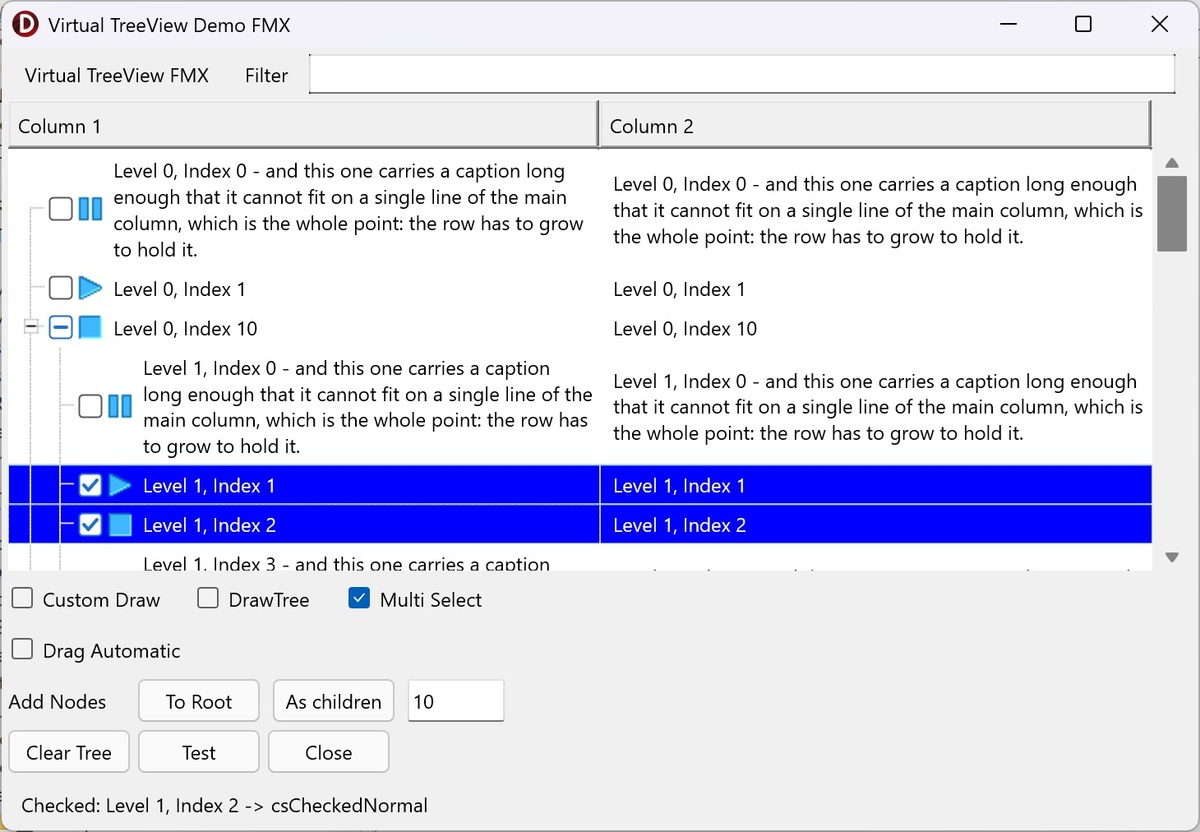
Virtual Treeview is a Delphi tree control built from the ground up. It is virtual: the control holds no data of its own, it asks your application for the text, images and states it needs while it paints. That is what makes it fast with very large trees, and what makes it flexible enough to be used as a list, a grid, a report view or a tree.
Where this comes from
This is a fork of a fork, and the chain matters when you go looking for something and cannot find it:
- Virtual Treeview, by Mike Lischke and later maintained by JAM Software — https://github.com/Virtual-TreeView/Virtual-TreeView
- livius2's FireMonkey port, begun in 2019 and last updated on 30 June 2024 — https://github.com/livius2/Virtual-TreeView
- this repository, which continues that port.
So the code here descends from Virtual Treeview as it stood when the FireMonkey port was started, not from today's upstream. Nothing released upstream since has been merged in. If you are looking for a fix or a feature that arrived in Virtual Treeview after 2019, assume it is not here — and if you merge it yourself, a pull request is welcome.
Status
This is a working but incomplete fork, maintained for my own applications. The VCL side is close to the upstream it was forked from; the FireMonkey side is a port that has been carried far enough to be useful on Windows and Android, and has had its first runs on macOS. It is developed with Delphi 13; it was developed with Delphi 12.1 until October 2026.
| Platform | Framework | Status |
|---|---|---|
| Windows 32/64-bit | VCL | Tested |
| Windows 32/64-bit | FMX | Tested |
| Android 64-bit | FMX | Tested |
| macOS ARM 64-bit | FMX | Runs, basic testing only |
| iOS Simulator ARM 64-bit | FMX | Compiles and links (Delphi 12.1), not run |
| iOS device | FMX | Compiles, does not link yet (see below) |
What is known to work under FMX: variable and multiline node heights, system and custom check boxes including tri-state, column headers with resizing and a built-in column popup, mouse and touch scrolling, pan gestures, in-place editing, multi-select, drag images, a context menu opened by right click or press and hold, and the usual painting options (buttons, tree lines, grid lines, hot tracking, blended selection).
What is missing or untested under FMX: OLE drag and drop, the clipboard, printing, iOS at run time, and accessibility. Several of these are Windows-only in the original design and would need real work rather than a port.
Building for iOS with Delphi 13
Delphi 13 compiles the FMX demo for iOS Device 64-bit, but importing an iOS SDK from Xcode
- or later through the PAServer that ships with Delphi 13.1 produces an SDK whose libraries
are empty files, and every link then stops with
E2597 ld: file too small (length=0) for architecture arm64. The fault is in the imported SDK, not in this code. Embarcadero's May 2026 patch for 13.1 is reported to include a PAServer that imports correctly; without it, import the SDK from Xcode 26.3 or earlier.
Building for macOS and iOS with Delphi 12.1
Delphi 12.1 is older than current Xcode releases, and that shows in the SDK Manager rather than in this code:
- macOS: Delphi 12.1 cannot link against the macOS 27 SDK (
E2597 ld: missing required architecture arm64). Importing the macOS 14.5 SDK instead — it ships with Command Line Tools for Xcode 15.4 — works. - iOS Simulator: Xcode 27 refuses simulator SDKs older than its own, so the 27.0 SDK is
the one to import. It links once
_LocationEssentialsis added to that SDK in the SDK Manager as a framework (path$(SDKROOT)/System/Library/Frameworks, type Framework) followed by Update Local File Cache. The Delphi 12.1 debugger cannot set breakpoints in the iOS 27 simulator; use Run Without Debugging.
Requirements
RAD Studio / Delphi 13 or 12. Nothing else; there are no external dependencies.
The packages are set to Delphi 13's library suffix and will refuse to compile under any
other RAD Studio, with a message saying what to do about it. To build them with Delphi 12 or
another version, read Packages\README FIRST - OTHER DELPHI VERSIONS.txt — it is one tool
run. The source itself needs nothing: the demos and your own projects compile with either
version as they are.
Only one framework can be installed in the IDE at a time — the VCL design package and the FMX design package register components of the same names. You can install one and still compile the other from source in your projects.
Installation
- Open
Packages\VirtualTreesVCL.groupproj(VCL) orPackages\VirtualTreesFMX.groupproj(FMX). - Build the runtime package —
VirtualTreesVCL_RuntimeorVirtualTreesFMX_Runtime— for Win32 and then Win64. - Right-click the design package —
VirtualTreesVCL_DesignorVirtualTreesFMX_Design— and choose Install. The design packages are Win32 only, because the IDE is a 32-bit program. - Add
Sourceto the IDE's library path (Tools ▸ Options ▸ Language ▸ Delphi ▸ Library) for each platform you build for. That path is stored per platform, so adding it for Win32 alone leaves Win64 and Android64 failing withF2613 Unit ... not found.
The components appear on the Virtual Controls palette page. Packages\ReadMe.txt covers
the same ground in more detail, including how to check that the install worked.
Using it in a project
Add Source to the search path — either the project's own (Project ▸ Options ▸ Building ▸
Delphi Compiler ▸ Search path) or the IDE's library path, for each platform you build for.
Miss it and the first compile stops with F2613 Unit 'VirtualTrees...' not found; installing
the design package does not do it for you.
VCL: add VirtualTrees to your uses clause. Nothing else is needed.
FMX: add VirtualTrees and VirtualTrees.FMX to your uses clause. Nothing else is
needed either — no conditional defines. RAD Studio defines FRAMEWORK_FMX by itself for a
FireMonkey project, and every unit derives its own VT_FMX / VT_VCL switch from that, so
the framework is selected for you.
Demos
Demos\TestTreeViewVcl and Demos\TestTreeViewFmx are two small projects built around the
same tree so the two frameworks can be compared side by side. They are the fastest way to
see what works.
They need no setup. Each .dpr lists the library units with relative paths, so both demos
build straight from a fresh clone with nothing added to any search path. If you want to see
how to reference the source from your own project, their .dpr files are the example.
Editing the VCL demo form
uFormVcl.dfm was laid out in a RAD Studio started DPI-unaware:
bds.exe /highdpi:unawareCompiling it is fine at any DPI, and so is opening it to look at. What is not fine is opening
it in the form designer at a different DPI and saving: the VCL designer rewrites every
coordinate in the file to match your monitor, so the whole .dfm changes at once and the
layout moves for everyone else. On a high-DPI screen with a DPI-aware IDE the form also just
looks wrong — too small — which is a symptom of the same thing and not a fault in the demo.
If you want to change that form, start the IDE DPI-unaware as above. If you would rather not,
say in the pull request that the .dfm was rewritten, so the diff is not mistaken for a
layout change. The FMX demo has no such problem: FireMonkey forms are resolution independent
and carry no PixelsPerInch.
Documentation
Source\VirtualTrees.dtx is the Doc-O-Matic source for the API reference and is kept in
step with the code. No compiled help file is shipped.
Differences from the original
VirtualTrees.HeaderPopup.pasis gone. The header's own column popup menu lives inVirtualTrees.Header.pas, sohoAutoColumnPopupMenuworks without an extra component.- The VCL in-place editor is single-line by default;
Returncommits instead of inserting a newline. SetEditorMultiline := Trueon the tree for the old behaviour. SelectOnMouseUpdelays selection until the finger or button is released, so a swipe on a touch screen scrolls without selecting.- Various FMX fixes: node heights are measured and re-measured correctly, the scroll range follows column and control resizing, check images are drawn rather than loaded from Windows themes, pan gestures reach the tree, and dtFMX drags show a ghost image that follows the pointer.
- FireMonkey has no right button outside Windows and never dispatches
WM_RBUTTONUP, so the FMX tree recognises the context gesture itself:PopupTrigger(right click, press and hold, or both),PopupDelay, anOnContextMenuevent, and aPopup: TPopupshown when the gesture is recognised. ATPopupis an ordinary control, so one menu serves Windows and Android; the inheritedPopupMenuis used whenPopupis nil, and now opens on a right click for the first time under FMX. - The FMX tree fires
OnMouseDown,OnMouseUpandOnDblClick.TVTAncestorFMX.MouseDowndeliberately does not callinherited, soTControlnever raised them; they are fired explicitly instead. - Design-time registration is in
Packages\VirtualTreesReg.pasfor both frameworks.
Licence
Virtual Treeview is published under a double licence: MPL 1.1 and LGPL 2.1 with the static linking exception as described at http://wiki.freepascal.org/modified_LGPLL This fork keeps that licence. The licence headers in the source files are the authoritative text.
Files in Source have been modified relative to the original release; the git history of
this repository records the changes made here.
Credits
Virtual Treeview is the work of many people over more than two decades, and this fork is a small addition on top of theirs.
- Mike Lischke — original author of Virtual Treeview.
- JAM Software / Joachim Marder — took the project under their wing in 2014 and maintained it through version 7.x: https://github.com/Virtual-TreeView/Virtual-TreeView
- livius2 — the experimental FireMonkey port this fork is based on: https://github.com/livius2/Virtual-TreeView
- Jan Rames, Fr0sT-Brutal, Stefan Glienke, blikblum and the many other contributors to the upstream project and its forks.
Support
Please do not contact Mike Lischke, JAM Software or livius2 about this fork. Please do not contact me for support either — I use this code, I do not support it. Questions about Virtual Treeview in general are best asked on Stack Overflow or Delphi-Praxis.