File-From-Clipboard-IDE-Expert

Detects when a PAS file appears into the clipboard and opens that file in the IDE.
- Active · last change 10-29-2026
- ★ 8 on GitHub
README
File-From-Clipboard IDE Expert
File-From-Clipboard is a small Delphi IDE expert that watches the clipboard for PAS filenames (full or partial paths).
When a filename is detected in clipboard and the file exists inside a user-configured search folder, the expert opens the file in the IDE automatically.
Useful when you browse repositories on GitHub, GitLab or similar services and need to open many files quickly (for example when resolving merges).
It also helps when working with SonarQube reports that reference source files.
Updates
I am just one guy with (too) many (freeware) projects.
The projects get updates based on how many stars they get.
Star this project if you want to see future updates and enhancements.
Installation
- Double click the DPK file to load the package in the IDE.
- In the Project Manager, right-click the package.
- Choose "Install".
This IDE expert has 1 dependency:
https://github.com/GabrielOnDelphi/Delphi-LightSaber/blob/main/IDE%20Experts/uOpenFileIDE.pas
After installation the expert will appear in the IDE menus.
Usage
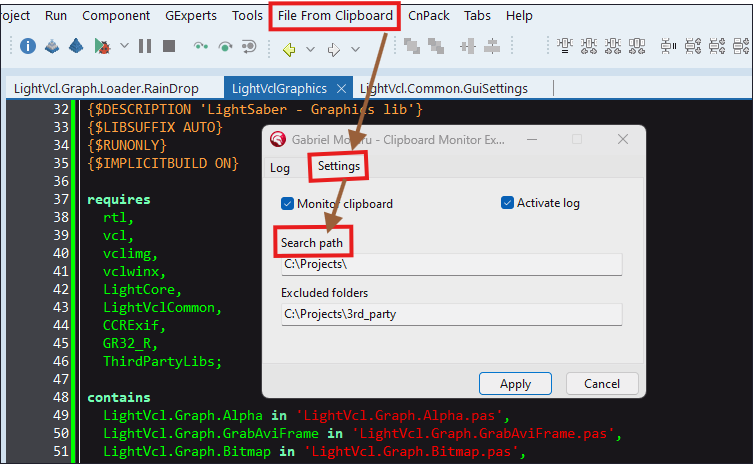
- Set where the expert should look for files:
- In the IDE, open the "File From Clipboard" menu and choose Settings.
- Add one or more folders where your project/source files live.
- Copy a filename (full path or partial path) to the clipboard.
- If a matching PAS file is found inside one of the configured folders, it will be opened in the IDE.
Troubleshooting
- Nothing happens when you copy a filename?
- Make sure the folder containing the file is added to the expert's Settings.
- Ensure the clipboard actually contains plain text with the filename (no formatting).
- Verify the file extension is .pas (case-insensitive).
Feedback
If you find this tool useful, please star the repository - it helps prioritize future updates.