

Volna-IpTv

- Active · last change 9-26-2026
- ★ 8 on GitHub
README
Volna
Volna is a lightweight IPTV player for Linux with M3U playlist support, EPG (TV guide), and hardware decoding via libmpv. Written in Free Pascal using raylib for UI rendering.

Features
- IPTV playback — M3U/M3U8 playlists, HLS, HTTP streams
- EPG (TV guide) — XMLTV loading, caching, current and next program display
- Playlist browser — groups, favorites, watch history
- EPG panel — program grid for the selected channel with logos
- Background shaders — 5 animated shaders for the background (switch with TAB)
- Floating control bar — progress, time, volume, auto-hide
- Hotkeys — fullscreen, pause, channel switching, volume, brightness/contrast
- Hardware decoding — via libmpv (VA-API, VDPAU, NVDEC)
- Channel logos — caching and display in panels
- User-Agent support — from #EXTVLCOPT:http-user-agent=...
Screenshots
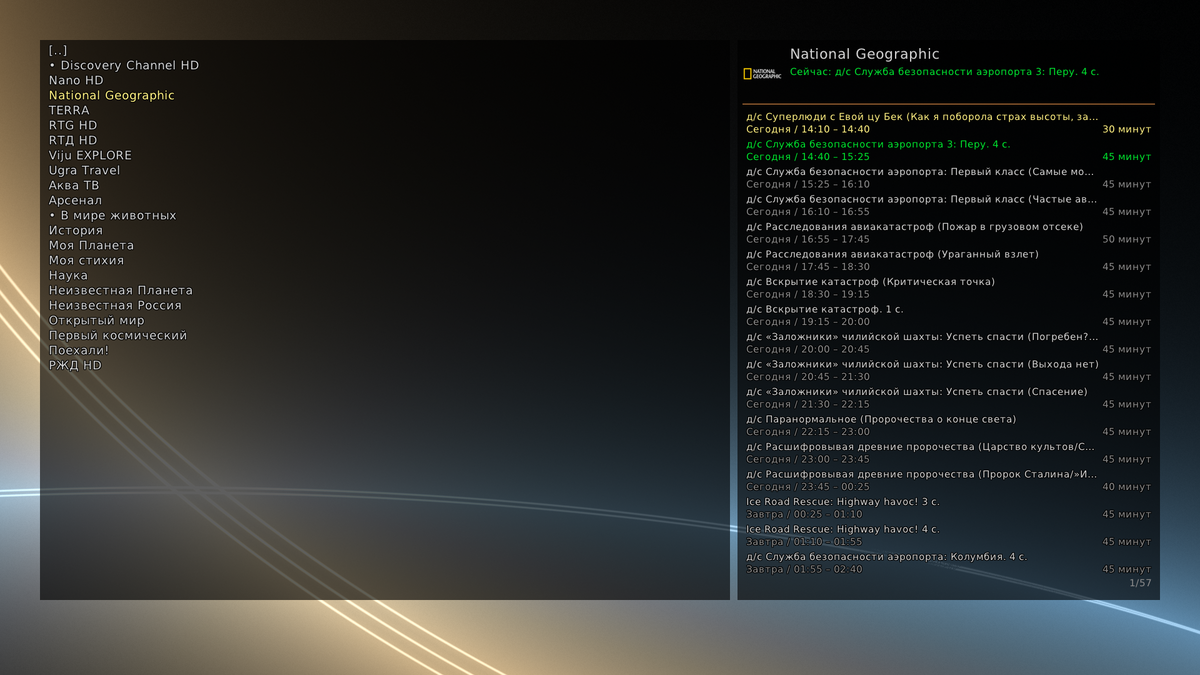
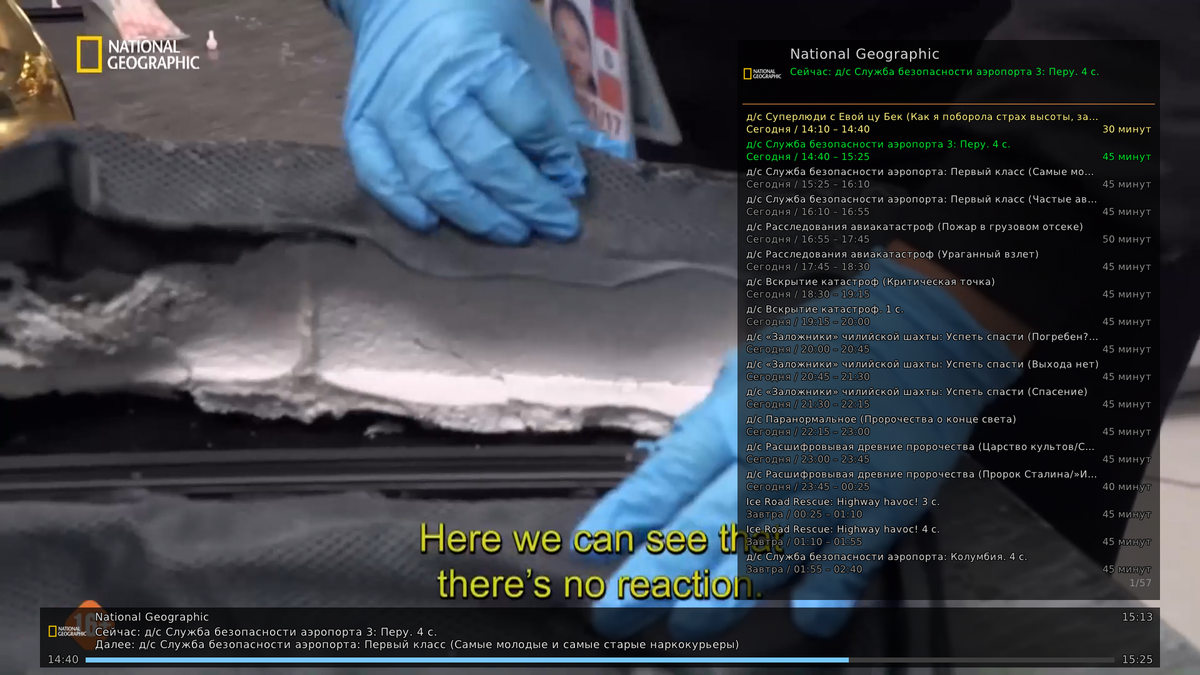
Place your screenshots in the
docs/folder and update the paths above.
Dependencies
System
- Free Pascal Compiler (FPC) 3.2+
- Lazarus (for LCL components, optional)
- libmpv (mpv >= 0.35)
- raylib >= 4.5 (with Pascal bindings)
- OpenSSL (for HTTPS)
Install (Debian/Ubuntu)
sudo apt install fpc libmpv-dev libssl-devFor raylib — build from source or install libraylib-dev.
Install (Arch)
sudo pacman -S fpc mpv openssl raylibBuild
# Clone the repository
git clone https://github.com/yourname/volna.git
cd volna# Build the main player
fpc volna.lpr# Build the EPG preparation utility
fpc epg_prepare.lprOr via Lazarus:
lazbuild volna.lpi
lazbuild epg_prepare.lpi
Running
# First run ??? prepare the EPG cache
./epg_prepare# Launch the player
./volnaConfiguration
playlist.cfg
List of playlists. Format:
# Playlist name | URL or path
My IPTV | https://example.com/playlist.m3u
Local | /home/user/playlist.m3u
---
Another provider | https://another.com/tv.m3u- --- — playlist group separator
- Lines starting with # are ignored
epg.cfg
Additional EPG sources (if not specified in playlists):
https://iptvx.one/EPG
https://example.com/epg.xml.gz
epg.skip
Automatically created by epg_prepare. Contains dead URLs that should not be retried. Remove a line to try again.
favorites.cfg / recent.cfg
Automatically created by the browser. Do not edit manually unless necessary.
Hotkeys
| Key | Action |
|---|---|
| F | Fullscreen mode |
| Space | Pause / play |
| M | Mute / unmute |
| N | Next channel |
| + / - | Volume ±5% |
| Q | Add/remove from favorites (currently playing) |
| S | Add/remove from favorites (selected) |
| I | Pin/unpin EPG panel |
| TAB | Next background shader |
| Shift+TAB | Previous background shader |
| RMB / KB_MENU | Show/hide browser |
| Esc / Backspace | Back in browser |
| Delete | Remove from favorites |
| Up / Down | Navigation |
| PgUp / PgDown | Fast navigation |
| Home / End | Jump to start / end |
| Enter / Right | Enter / play |
| Left | Go up one level |
Mouse
- Wheel — volume (or brightness with B, contrast with C)
- Double click — fullscreen / play
- Single click — select item
Architecture
volna.lpr              ??? main application module
????????? uM3UBrowser.pas    ??? playlist browser (groups, favorites, history)
????????? M3UPlaylist.pas    ??? M3U/M3U8 parser
????????? PlaylistManager.pas??? playlist list management
????????? uEPG.pas           ??? XMLTV loader, caching, channel lookup
????????? uEPGCoordinator.pas??? background EPG loading coordination
????????? uEPGPanel.pas      ??? TV program grid panel
????????? uChannelLogo.pas   ??? channel logo cache
????????? uPlayerBar.pas     ??? playback control bar
????????? BgShader.pas       ??? background shaders
????????? libMPV.Client.pas  ??? libmpv bindings (client)
????????? libMPV.Render.pas  ??? libmpv bindings (render API)
????????? MPVPlayer.pas ??? high-level player wrapperepg_prepare.lpr ??? EPG cache preparation utility
????????? uEPG.pas ??? XMLTV loader
????????? uEPG_oxml.pas ??? XMLTV parser (DOM)
????????? PlaylistManager.pas??? reads playlist.cfgHow EPG Works
- epg_prepare collects URLs from epg.cfg and x-tvg-url of playlists
- Downloads XMLTV, decompresses gzip, parses and saves to binary cache epg.cache.*
- Writes dead URLs to epg.skip
- volna on startup runs epg_prepare in the background and shows a progress overlay
- Once loaded, EPG is available in the browser and EPG panel
Cache is valid for 24 hours. Force refresh:
./epg_prepare --forceDebugging
# Verbose EPG log
./epg_prepare --verbose# libmpv logs
MPV_VERBOSE=1 ./volnaKnown Limitations
- Linux only (uses cthreads, opensslsockets)
- No built-in playlist editor
- No archive support (catchup)
- No broadcast recording
Roadmap
- [ ] Windows/macOS support
- [ ] Archives (catchup/timeshift)
- [ ] EPG search
- [ ] Program reminders
- [ ] GUI settings
- [ ] Plugins
License
MIT License. See LICENSE.
Credits
- raylib (https://www.raylib.com// — simple and fast rendering framework
- mpv (https://mpv.io// — powerful media player
- Free Pascal (https://www.freepascal.org// — compiler
- iptvx.one (https://iptvx.one// — default EPG source
Volna — watch IPTV in comfort.