

Catalog · How the catalog works
ARConsole

Cross Platform Console library
- ★ 8 on GitHub
Anyone may press Interesting, signed in or not. It helps others find this project.
README
AR.Console
A lightweight, cross-platform TUI (Text User Interface) framework for Delphi.
Windows + Linux + macOS from a single codebase.
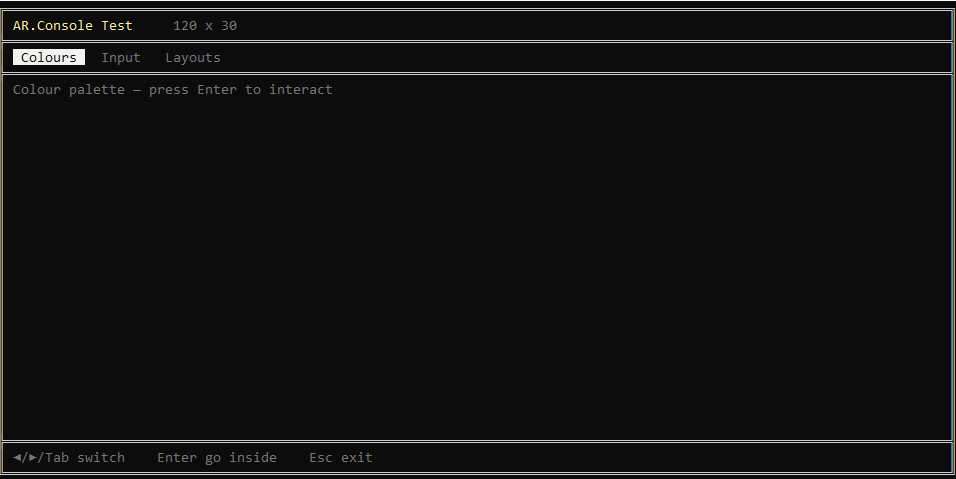
Features
- Cross-platform -- Windows (VT100 via SetConsoleMode), Linux and macOS (termios raw mode)
- Unicode box drawing -- single-line and double-line frame characters
- 16-colour palette -- standard + bright ANSI foreground colours
- Extended key input -- arrow keys, F-keys, Home/End/PgUp/PgDn with full CSI parsing on POSIX
- Mouse support -- click detection, wheel scrolling, and cursor shapes (
crDefault,crPointer,crBusy) via SGR mouse protocol - Layout system -- abstract
TConsoleLayoutbase with pluggable concrete layouts - Layout registry --
TLayoutRegistryfor enumerating and instantiating registered layouts, each with a self-rendering preview - Tab bar --
TTabBarwith arrow/Tab navigation, focus state (reverse-video / underline), Enter activation, and clickable tabs - Button items --
TButtonItemwithOnClickhandlers, embeddable in the tab bar alongside tabs - List box --
TListBoxwith keyboard/mouse navigation, scrolling, and optional multi-column display - Clickable item base --
TClickableItemshared ancestor for bar items, list-box items, and custom clickable elements - Focus model -- tab-bar vs content focus with key bubbling via
ReadLine(out AExitKey) - Layout helpers --
PrintContent,ShowStatus,PromptInputfor working relative to the content area - Menu system --
ShowMenudraws a framed option list and waits for a keypress
Architecture
Library/
  AR.Console.Base.pas       -- TConsoleBase (abstract), TConsoleLayout (abstract),
                               enums (TConsoleColor, TBoxStyle, TConsoleCursor,
                               TMouseButton, TMouseEvent), key codes, box-drawing
                               constants, ANSI output
  AR.Console.Layouts.pas    -- TClickableItem, TBarItem / TTabItem / TButtonItem,
                               TFrameLayout, TSingleFrameLayout, TDoubleFrameLayout,
                               TTabBar, TListBox, TTabbedLayout, TLayoutRegistry
  AR.Console.Windows.pas    -- TWindowsConsole : TConsoleBase
  AR.Console.POSIX.pas      -- TPosixConsole : TConsoleBase
  AR.Console.pas            -- TConsole = platform alias + Con singleton

Demo/
  ConsoleTest.dpr           -- Tabbed demo app (Colours, Input, Layouts)
Platform selection happens at compile time:
uses AR.Console, AR.Console.Base, AR.Console.Layouts;

// TConsole is TWindowsConsole on Windows, TPosixConsole on POSIX.
// Con is a lazily-initialised global singleton.
Quick start
uses
  AR.Console.Base, AR.Console.Layouts, AR.Console;

begin
  // Con auto-initialises on first access
  Con.Clear;
  Con.SetColor(ccBrightYellow);
  Con.PrintAt(3, 2, 'Hello from AR.Console!');
  Con.ResetColor;
  Con.ReadKey;
end.
Using a layout
var
  Layout: TDoubleFrameLayout;
begin
  Layout := TDoubleFrameLayout.Create(Con);
  Con.SetLayout(Layout);   // Draws the frame immediately

  Con.PrintContent(1, 1, 'Title goes here');
  Con.ShowStatus('Press any key...');
  Con.ReadKey;
end.
Using the tab bar
var
  Layout: TTabbedLayout;
begin
  Layout := TTabbedLayout.Create(Con, bsDouble);
  Layout.TabBar.SetTabs(['Tab 1', 'Tab 2', 'Tab 3']);
  Con.SetLayout(Layout);

  // Left/Right/Tab to cycle, Enter to activate
  // Click a tab with the mouse to switch directly
  // See Demo/ConsoleTest.dpr for a complete focus-model example.
end.
Mouse support
begin
  Con.EnableMouse;
  Con.SetMouseCursor(crPointer);

  repeat
    Key := Con.ReadKeyCode;
    if Key = KEY_MOUSE then
    begin
      Evt := Con.MouseEvent;
      if (Evt.Button = mbLeft) and Evt.Pressed then
        Con.PrintAt(1, 1, Format('Click at %d,%d', [Evt.Col, Evt.Row]));
    end;
  until Key = KEY_ESCAPE;

  Con.DisableMouse;
end.
Adding a button to the tab bar
var
  Layout: TTabbedLayout;
begin
  Layout := TTabbedLayout.Create(Con, bsDouble);
  Layout.TabBar.SetTabs(['Tab 1', 'Tab 2']);
  Layout.TabBar.AddButton('[Quit]',
    procedure begin ShouldExit := True; end);
  Con.SetLayout(Layout);
end.
Using a list box
var
  LB: TListBox;
begin
  LB := TListBox.Create(Con);
  LB.SetBounds(3, 6, 30, 10);       // left, top, width, height
  LB.Columns := 1;                   // set to 2+ for multi-column
  LB.AddItem('Option A');
  LB.AddItem('Option B');
  LB.AddItem('Option C', procedure begin ShowMessage('C!'); end);
  LB.Draw;

  // In your key loop:
  //   if LB.HandleKey(KeyCode) then
  //     ... selection changed or Enter fired OnClick ...
  //
  // For mouse clicks:
  //   Hit := LB.HitTest(MouseEvt.Col, MouseEvt.Row);
  //   if Hit >= 0 then begin LB.SelectedIndex := Hit; LB.Draw; end;
end.
Extending
Add a new layout: subclass TConsoleLayout, implement DrawFrame, DrawPreview, GetContentArea, GetInputRow, GetInputCol, GetTitleArea, and register it.
Add a custom clickable item: subclass TClickableItem for list boxes, or subclass TBarItem (which adds Draw and DisplayWidth) for the tab bar.
Register a layout:
TLayoutRegistry.Register('My Layout', TMyLayout);It will automatically appear in any layout browser that enumerates the registry.
Requirements
- Delphi 10.4 Sydney or later (inline variable declarations)
- Windows 10+ (for VT100 support) or any POSIX terminal
Author
Andrea Raimondi
License
MIT