

Catalog · How the catalog works
TClientSocket-TServerSocket-File-Transfer

Demo for showing how to transfer files using Delphi's TClientSocket and TServerSocket Legacy Winsock Wrappers.
- ★ 8 on GitHub
Anyone may press Interesting, signed in or not. It helps others find this project.
README
Delphi Socket File Transfer
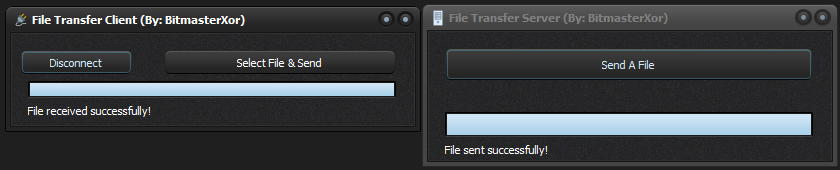
A simple yet robust file transfer application built with Delphi using the WinSock wrapper components TClientSocket and TServerSocket. This application enables bidirectional file transfers between client and server over TCP/IP connections.
Features
- Bidirectional File Transfer: Send files from client to server or server to client
- Progress Tracking: Real-time progress bar displays transfer completion percentage
- Chunked Transfer: Files are sent in 8KB chunks for efficient memory usage
- Drag-and-Drop Ready: Easily integrated into any Delphi application
- Automatic Reconnection: Handles connection drops gracefully
- File Overwrite Protection: Prompts before overwriting existing files
Architecture
The application consists of two main components:
Server Component
- Built using TServerSocket component
- Listens on port 3434 by default
- Manages client connections
- Handles file reception and sending
- Includes progress tracking
Client Component
- Built using TClientSocket component
- Connects to server using IP address and port
- Sends files to server
- Receives files from server
- Tracks progress with visual indicators
Protocol
The application uses a simple text-based protocol for negotiation and binary transfer for file data:
- File Info Exchange:
FileSize|FileNameorSERVER_SENDING|FileSize|FileName - Transfer Acknowledgment:
READY_TO_RECEIVE - Chunk Acknowledgment:
CHUNK_RECEIVED
Files are transferred in 8KB chunks with acknowledgments between each chunk to ensure reliable delivery.
Getting Started
Prerequisites
- Delphi IDE (tested with Delphi 10.4 and later)
- Windows OS
Installation
- Clone this repository
- Open the project in Delphi IDE
- Compile both client and server applications
Usage
Server Application
- Launch the server application
- The server automatically starts listening on port 3434
- Wait for a client connection
- Use the "Send File" button to send a file to the connected client
- When a client sends a file, the server will receive it automatically
Client Application
- Launch the client application
- Click "Connect" to connect to the server (default: localhost:3434)
- Once connected, use "Send File" to send a file to the server
- The client will automatically receive files sent from the server
Configuration
You can modify the following constants in the code:
- CHUNK_SIZE: Adjust the chunk size (default: 8KB)
- Port: Change the server port in
FormCreatemethod (default: 3434) - Host: Change the server host in
Button1Clickmethod (default: localhost)
Implementation Details
The file transfer is implemented using Delphi's stream classes and socket components:
- TFileStream: Handles file I/O operations
- TServerSocket/TClientSocket: Manages TCP/IP connections
- SendBuf/ReceiveBuf: Transfers raw binary data
License
Free and Open Source for use with any project!
Acknowledgements
- Delphi VCL components
- Windows Socket API
Contributing
Contributions are welcome!
Contact
Discord: bitmasterxor